Abdul Basit
Best audio editing software in Pakistan matters when a voice note is noisy, a lecture recording is too low, or your podcast sounds messy after export.
Many people pick random “best free” tools, then get poor sound, failed exports, or unsafe installers that can risk your audio files and PC.
The safer option is to choose software by your real task, then use a genuine license so updates, performance, and support stay reliable. Available in Pakistan with PKR pricing, local payments, and 1–72 hour digital email delivery on most orders from BreTech (authorized reseller).
For most users, the best audio editor is the one that matches your main job: recording, trimming, noise cleanup, or converting formats. If you mostly edit music, choose a tool built for organising and mixing. If you mostly record voice, choose a tool with clean recording and simple edit tools.
Quick Picks: Audio Editing Software in Pakistan (2026)
| Best Pick | Your Main Need | Why It Fits |
|---|---|---|
| EaseUS MakeMyAudio Pro | Voice recording + fast edits | Simple record, trim, merge, and export for daily voice work |
| EaseUS Ringtone Editor | Mobile ringtone cutting | Quick clipping and clean export for phone ringtones |
| Ashampoo Music Studio | Music editing for beginners | Practical music tools for editing, organising, and basic mixing |
| Ashampoo Soundstage Pro | Audio “studio feel” on headphones | Enhances listening depth for better monitoring and playback |
| Audials Music | Record and build a clean music library | Helps capture, tag, and organise audio for a high-quality library |
| Audials One | All-in-one Audials suite | Bigger toolkit for recording, converting, and library handling |
| Wondershare Filmora | Video creators who need cleaner voice | Video editor with helpful audio cleanup tools for voiceovers |
| EaseUS VoiceWave | Real-time voice effects and processing | Voice effects and live processing for creators and streamers |
Browse the full collection here: Audio Editing Software in Pakistan
You can also explore: Music Studio tools, Video Editing software, and Audio & Music utilities.
Quick Comparison by Skill Levels
| Tool | Best For | Skill Levels | Workflow Type |
|---|---|---|---|
| EaseUS MakeMyAudio Pro | Voice recording | Beginner to standard | Fast trim & export |
| Ashampoo Music Studio | Music editing | Beginner | Music organisation |
| Audials One | Media suite | Advanced | Recording + converting |
| Wondershare Filmora | Video voice cleanup | Beginner to intermediate | Timeline editing |
| EaseUS VoiceWave | Live effects | Creator level | Real-time processing |
Do you need a DAW or a simple audio editor?
A DAW (digital audio workstation) is made for multi-track music production, recording instruments, and deeper mixing workflows.
Most people in Pakistan do not need a full DAW for lectures, voiceovers, or basic edits. If your main job is trimming, cleaning voice, or exporting formats, a simple editor is faster and easier. If you truly need multi-track music production, then you should consider a dedicated DAW separately and use this guide for everyday editing and creator tasks.
How to Choose the Right Tool in Pakistan
Choosing audio editing software is easier when you start from your main job. A beginner often needs quick edits and clean export. A more advanced user may need deeper control and multi-track work.
At BreTech, we often see users in Pakistan buying heavy multi-track studio software when they only need trim, record, and export. That increases cost without adding real value. Choosing by your main task first helps avoid wasted budget and confusion.
Use these checks to pick the right option without wasting money:
- Export formats you need (MP3, WAV, M4A)
- Clean trim points (no clicks at start or end)
- Volume control so the final sound is not too low
- Noise cleanup that does not make voice sound robotic
- Simple interface if you are new
- Clear license plan rules (yearly vs one-time, upgrade rules)
Also, not every tool works on every platform. If you are on Mac, confirm Mac support first. If you are on Windows, check your system requirements and available storage.
Note: always check the official vendor website for the latest features, editions, system requirements, and updates.
Mac users in Pakistan: check macOS support first
If you use a Mac, don’t assume every audio tool will install. Before you buy, open the product page and confirm macOS is listed in system requirements, plus the export formats you need (MP3, WAV, M4A).
If macOS is not supported, you can still use this guide to pick a workflow, but choose a tool that clearly supports your platform.
Best Tools for Quick-Fix Edits and Recording Essentials
1. EaseUS MakeMyAudio Pro: fast recording and clean edits
If your daily work is simple, focus on software that trims, cuts, merges, and saves fast. This is ideal for voice notes, lectures, and short clips.
EaseUS MakeMyAudio Pro fits this “record to export” workflow well. It is made for people who want quick results without learning a heavy studio program.
Key things it helps with:
- Record from mic (and supported system sources)
- Trim and remove mistakes quickly
- Merge clips into one clean file
- Export in common formats for sharing
Best for: teachers, students, office staff, training audio, simple podcast edits.
2. EaseUS Ringtone Editor: quick ringtone cutting for phones
If you specifically need ringtone clips, you do not need a full studio tool.
EaseUS Ringtone Editor is a focused utility for clipping and exporting short audio pieces for mobile use.
Key things it helps with:
- Fast trimming for short clips
- Smooth start/end with simple fades
- Export a ringtone-ready file
- Quick repeat edits for multiple tones
Best for: users who want clean ringtones without complex editing.
Professional Ringtone Design & Creation Software
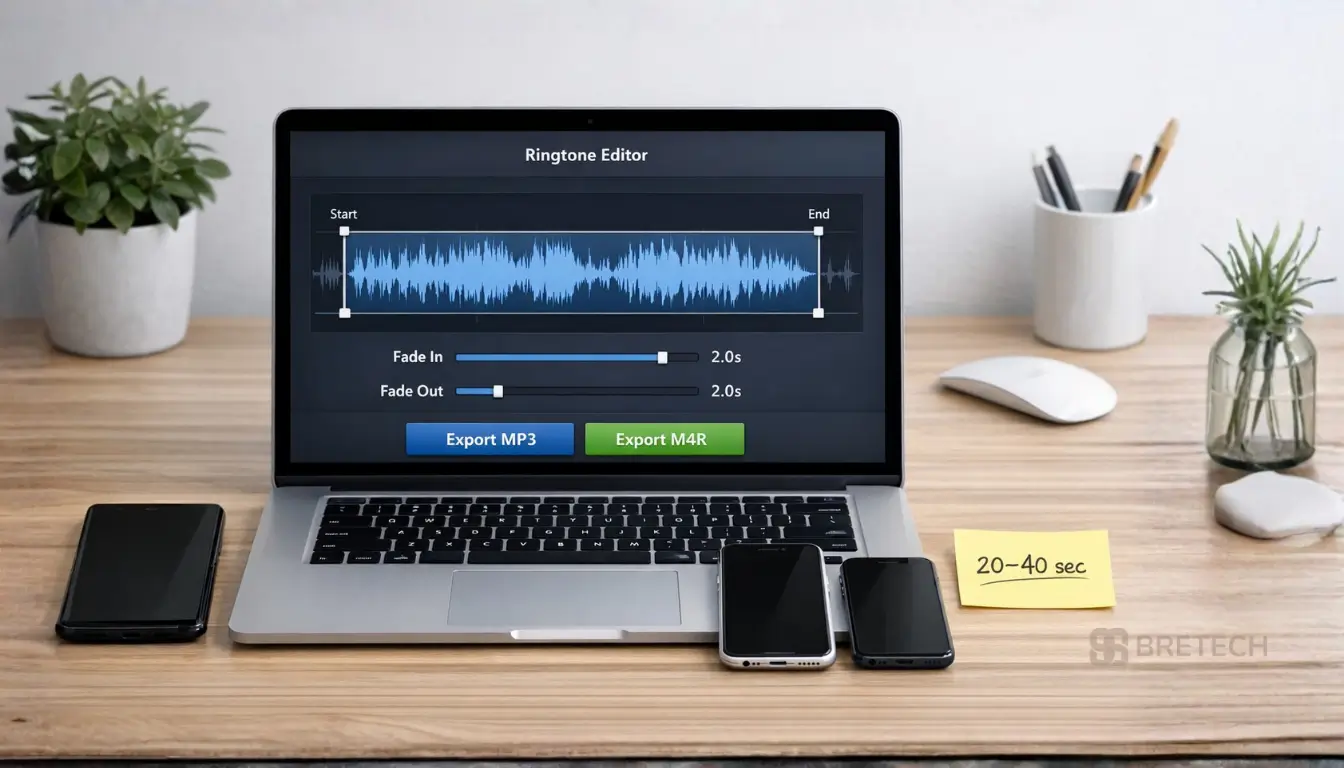
Many users looking for ringtone design software for beginners often realize that specialized audio editors offer much better precision than simple mobile apps. Using a dedicated ringtone creation software workflow allows you to:
- Trim with Frame-Accuracy: Ensure your ringtone starts and ends exactly where you want with no awkward silences.
- Apply Pro Fades: Use “Fade In” and “Fade Out” tools so the audio doesn’t startle you when your phone rings.
- High-Quality Exports: Save files in high-bitrate MP3 or M4R (iPhone) formats for the best sound quality.
If you are searching for the best ringtone editing software for beginners, tools like EaseUS Ringtone Editor or EaseUS MakeMyAudio Pro provide a much cleaner, ad-free experience compared to free Play Store tools. These programs allow you to manage your ringtone maker workflow on a PC, giving you a larger visual timeline to see exactly where you are cutting your audio.
Best Tools for Music Editing and Library Building
1. Ashampoo Music Studio: practical music toolkit for everyday users
If you work with songs, albums, or regular music files, you may want a tool that feels more “music-focused” than a voice editor.
Ashampoo Music Studio is useful for basic music editing, organising, and common audio tasks that many users do at home or in small studios.
Key things it helps with:
- Edit and split music files
- Organise music collections and tags
- Convert formats when needed
- Create clean files for playback and sharing
Best for: beginners in music editing, home users, small content creators.
2. Audials Music: record and organise a clean library
Some users mainly want a clean library with proper titles, tags, and good quality captures.
Audials Music is built around recording and managing music collections, which can be helpful if your workflow is “capture, tag, and play anywhere”.
Key things it helps with:
- Build a neat music collection
- Keep tracks organised with useful metadata
- Convert formats for different devices
- Maintain consistent quality settings (where supported)
Best for: users who want a well-managed music library with reliable export.
3. Audials One: bigger all-in-one suite for advanced needs
If you prefer an all-in-one media toolkit rather than a single-purpose tool, Audials One is the wider suite.
It is usually a better fit when you handle more formats, more conversions, and multiple media tasks in one place.
Key things it helps with:
- Record and save media in a cleaner workflow
- Convert between common audio formats for different devices
- Trim and prepare files for sharing
- Organise a larger media library in one place
Best for: advanced users who want one suite for recording, converting, and managing media.
Ashampoo Soundstage Pro: better monitoring and “studio feel” playback
This is not a classic “editor” for cutting clips. It is more about improving how audio sounds on headphones and speakers.
Ashampoo Soundstage Pro can help when you want richer depth for listening, monitoring, and playback, especially if you do a lot of headphone work.
Key things it helps with:
- Improve headphone listening depth for monitoring
- Create a wider “space” feel for movies, music, and games
- Make audio feel less flat during playback
- Improve comfort for longer listening sessions
Best for: better listening, monitoring, and audio enhancement during playback.
Best Tools for Video Creators Fixing Voiceovers
Wondershare Filmora: video editing plus helpful audio cleanup
Video creators in Pakistan often record voice in a normal room, then notice the sound is weak, echoey, or full of fan noise.
Wondershare Filmora is mainly a video editor, but it is a strong option when your goal is clean voice inside a simple timeline. Many versions include audio cleanup features, but exact tools can vary by version.
Key things it helps with:
- Clean up voice inside a simple timeline workflow
- Adjust voice level so speech is clearer
- Reduce common background noise (results vary by file)
- Export video with improved audio in one process
Best for: YouTube creators, course makers, reels/shorts editors, business promos.
Movavi Video Editor Plus: simple timeline with strong creator workflow
If you want a fast editor for both video and voiceover work, Movavi Video Editor Plus is another practical choice.
It can be useful when you want quick edits, clean exports, and a beginner-friendly interface for repeated content.
Key things it helps with:
- Quick timeline edits for voiceover videos
- Simple audio level control while editing
- Easy export settings for social platforms
- Faster workflow for repeat content
Best for: students, new YouTubers, small businesses, trainers.
HD Video Converter Factory Pro: extract and convert audio from video files
Sometimes your “audio problem” is really a format problem, like needing to extract audio from a video, compress it, or convert it for a phone.
HD Video Converter Factory Pro is a helpful add-on tool for conversion and extraction tasks.
Key things it helps with:
- Extract audio from video files for reuse
- Convert audio formats for phone or PC playback
- Compress files when size is too big to share
- Quick exports for common device formats
Best for: format conversion, audio extraction, and quick export for different devices.
Best Tools for AI Voice Effects and Real-Time Processing
EaseUS VoiceWave: real-time voice effects for creators
If you need voice effects, live processing, or a different voice style for content, EaseUS VoiceWave is designed for that use case.
It is more useful for creators than for “classic audio editing”, because the goal is real-time voice output and effects.
Key things it helps with:
- Real-time voice effects for content style use
- Voice processing for live sessions (results vary by mic)
- Cleaner output when your room audio is weak
- Quick switching between voice styles for different content
Best for: streamers, creators, voice styling, real-time voice effects.
Best Tools for Voice Work, Podcasts, and Lessons
Voice work is where most users feel the difference between a basic tool and a solid editor. A small issue like fan noise, low mic volume, or uneven loudness can make a recording hard to understand.
If you record lectures, training, podcast episodes, or voice messages for clients, focus on three things: clean recording, simple edit controls, and reliable export.
A simple workflow that many users follow:
- Record a 10-second test first to check sound
- Keep mic distance consistent
- Edit mistakes in one pass, then do final trims
- Add a short fade at start and end
- Export once in your target format, then listen on a phone
What to Avoid: Common Mistakes in Pakistan
Most problems happen before you even start editing. People install the wrong tool, pick the wrong license, or chase a “best free” option that does not match the job.
Quick avoid checklist:
- Do not install cracked or unknown tools for recording work
- Do not choose a heavy pro setup if you only need trim and export
- Do not pay before checking platform support (Windows vs Mac)
- Do not export the final file without listening on a phone
- Do not mix too many effects, keep sound natural
Audio Editing Software Price in Pakistan (2026)
Audio editing software price in Pakistan depends on the edition, license term, and included capability. Some tools offer yearly plans, while others provide lifetime or master’s edition options.
Before buying, check:
- Standard vs premium feature differences
- Upgrade policy and renewal cost
- Whether the tool covers your real workflow
- If you need multi-track recording or just simple edits
To compare current options, start here: Audio Editing Software in Pakistan.
Why Buy Locally via BreTech?
When you buy audio editing software, you are not only buying a tool. You are buying a smoother experience, stable performance, and a clean path to upgrades and the latest version when you need it.
BreTech is an authorised reseller in Pakistan. Most orders include PKR price display, local payment options, and digital email delivery within 1–72 hours.
What this helps you avoid:
- Confusing installs and broken activation
- Missing features after updates
- Paying for the wrong product or wrong plan
- Losing time when you need a tool urgently
Conclusion: Start With the Right Audio Editing Software in Pakistan
Best audio editing software in Pakistan (2026) is the option that matches your main task: recording, clean edits, better voice for video, or format conversion.
If you want quick voice recording and trims, start with EaseUS MakeMyAudio Pro. If you are building a music library and doing basic music work, Ashampoo Music Studio and Audials Music are practical picks. If your work is mostly video, Wondershare Filmora or Movavi Video Editor Plus can help you fix audio inside your editing workflow.
Start With the Right Audio Editing Software in Pakistan
Best audio editing software in Pakistan (2026) is the one that matches your main task, not the most complicated tool.
If you want quick voice recording and trims, start with EaseUS MakeMyAudio Pro. If you are building a music library and doing basic music work, Ashampoo Music Studio and Audials Music are practical picks. If your work is mostly video, Wondershare Filmora or Movavi Video Editor Plus can help you fix audio inside your editing workflow.
Compare editions, check PKR pricing, and choose the right license here: Audio Editing Software in Pakistan.
You can also explore brands for more options: EaseUS, Ashampoo, Audials, Wondershare, and Movavi.
BreTech provides PKR pricing, local payment options, and digital email delivery within 1–72 hours on most orders as an authorized reseller in Pakistan.
FAQs
Q: What is the best audio editor overall in Pakistan for a beginner in 2026?
A: For a beginner, pick an audio editor with the right capability for every day voice work: record, trim, and export in a standard format. Get started with simple presets, then improve step by step.
Q: Which audio editing software is better for professional work and multi-track recording?
A: For professional work, you need a powerful workflow with multi-track recording, stable export, and control over vocal levels. A premium tool can deliver a more comprehensive setup, but only if you expect to use those elements frequently.
Q: How do I choose audio editing software by budget and cost in Pakistan?
A: Start with your budget, then compare what you get in each offer. Check the cost for the standard plan versus premium plans, and only pay more if the capability gives you a real advantage.
Q: How can I compare tools for different skill levels without wasting money?
A: Compare tools by your skill levels and your main job. If you are editing voice, focus on clean export and simple presets. If you are doing music, choose a tool that covers mixing needs effectively.
Q: If I use Logic Pro or tools like Adobe, what should I look for in another editor?
A: If you are used to Logic Pro or a workflow like Adobe, you will expect stronger control and a more comprehensive layout. Look for similar capability in editing, export options, and how well it handles vocal work.
Q: Is WavePad a decent choice, or should I pick something more powerful?
A: WavePad can be a decent choice for simple edits. If you frequently need more control, more presets, or smoother export, a more powerful editor may compete better for your needs. I’ve seen many users do fine by starting simple, then upgrading when the need becomes clear.
Further Reading
Before we conclude, you might find these related articles helpful for expanding your editing skills:
- Best Audio Editing Software for Beginners in Pakistan
- Top Audio Editing Software in Pakistan for Creators
- Best Video to Audio Converter for PC in Pakistan (2026 Guide)
- Best Ringtone Maker Software in Pakistan (2025)
Browse more guides in Design & Multimedia Guides.