Abdul Basit
Avast Premium Security in Pakistan matters most when you are about to log in to banking, open a “supplier invoice” email, or download a tool for work and you suddenly feel unsure if your device is protected.
Many people rush and buy the wrong edition, or install a random “free key” that later fails, shows warnings, or creates activation problems at the worst time.
This guide makes it simple. You will pick the right Avast edition for your devices, understand what changes the price, and buy a genuine license from BreTech with local payment options.
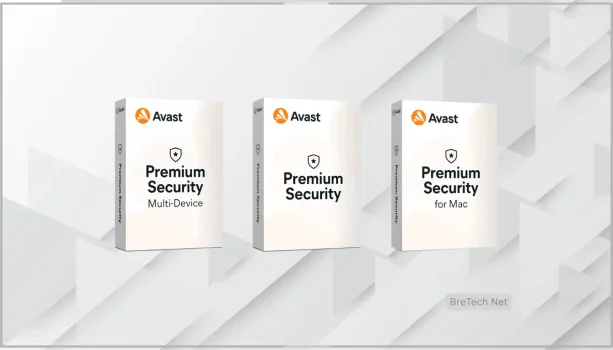
If you want one clear rule: Windows is for one PC, Mac is for one Mac, and Multi-Device is best when you have mixed devices or you want one plan for family or a small office.
BreTech trust line: PKR pricing, local payments 1–72 hour digital email delivery on most orders, and BreTech is an authorized reseller in Pakistan with Urdu/English support.
Quick Links To Buy The Right Edition
- Windows: Avast Premium Security for Window
- Mac: Avast Premium Security for Mac
- Multi-Device: Avast Premium Security Multi-Device
- Browse: Avast Licenses
- Explore: Security Suites and Security
What Avast Premium Security Does In Pakistan
Avast Premium Security helps protect against malware, ransomware, risky websites, and phishing pages that try to steal passwords or banking details.
For many Pakistani users, the biggest daily risk is not “a virus from a CD”. It’s a fake login page, a harmful attachment, or a download from the wrong site.
If you want a simple setup, start with the edition that matches your device type, enable web protection, and schedule scans for off-hours.
Which Avast Premium Security Edition Should You Buy In Pakistan?
Choose based on your device mix.
If you only protect one Windows laptop or PC, buy the Windows edition.
If you only use a MacBook or iMac, buy the Mac edition.
If you have mixed devices, or you want one plan for home and work, Multi-Device is usually the most practical choice.
Quick Overview: Windows vs Mac vs Multi-Device
Here is the fastest way to decide.
| Edition | Best For | Good Fit When | Buy Link |
|---|---|---|---|
| Windows | One Windows PC | You use a single Windows laptop/desktop | Avast Premium Security for Windows |
| Mac | One Mac | You use only macOS on one device | Avast Premium Security for Mac |
| Multi-Device | Mixed devices | Family or small office, or PC + Mac combination | Avast Premium Security Multi-Device |
Avast Premium Security For Windows: Who It’s For
Choose the Windows edition if your main device is a Windows laptop or desktop and you want strong everyday protection without complicated settings.
This is a common fit for students, freelancers, shop owners, and small offices using one PC for accounts, POS, invoices, and email.
Key Protection You Typically Use On Windows
- Web protection to reduce risky sites and fake pages
- Ransomware-style folder protection for documents and photos
- Firewall features (where supported) to control network traffic
- Wi-Fi or network checks (where available) to spot basic router risks
Ideal for: one Windows PC at home, study, or work Buy: Avast Premium Security for Windows
Avast Premium Security For Mac: Who It’s For
Choose the Mac edition if you work mainly on a MacBook or iMac and you want protection focused on web threats, downloads, and phishing.
Mac users in Pakistan often get hit by “fake installer” pages, adware-style apps, and phishing links that look real.
Key Protection You Typically Use On Mac
- Real-time scanning for downloaded files
- Safer browsing and anti-phishing protection
- Network checks for common Wi-Fi weaknesses (where available)
- Extra protection for important folders (varies by version)
Ideal for: one Mac used for work, study, or creative projects Buy: Avast Premium Security for Mac
Avast Premium Security Multi-Device: When It’s Worth It
Multi-Device is the best fit when you want one plan to cover more than one device, or you have mixed devices in the same home or office.
It also makes renewals easier because you are not tracking separate subscriptions for each device.
Why People In Pakistan Choose Multi-Device
- One plan is simpler for renewals and support
- Works well for families with multiple devices
- Useful for a small office that has more than one PC
Ideal for: mixed devices, families, and small offices Buy: Avast Premium Security Multi-Device
Avast Premium Security Price In Pakistan: What Changes The Cost?
Pricing usually changes based on:
- Number of devices covered (single device vs multi-device)
- License duration (for example 1 year vs longer terms, if offered)
- Promotions and seasonal offers
- Renewal pricing vs first-time purchase pricing
For the latest PKR price, open the edition page you want and check the current listing.
How To Buy Avast Premium Security In Pakistan (Fast Delivery)
- Open the edition link you want (Windows, Mac, or Multi-Device).
- Add to cart and choose your local payment method.
- After checkout, you receive the license by email (often within 1–72 hours).
- Install and activate. If anything feels confusing, BreTech support can guide you.
Start here: Avast Licenses Or browse categories: Security Suites and Security
What To Avoid When Buying Antivirus In Pakistan
- Avoid “cheap keys” from random sellers. Many are reused, region-limited, or later revoked.
- Avoid running two real-time antiviruses together. It can slow the PC and cause conflicts.
- Avoid clicking “fix now” popups from unknown websites. Those are often fake.
If you already installed something suspicious, uninstall it, restart, then install Avast cleanly.
How We Picked The Best Edition For You
We matched each edition to the real setup people use in Pakistan: one Windows laptop, one Mac, or a mix of devices in a family or small office.
We also prioritised choices that reduce confusion at renewal time and keep installation simple for non-technical users.
Why Buy From BreTech
BreTech helps you avoid activation issues and risky purchases by offering genuine licenses with local support.
You also get PKR pricing, local payments, and fast digital delivery for most orders.
If you are unsure, tell support your device type and how many devices you want to protect, and you’ll be guided to the right edition.
Disclaimer: Features, editions, system requirements, and updates can change. Please check the official vendor website for the latest details before you buy.
FAQs
Q: Is Avast Premium Security in Pakistan available with PKR pricing and local payments?
A: Yes. BreTech offers PKR pricing with JazzCash, Easypaisa, and bank transfer options, plus digital email delivery on most orders.
Q: Which edition should I buy: Windows, Mac, or Multi-Device?
A: Buy Windows for one Windows PC, Mac for one Mac, and Multi-Device if you have mixed devices or want one plan for family or a small office.
Q: Does Avast Premium Security include a firewall?
A: Some editions include firewall features. Check the exact edition page on BreTech to confirm what’s included for your platform.
Q: How many devices does the Multi-Device plan cover?
A: It covers multiple devices under one plan. The device count can vary by offer, so confirm the seat count on the Multi-Device product page before purchase.
Q: Can I move my license to a new PC or Mac?
A: In most cases, yes. You usually deactivate or remove the old device, then activate on the new device using the same license or account method.
Q: Will Avast Premium Security slow down my computer?
A: On most PCs it runs fine for everyday work. If your PC is older, schedule scans at night and keep only one antivirus installed.
Q: Do you help with installation and activation?
A: Yes. If you buy from BreTech, you can get guidance for download, clean install, activation, and basic recommended settings.
Further Reading
- Best Security Software in Pakistan
- Why Antivirus Software Is Important in Pakistan
- Best Kaspersky Antivirus Alternatives in Pakistan
- Best Business Security Software for SMEs in Pakistan
- Best Antivirus Software for Online Banking in Pakistan
- Best Cybersecurity Tools in Pakistan
Explore more security guides and protection tips in our BreTech Security Guides section.