Abdul Basit
Foxit eSign Essentials vs Business can be difficult to compare because both plans let you send, sign, and track electronic documents. Choosing the wrong license can leave one user paying for unnecessary features or a growing company facing user, envelope, and template limits.
Many buyers in Pakistan compare only the price. They may not check how many employees need access, how many agreements they send each year, or whether they require company branding, bulk sending, web forms, integrations, or centralized administration.
The right plan depends on your actual signing workflow. This guide compares Essentials and Business by users, envelopes, templates, team controls, advanced features, and practical business use in Pakistan.
Foxit eSign licenses are available through BreTech with PKR pricing, local PKR payments, and digital email delivery within 1 to 72 hours. BreTech is an authorized Foxit reseller in Pakistan.
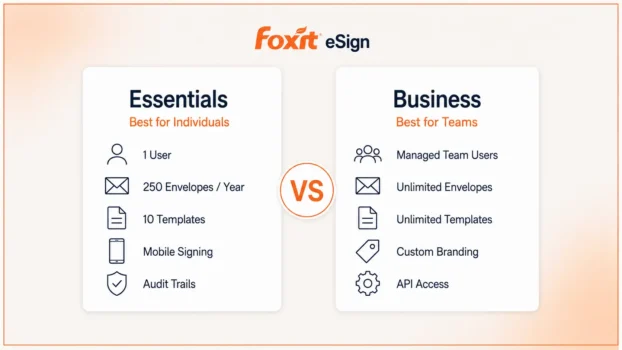
Foxit eSign Essentials is best for one dedicated user who needs 250 envelopes and 10 reusable templates per year. Foxit eSign Business is better for organizations that need managed users, unlimited envelopes and templates, company branding, and advanced signing workflows.
Foxit eSign Essentials vs Business: Quick Comparison
Essentials provides straightforward electronic signing for one user. Business adds the capacity, administration, and workflow controls needed by growing teams.
The table below shows the main differences to review before buying a Foxit eSign license.
| Feature | Foxit eSign Essentials | Foxit eSign Business |
|---|---|---|
| Best for | Individuals and independent professionals | Growing teams and organizations |
| Licensed users | One dedicated user | Multiple managed users |
| Envelopes | 250 per year | Unlimited |
| Reusable templates | 10 | Unlimited |
| Document tracking | Included | Included |
| Multi-document envelopes | Included | Included |
| Audit trails and certificates | Included | Included |
| Mobile signing | Included | Included |
| Foxit Pay | Included | Included |
| Custom branding | Not included | Included |
| Signable web forms | Not included | Included |
| User and team management | Not included | Included |
| Advanced authentication | Standard options | Advanced options |
| eSigner delegation | Not listed | Included |
| Bulk sending | Limited by annual allowance | Unlimited |
| eSign API access | Not listed | Included |
| Main integrations | Basic Foxit workflows | Teams, Dynamics, and Zapier |
| Foxit Connectors | Optional add-on | Optional add-on |
| Minimum purchase | One user | Five or more licenses |
Foxit currently lists 250 annual envelopes, 10 templates, and one dedicated user for Essentials. Business includes unlimited envelopes, unlimited templates, custom branding, web forms, user management, API access, and bulk sending, with a minimum of five licenses.
The Main Buying Difference
Choose Essentials when one person controls the complete signing process. Choose Business when several employees need managed access or the organization requires unlimited usage, branding, delegation, integrations, or centralized controls.
Before ordering: Confirm the Business minimum quantity and included services with BreTech. Supplier packages, connectors, implementation services, and renewal terms may vary.
What Is Foxit eSign Essentials?
Foxit eSign Essentials is an electronic signature plan for one dedicated user. It helps an individual prepare documents, request signatures, track progress, and maintain a record of completed signing transactions.
The plan includes 250 envelopes per year and 10 reusable templates. It also provides document tracking, multi-document envelopes, audit trails, signature certificates, mobile signing, multiple-language support, Foxit Pay, and access to supported notary services.
You can view Foxit eSign Essentials for Pakistan when one person needs a practical system for sending, signing, and tracking agreements.
Foxit Pay and notary services may depend on location, connected providers, and additional service charges. Confirm availability before purchasing Essentials mainly for these features.
What Is an Envelope?
An envelope is one complete signing transaction containing one or more documents, recipients, and signature fields.
For example, one employment envelope may include:
- An offer letter
- An employment agreement
- A confidentiality form
- A policy acknowledgment
These documents can be prepared and sent together instead of creating a separate signing transaction for every file.
Is the Annual Envelope Allowance Enough?
The 250-envelope allowance equals an average of about 20 signing transactions per month. This may be enough for a freelancer, consultant, property agent, trainer, or small business owner who sends only a few agreements each week.
Usage can become restrictive during busy recruitment, admissions, renewal, or customer onboarding periods. Estimate your busiest months, not only your normal monthly use.
How Useful Are 10 Templates?
Templates store commonly used documents, signing fields, and workflow instructions. Ten templates may be enough for one user who repeatedly sends a small set of documents.
Examples include:
- Client contracts
- Non-disclosure agreements
- Service agreements
- Registration forms
- Quotation approvals
- Consent forms
A company with several departments or many document variations may require more than the Essentials template allowance.
Who Should Choose Essentials?
Essentials is suitable when one person prepares documents, sends signature requests, checks progress, and downloads completed agreements.
It may work well for freelancers, consultants, property agents, trainers, independent professionals, small business owners, and one HR or administration employee with moderate signing needs.
When Essentials May Not Be Enough
Essentials may not be suitable when several employees need separate access or the organization requires:
- More than 250 envelopes per year
- More than 10 reusable templates
- Several managed users
- Custom company branding
- Signable web forms
- Advanced authentication
- eSigner delegation
- API-based workflows
- Centralized administration
A common mistake is buying one Essentials license and expecting several employees to use it as a shared team account. Count every person who needs to prepare, send, track, or manage documents before ordering.
Pakistan Use Case
Consider an independent consultant in Lahore who sends eight client agreements each month and uses five standard templates. This equals about 96 envelopes per year, so Essentials could provide enough capacity without unnecessary team features.
If the consultant later hires sales and administration staff who must send their own agreements, Business would become the more suitable plan.
What Is Foxit eSign Business?
Foxit eSign Business is designed for growing companies and organizations that manage electronic agreements across several users or departments. It includes the main signing features of Essentials but adds greater capacity and stronger administrative controls.
Business includes unlimited envelopes, unlimited templates, custom branding, signable web forms, user management, delegation, API access, and bulk sending and signing. Foxit currently lists a minimum purchase of five licenses.
You can view Foxit eSign Business for Pakistan when several users need a controlled system for preparing, sending, and managing agreements.
Why Unlimited Envelopes Matter
Unlimited envelopes are useful when signing volume is high or difficult to predict. A company may have quiet months followed by heavy recruitment, customer onboarding, admissions, renewals, or supplier registration.
Business removes the 250-envelope annual limit shown for Essentials. Organizations should still review the license and acceptable-use conditions supplied with their package.
Team Management and Administration
Business provides a structured way to manage employees who use the signing platform.
For example, one company may have:
- HR sending employment documents
- Sales preparing customer agreements
- Finance collecting approvals
- Administration managing supplier forms
Managed access helps these departments work without sharing one individual login. It also makes access easier to control when an employee changes roles or leaves the organization.
Custom Branding, Bulk Sending, and Web Forms
Custom branding helps recipients recognize the organization sending a signature request. Bulk sending lets a team send one prepared agreement to many recipients while tracking every response separately.
Common bulk-signing uses include:
- Employee policy acknowledgments
- Customer consent forms
- Supplier declarations
- Membership registrations
- Annual agreement renewals
Signable web forms allow recipients to open, complete, and sign a form online without waiting for a separately prepared request.
API Access and Integrations
Foxit eSign Business includes eSign API access for connecting signature workflows with websites, customer portals, business applications, or internal systems.
For example, an approved customer order could automatically generate an agreement, send it for signature, and update the order status when signing is complete.
Foxit lists Microsoft Teams, Microsoft Dynamics, and Zapier among supported Business integrations. Connectors for selected HR, applicant tracking, and cloud storage platforms may be offered as add-ons.
Package warning: Confirm every required connector, API, integration, and implementation service before ordering. Some Foxit APIs and connectors may involve separate charges.
Who Should Choose Business?
Business is suitable when electronic signing is part of a shared organizational process instead of an occasional task handled by one person.
It may be the better choice for:
- HR departments
- Sales teams
- Legal offices
- Finance departments
- Schools and training organizations
- Property companies
- Businesses with repeated customer onboarding
Pakistan Business Use Case
Consider a recruitment company in Karachi with five employees handling documents for different clients. The team sends offer letters, contracts, policy forms, and acknowledgments throughout the year.
Essentials would create limits around users, envelopes, and templates. Business would provide a more suitable environment through managed users, unlimited templates, and higher signing capacity.
When Business May Be More Than You Need
Business may not be cost-effective when only one person sends a small number of agreements and does not need branding, team administration, APIs, delegation, or advanced workflows.
Do not choose Business only because it includes unlimited envelopes. Compare the user count, annual volume, templates, required features, and minimum quantity first.
Four Differences That Should Decide Your Purchase
The most useful way to compare these plans is to focus on four practical differences. These points have a greater effect on the buying decision than minor feature details.
1. Individual Access vs Team Management
Essentials is assigned to one dedicated user, while Business is designed for managed organizational use. A team environment helps a company control access, organize workflows, and reduce dependence on one employee’s account.
Using one individual login across several employees can make it difficult to identify who prepared, sent, changed, or downloaded a document. Business is more appropriate when several people need regular access.
2. 250 Envelopes vs Unlimited Envelopes
Envelope capacity affects how many separate signing transactions you can send during the subscription period.
| Average monthly envelopes | Estimated yearly envelopes |
|---|---|
| 5 | 60 |
| 10 | 120 |
| 20 | 240 |
| 30 | 360 |
| 50 | 600 |
A user sending 20 envelopes per month would reach about 240 per year, leaving little room for unexpected work. Business is more practical when usage may exceed 250 or several employees send documents regularly.
3. 10 Templates vs Unlimited Templates
Templates reduce repeated preparation by saving common documents, fields, and signing instructions. Essentials includes 10 reusable templates, while Business includes unlimited templates.
Ten templates may be enough when one person uses the same small group of agreements throughout the year. A team may need more because HR, sales, finance, legal, and administration can each require different documents and approval paths.
4. Standard Signing vs Advanced Workflows
Essentials covers the main tasks needed to prepare, send, track, and complete agreements. Business adds advanced functions for organizations with more complex signing processes.
Choose Business when you need branding, web forms, advanced authentication, delegation, managed users, API access, integrations, or unlimited bulk sending.
Foxit eSign Essentials vs Business Price in Pakistan
Foxit eSign price in Pakistan depends on the selected plan, number of users, subscription period, supplier terms, exchange rate, and any required integrations or services.
Fixed PKR prices should not be placed in this comparison because software pricing can change. Check the current amount on the relevant BreTech product page before ordering.
What Can Affect the Final Cost?
The final order amount may depend on the number of licensed users, Business minimum quantity, subscription period, renewal conditions, APIs, connectors, implementation services, and applicable taxes.
The lowest initial price is not always the lowest long-term cost. Essentials may be economical for one person, but it can become unsuitable if the company later requires more users, templates, or envelopes.
Pricing tip: Ask for a confirmed quotation showing the user quantity, subscription period, renewal terms, included services, and applicable taxes.
Before You Buy Foxit eSign
A short requirements review can prevent an incorrect license purchase. Check the following points before comparing quotations or placing an order.
Count the Actual Users
Count every employee who needs to prepare documents, send signature requests, manage templates, or review completed agreements. Do not count only the person placing the order.
Essentials is assigned to one dedicated user, while Business is intended for managed team access.
Estimate Annual Envelope Use
Review your signing activity during normal and busy periods. Essentials may work when usage remains safely below 250 envelopes per year.
Business is more suitable when volume is higher, unpredictable, or divided among several users.
List Your Reusable Documents
Write down the agreements and forms you send repeatedly, including contracts, NDAs, registration forms, quotations, employment documents, consent forms, and approval requests.
Essentials includes 10 templates, so a longer document list may point toward Business.
Check Advanced Requirements
Determine whether your workflow needs branding, web forms, team administration, delegation, advanced authentication, APIs, bulk sending, or external integrations.
Confirm these requirements before ordering because connectors and implementation services may use separate packages.
Confirm Document Acceptance
Not every document is suitable for electronic signing. Acceptance may depend on the document type, involved parties, company rules, and applicable law.
Government, property, banking, legal, or regulated documents may require extra procedures or professional advice.
Which Foxit eSign Plan Should You Choose?
The best Foxit eSign plan depends mainly on the number of users and the complexity of your signing workflow.
| Choose Foxit eSign Essentials when | Choose Foxit eSign Business when |
|---|---|
| One person manages all signing | Several users need managed access |
| You send fewer than 250 envelopes yearly | Signing volume is high or unpredictable |
| Ten templates are enough | You need unlimited templates |
| Team administration is unnecessary | You need centralized user management |
| Standard signing is sufficient | You need advanced workflows |
| Basic document presentation is enough | You need custom company branding |
| No API workflow is required | You need APIs or integrations |
| Bulk requirements are limited | You need unlimited bulk sending |
Best Choice for Individuals
Essentials is generally better for freelancers, consultants, independent professionals, and small business owners who personally manage their signing activity.
It provides a straightforward workflow without adding team controls that one person may not need.
Best Choice for Teams
Business is more suitable when several employees require access or the organization needs unlimited templates, unlimited envelopes, branding, administration, delegation, APIs, or advanced workflows.
It is designed for departments and companies where signing is part of a shared operational process.
Final Decision Rule
Choose Essentials according to the needs of one dedicated user. Choose Business according to the needs of the whole organization.
Do not choose Business only because it offers unlimited envelopes, and do not choose Essentials only because its initial cost may be lower.
What About Foxit PDF Editor Plus?
Foxit PDF Editor Plus is an alternative when PDF editing is the main requirement and electronic signing is only one part of the workflow.
It combines professional PDF editing with mobile applications, Smart Redact, OCR, document conversion, and 150 Foxit eSign envelopes per user each year.
You can review Foxit PDF Editor Plus when you need to edit, convert, redact, protect, and sign PDFs in one package.
When PDF Editor Plus Is the Better Fit
Choose PDF Editor Plus when most daily work involves creating, correcting, converting, protecting, or redacting PDF documents.
Choose a dedicated Foxit eSign plan when sending, tracking, and managing agreements is the main business requirement.
Frequently Asked Questions
Q: What is the main difference between Foxit eSign Essentials and Business?
A: Essentials is for one dedicated user with 250 annual envelopes and 10 templates. Business is for teams needing managed users, unlimited envelopes, branding, and advanced workflows.
Q: How many envelopes does Foxit eSign Essentials include?
A: Foxit eSign Essentials includes 250 envelopes per year. One envelope can contain one or several related documents in the same signing transaction.
Q: Does Foxit eSign Business include unlimited envelopes?
A: Yes. Foxit lists unlimited envelopes and reusable templates with Business, subject to the applicable license terms.
Q: Can several people use Foxit eSign Essentials?
A: Essentials is intended for one dedicated user. Business is more suitable when several employees need separate, managed access.
Q: Which plan is better for a small business?
A: Choose Essentials when one person handles moderate signing needs. Choose Business when several users need shared templates, branding, administration, APIs, or bulk sending.
Conclusion: Choose the Right Foxit eSign License
The correct Foxit eSign license should match your users, annual signing volume, templates, branding needs, and workflow requirements. Choosing according to real usage can prevent unnecessary costs or an early upgrade.
Choose Essentials when one dedicated user needs a straightforward signing solution with a moderate annual allowance. Choose Business when an organization needs managed users, unlimited envelopes and templates, branding, delegation, APIs, or advanced workflows.
Before ordering, confirm the current PKR price, minimum Business quantity, renewal terms, included services, and applicable taxes.
Explore more solutions in the Office Productivity software category or view other genuine products from the Foxit brand.
Further Reading
These BreTech guides can help you compare related PDF tools and prepare business documents correctly.