Abdul Basit
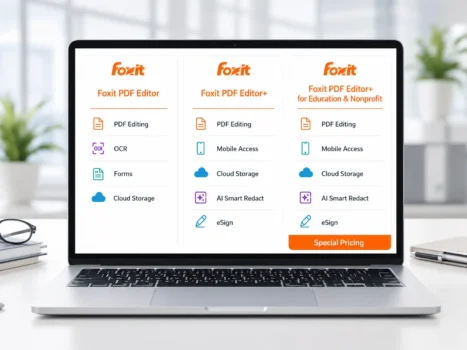
Choosing the right Foxit PDF Editor edition in Pakistan depends on how you work, which devices you use, and whether you need mobile apps, cloud storage, AI tools, or electronic signatures.
Foxit PDF Editor is suitable for regular PDF editing, OCR, conversion, forms, and document security. Foxit PDF Editor+ adds mobile access, AI Smart Redact, more cloud storage, and Foxit eSign. A separate Education and Nonprofit edition is available for eligible users and organizations.
This guide compares all three options and explains subscription and perpetual licensing. It will help individuals, offices, businesses, schools, universities, and nonprofit organizations in Pakistan choose the right Foxit license.
Key Takeaways
- Foxit PDF Editor covers professional PDF editing, OCR, conversion, forms, and security.
- Foxit PDF Editor+ adds mobile apps, AI Smart Redact, 150GB of cloud storage, and 150 Foxit eSign envelopes per user each year.
- Foxit PDF Editor is available through subscription licensing and as a separate perpetual desktop license.
- Foxit PDF Editor+ is a subscription-based option with connected services.
- Eligible education and nonprofit customers may qualify for special licensing.
- Business and corporate customers can request a business account, official quotation, and invoice from BreTech.
- Qualifying education purchases of 500 or more licenses may receive additional student licenses, subject to current supplier terms.
Foxit PDF Editor Editions at a Glance
Foxit provides options for individual users, offices, teams, educational institutions, and eligible nonprofit organizations.
For buyers in Pakistan, the best choice depends on the number of users, required devices, cloud storage, eSign needs, and preferred license type.
| Edition | Main Difference | Best For |
|---|---|---|
| Foxit PDF Editor | Core PDF editing, OCR, conversion, forms, security, and review tools | Individuals, professionals, and offices that mainly work on Windows, macOS, or the web |
| Foxit PDF Editor+ | Adds mobile apps, AI Smart Redact, 150GB cloud storage, and 150 eSign envelopes per user each year | Users and teams that need a wider document workflow |
| Foxit PDF Editor+ for Education and Nonprofit Organizations | Provides the PDF Editor+ tools under special eligibility and quotation terms | Eligible students, schools, universities, and nonprofit organizations |
For most home users and offices in Pakistan, the standard Foxit PDF Editor edition provides enough tools for daily PDF work.
Foxit PDF Editor+ is more suitable when mobile editing, AI-assisted redaction, larger cloud storage, or electronic signature requests are part of your regular work.
Foxit PDF Editor
Foxit PDF Editor is the standard option for users who need professional PDF tools without the mobile apps, Smart Redact, and Foxit eSign allowance included with PDF Editor+.
Key Features
Foxit PDF Editor can:
- Edit text, images, links, and page content
- Add, remove, rotate, crop, or reorder pages
- Merge several files into one PDF
- Split one PDF into smaller files
- Convert PDFs to Word, Excel, PowerPoint, and image formats
- Create PDFs from documents, images, and web pages
- Use OCR to make scanned documents searchable and editable
- Create, fill, and sign PDF forms
- Add comments, stamps, drawings, and review notes
- Compare two versions of the same document
- Protect files with passwords and permissions
- Remove sensitive information through manual redaction
The subscription version supports Windows, macOS, and web access. It also includes cloud storage and a limited monthly allowance of AI Assistant credits.
Foxit uses an office-style ribbon interface. Users who already work with Microsoft Office software should find many of its menus and tools familiar.
For practical conversion help, read how to convert PDF to Word without losing formatting and how to convert Word to PDF without losing formatting.
Who Should Choose Foxit PDF Editor?
Choose Foxit PDF Editor when you need a complete PDF editing solution for normal office work but do not need mobile editing or included Foxit eSign envelopes.
It is a good choice if:
- You mainly work on a desktop computer or web browser
- You edit, convert, organize, or secure PDFs regularly
- You need OCR for paper documents and scanned files
- You create or complete PDF forms
- Manual redaction is enough for your work
- You do not regularly send documents to other people for signing
- You want the choice between subscription and perpetual licensing
This edition may suit freelancers, accountants, teachers, legal professionals, home users, and small offices in Pakistan.
Foxit PDF Editor+
Foxit PDF Editor+ includes the main Foxit PDF Editor tools with extra services for mobile work, intelligent redaction, cloud storage, and electronic signatures.
What Foxit PDF Editor+ Includes
Foxit PDF Editor+ adds:
- Foxit PDF Editor Mobile for iOS and Android
- AI Smart Redact for finding sensitive information
- Foxit eSign with 150 envelopes per user each year
- 150GB of cloud storage
- PDF editing across desktop, web, and supported mobile devices
- Signature requests and response tracking
- AI-powered productivity tools
- Connected document services under one subscription
Smart Redact can help find names, addresses, identity numbers, and other private information. This can save time when working with contracts, customer records, employee documents, and business files.
However, AI-powered results should always be checked before the document is shared.
Learn more in our guide to PDF redaction software in Pakistan.
How Foxit eSign Envelopes Work
An eSign envelope is a package containing one or more documents sent to one or more people for signing.
The included Foxit eSign service can help users:
- Send documents for signature
- Track who has opened or signed a document
- Receive completed documents
- Manage signature requests from one workspace
Foxit PDF Editor can place signatures inside a PDF and work with signed forms. The 150-envelope allowance in PDF Editor+ is a separate service for sending documents to other people and tracking their responses.
Businesses that need higher signing limits or more advanced controls can browse dedicated Electronic Signature software.
Who Should Choose Foxit PDF Editor+?
Choose Foxit PDF Editor+ when you need more than desktop PDF editing.
It is a better fit when you:
- Edit PDF documents on a phone or tablet
- Work from different locations or devices
- Regularly send documents for electronic signatures
- Need faster redaction of private information
- Want 150GB of cloud storage
- Want editing, mobile access, AI tools, and eSign in one subscription
- Need an all-in-one document solution for a small team or business
- Want ongoing access to subscription updates
Users who mainly edit PDFs on one computer may find the standard Foxit PDF Editor edition sufficient.
Foxit PDF Editor+ for Education and Nonprofit Organizations
Foxit PDF Editor+ for Education and Nonprofit Organizations provides the PDF Editor+ feature set under special licensing for eligible education users and nonprofit organizations.
It may be suitable for:
- Students
- Teachers
- School staff
- College and university staff
- Educational institutions
- Eligible nonprofit organizations
Education eligibility and nonprofit requirements are different. Final pricing, license quantities, and eligibility must be confirmed before ordering.
What Is Included?
Eligible users can receive the main PDF Editor+ tools, including:
- PDF editing, conversion, and page management
- OCR for scanned documents
- Form creation, filling, and signing
- Password protection and document security
- Manual and AI-assisted redaction
- Foxit eSign with 150 envelopes per user each year
- 150GB of cloud storage
- Windows, macOS, web, iOS, and Android access
- A limited number of monthly AI Assistant credits
- Cloud integrations and an online Admin Console
These features can help schools and universities manage forms, admission documents, reports, course materials, certificates, and other PDF files.
Education Eligibility
Students, teachers, and school staff may need to register with an official school-provided email address.
Public email services may not qualify automatically for education pricing. The buyer should confirm eligibility before placing the order.
Educational institutions that need several licenses should request an official quotation based on the number of users, license term, and deployment requirements.
Nonprofit Eligibility
Eligible nonprofit organizations may qualify for special pricing.
The organization may need to provide:
- Registration details
- Proof of nonprofit status
- Number of required users
- Intended use of the software
- Required license term
The exact discount and license conditions are confirmed through a custom quotation.
Free Student Licenses for Qualifying Education Orders
The Foxit APAC reseller price list includes a student-license offer for qualifying education purchases of 500 or more licenses.
The offer may provide up to six times the purchased quantity in additional student licenses. For example, a qualifying purchase of 500 licenses may support up to 3,000 student licenses.
The exact quantity, eligible users, license period, renewal terms, and availability must be confirmed in the official supplier quotation.
Additional student licenses are linked to a qualifying education purchase. They are not a separate free product for general users.
Foxit PDF Editor Subscription vs Perpetual License
Foxit PDF Editor is available through subscription licensing and as a separate perpetual desktop license.
The right choice depends on whether you want ongoing updates and connected services or prefer to keep one purchased desktop version.
Subscription License
A subscription license remains active for a fixed term and must be renewed to continue using the paid software and included services.
BreTech reseller subscriptions are normally quoted for a minimum term of 12 months. Buyers should confirm the exact license period before ordering.
Main benefits include:
- Access to the current software version
- Feature and security updates during the active term
- Windows, macOS, and web access, based on the edition
- Monthly AI Assistant credits
- Cloud storage
- Easier license changes for growing teams
- Mobile applications and eSign with PDF Editor+
Foxit PDF Editor+ is a subscription product. Its mobile apps, Smart Redact, cloud storage, eSign allowance, and connected services are part of the active plan.
Perpetual License
A perpetual license is a one-time purchase for a specific desktop version of Foxit PDF Editor.
You can continue using the purchased version without paying a yearly subscription fee.
However:
- Future major versions are not automatically included
- Mobile apps are not included
- PDF Editor+ connected services are not included
- AI Assistant is not included with the perpetual license
- Foxit eSign envelopes are not included
- Maintenance and Support may be needed for upgrades and extended support
- A single-use license is normally assigned to one user and one computer or virtual machine
Foxit provides active support for the current perpetual version and the previous major version.
The purchased software may continue to work after its support period ends, but it may no longer receive security fixes, updates, or technical support.
A perpetual license may suit users in Pakistan who prefer a one-time purchase and plan to keep the same desktop setup for several years.
Foxit PDF Editor vs Foxit PDF Editor+: Main Differences
Both editions include tools for editing, converting, organizing, reviewing, and securing PDF documents.
The main differences are mobile access, Smart Redact, cloud storage, and the included Foxit eSign service.
| Feature | Foxit PDF Editor | Foxit PDF Editor+ |
|---|---|---|
| Edit text, images, links, and pages | Included | Included |
| OCR for scanned documents | Included | Included |
| PDF conversion and forms | Included | Included |
| Windows, macOS, and web subscription apps | Included | Included |
| Mobile apps for iOS and Android | Not included | Included |
| Manual redaction | Included | Included |
| AI Smart Redact | Not included | Included |
| Foxit eSign envelopes | Not included | 150 per user each year |
| Monthly AI Assistant credits | Included with subscription | Included |
| Cloud storage | 20GB | 150GB |
| Perpetual desktop option | Available separately | Not available |
Foxit PDF Editor is enough for users who mainly need professional PDF tools on a computer.
Foxit PDF Editor+ provides a wider document workflow for people who work across several devices, handle private information, or regularly send documents for electronic signatures.
Which Foxit PDF Editor Edition Should You Choose?
The best edition depends on your daily work, number of users, devices, signing volume, storage needs, and preferred license type.
Choose Foxit PDF Editor for Regular PDF Work
Choose the standard edition when you need reliable tools for editing, converting, organizing, and protecting PDF documents.
It is a good choice if:
- You mainly work on Windows, macOS, or the web
- You need OCR, conversion, forms, and security tools
- You do not need mobile PDF editing
- You do not need included eSign envelopes
- You want a subscription or perpetual desktop license
This option may be enough for home users, freelancers, individual professionals, and small offices in Pakistan.
Choose Foxit PDF Editor+ for Mobile Work and eSign
Choose Foxit PDF Editor+ when you need a wider document solution across several devices.
It is better if:
- You edit PDFs on a phone or tablet
- You send documents for electronic signatures
- You need AI Smart Redact
- You want 150GB of cloud storage
- You want desktop, web, mobile, and eSign access together
- You prefer an active subscription with regular updates
This option may suit small teams, sales staff, managers, consultants, and businesses that work with contracts or approval documents.
Choose Education and Nonprofit Licensing for Eligible Users
This option is suitable for approved students, teachers, educational institutions, and nonprofit organizations.
Choose it when you or your organization:
- Qualify for education or nonprofit pricing
- Need PDF Editor+ for approved users
- Need several licenses
- Want centralized license management
- Plan to buy licenses in volume
- May qualify for additional student licenses
- Need an official quotation and invoice
Eligibility, quantities, pricing, support terms, and additional student licenses should be confirmed before ordering.
Request a Business Account for Corporate Requirements
Business and corporate customers may need more than a single-user license.
A BreTech business account can help when your organization needs:
- Several licenses
- An official quotation
- Invoice support
- License assignment guidance
- Deployment planning
- Renewal management
- Corporate payment instructions
- Education or nonprofit eligibility checks
The final recommendation should be based on your user count, devices, required features, and license term.
Buying Foxit PDF Editor in Pakistan
Customers in Pakistan can buy genuine Foxit licenses through BreTech with PKR pricing, digital delivery, activation help, and invoice support.
You can browse the full Foxit product range or explore the broader PDF & E-Sign category.
Buyers who mainly need editing and conversion tools can also browse PDF Editing software.
Before ordering, confirm:
- The required Foxit edition
- Subscription or perpetual licensing
- Number of users
- Required operating systems
- Need for mobile apps or Foxit eSign
- Required cloud storage
- Education or nonprofit eligibility
- Support and deployment requirements
Single-user licenses may have a listed PKR price.
Business, corporate, education, and nonprofit customers should contact BreTech to request a business account, official quotation, invoice, and suitable payment instructions.
Pricing can depend on the edition, number of users, license term, eligibility, deployment requirements, and current supplier conditions.
Buyers who are unsure about license safety can also read our guide on buying genuine software in Pakistan.
Frequently Asked Questions
Q: Which Foxit PDF Editor edition is best for users in Pakistan?
A: Foxit PDF Editor is suitable for most home users, professionals, and offices that mainly work on a computer. Foxit PDF Editor+ is better when you need mobile apps, AI Smart Redact, more cloud storage, or Foxit eSign.
Q: Can I buy a genuine Foxit PDF Editor license in Pakistan?
A: Yes. Pakistan buyers can purchase genuine Foxit licenses through BreTech with PKR pricing, digital delivery, activation guidance, and invoice support. Confirm the edition and license term before ordering.
Q: Can businesses in Pakistan request a Foxit business account?
A: Yes. Business and corporate customers can contact BreTech for a business account, official quotation, invoice, suitable licensing, and payment instructions. Pricing can depend on the number of users and license term.
Q: Does Foxit PDF Editor include AI tools?
A: The subscription editions include monthly AI Assistant credits. Foxit PDF Editor+ also includes AI Smart Redact, which helps find private information in a document. Always check the results before sharing the file.
Q: Can Foxit PDF Editor work with Microsoft Office files?
A: Yes. Foxit can convert PDF files to Microsoft Word, Excel, and PowerPoint. It can also create PDFs from supported Microsoft Office files. Check complex tables, fonts, and images after conversion.
Q: Is Foxit PDF Editor suitable for schools and nonprofit organizations?
A: Yes. Eligible students, schools, universities, and nonprofit organizations may qualify for special licensing. Request a quotation to confirm eligibility, user quantities, pricing, and license terms.
Q: Should I choose a subscription or perpetual Foxit license?
A: Choose a subscription if you want updates, cloud storage, AI tools, and connected services. Choose a perpetual license if you prefer a one-time purchase for a specific desktop version and do not need PDF Editor+ services.
Conclusion
Foxit PDF Editor provides several licensing options for Pakistan users who need professional tools for editing, converting, organizing, and protecting PDF documents.
The standard edition is suitable for most home users, professionals, and offices. It covers normal PDF work and provides a separate perpetual desktop option.
Foxit PDF Editor+ is better for users and teams that need mobile access, AI Smart Redact, more cloud storage, and 150 Foxit eSign envelopes per user each year.
Eligible education users and nonprofit organizations may qualify for special licensing. Large education orders may also qualify for additional student licenses under current supplier terms.
Business, corporate, education, and nonprofit customers should confirm the correct edition, user quantity, license term, eligibility, and deployment needs before ordering.
Customers in Pakistan can contact BreTech for genuine Foxit licensing, current PKR pricing, digital delivery, activation help, business accounts, official quotations, and invoice support.