Abdul Basit
IObit Uninstaller vs Revo vs Ashampoo matters when Windows 10/11 starts feeling slow after you remove apps the normal way and the PC still keeps leftover files and folders behind. Over time, this clutter adds up, especially on older laptops and small SSDs.
The built-in Windows uninstaller usually removes the main program, but it may leave hidden leftovers like registry entries, background services, startup items, and old cache folders. That is why “uninstall” often does not feel like a clean reset.
A dedicated uninstaller can run a deeper scan, remove traces safely, and handle stubborn apps with a clean removal workflow. If you prefer genuine licensing and local help, BreTech is an authorized reseller partner in Pakistan with PKR pricing, local payments, and fast email delivery on most orders.
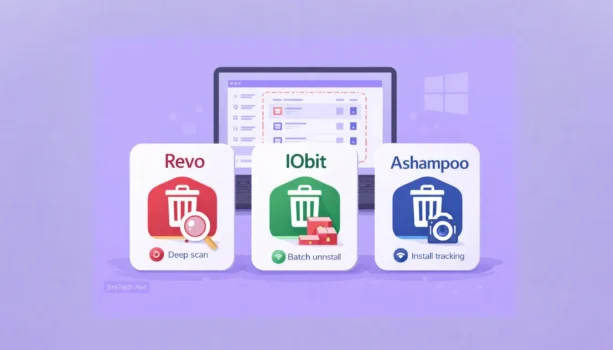
Use the normal uninstall first, then run a leftover scan to clean traces. Revo is best for stubborn or broken installs, IObit is best for fast batch removals and browser add-ons, and Ashampoo is best for beginners who want install tracking and snapshots.
Quick Comparison: Top Uninstallers in Pakistan
Choose based on your need: stuck apps need deep cleanup, frequent removals need batch uninstall, and beginners benefit from tracking/snapshots.
| Tool | Best For | Key Features | Notable Advantage |
|---|---|---|---|
| Revo Uninstaller Pro 5 | Power users, IT students, admins | Deep scan, Hunter Mode, Forced Uninstall, registry backups | Safest for stubborn apps and broken installs |
| IObit Uninstaller 15 PRO | Everyday users, students, professionals | Batch uninstall, Software Health, extension removal, startup control | Fast cleanup for daily use |
| Ashampoo UnInstaller 16 | Budget users, beginners | Install tracking, snapshots, batch removal, clear logs | Best value with visual tracking |
If you want a cleaner with a basic uninstaller, CCleaner is a good add-on, but it is not a dedicated deep uninstaller like the three tools above. You can compare CCleaner options on CCleaner in Pakistan.
Tip: uninstall first, then run the leftover scan, and restart after removing big tools like antivirus or VPNs.
Why Use an Uninstaller Tool on Windows PCs?
Remove apps cleanly on Windows 10/11 by deleting leftovers, startup items, and traces that slow PCs after repeated installs and updates.
Problems With the Default Windows Uninstaller
The default Windows uninstaller often removes the main app but leaves folders, caches, old settings, and other traces behind. Over time, this buildup can reduce free space and make updates and startups feel slower.
It can also leave background items like scheduled tasks, startup entries, and leftover services. That is why uninstalling a program does not always feel like a clean reset.
Why Third-Party Uninstaller Tools Are More Effective
Third-party tools run the normal removal and then scan for leftovers. Many also track installs so cleanup is more accurate. If a program refuses to uninstall, they can remove it safely.
- Normal uninstall + deep scan to catch leftover files
- Install monitoring for more precise cleanup
- Forced uninstall for stubborn or broken programs
- Store apps support for Microsoft Store removals
What to Avoid When Uninstalling Programs
- Do not delete random registry keys manually unless you know exactly what they do.
- Do not uninstall drivers blindly, especially display, audio, Wi-Fi, or touchpad drivers.
- Do not skip the restart, because services and startup items may stay loaded until reboot.
- Do not uninstall security apps and keep browsing, restart first so protection is stable.
How Uninstalling Software Improves PC Performance
Regular cleanup frees up storage and reduces background clutter. It can also trim startup items and old services that slow boot time. The result is smoother updates, quicker app launches, and more free space for work, games, and projects.
Best Uninstaller Software Options Compared (2026 Guide)
Compare Revo, IObit, and Ashampoo for Windows 10/11 by cleanup depth, speed, tracking, and ease of use so you can pick the right tool in Pakistan.
1. Revo Uninstaller Pro 5: Deep Cleaning for Stubborn Apps
Revo Uninstaller Pro 5 is a strong choice when apps break, refuse to uninstall, or leave too many traces behind. It is known for deep leftover scanning and tools like Hunter Mode that help you target stubborn programs.
If you install and remove many tools for testing, IT work, or troubleshooting, Revo is often the safest option because it focuses on thorough cleanup and rollback-friendly handling.
2. IObit Uninstaller 15 PRO: Fast Batch Uninstall for Everyday Use
IObit Uninstaller 15 PRO is built for speed and simplicity. It supports one-click batch removal and is especially helpful for cleaning browser extensions, toolbars, and bundled items that users often forget.
It is a good fit for students and busy PC users who want quick results without spending time learning advanced menus.
3. Ashampoo UnInstaller 16: Beginner-Friendly Tracking and Snapshots
Ashampoo UnInstaller 16 uses install tracking and snapshots so you can see what changes an app made to your system. That makes it easier for beginners to understand what will be removed and to keep removals tidy.
If you want good value plus visual logs and tracking, Ashampoo is a smart pick for home users and small offices.
IObit Uninstaller vs Revo vs Ashampoo: Key Differences
Compare cleanup depth, batch uninstall speed, install tracking, and stubborn app removal so you can pick the right uninstaller for Windows 10/11.
Choose by Scenario in Pakistan
| Scenario | Revo Uninstaller Pro 5 | IObit Uninstaller 15 PRO | Ashampoo UnInstaller 16 |
|---|---|---|---|
| Stuck or broken uninstall | Best | Good | Good |
| Deep leftover cleanup | Best | Good | Good |
| Batch uninstall many apps | Good | Best | Good |
| Beginners who want visual logs | Good | Good | Best |
| Install tracking and snapshots | Good | Basic | Best |
| Quick daily maintenance | Good | Best | Good |
If you want maximum control, choose Revo. If you want speed and batch removal, choose IObit. If you want value plus tracking, choose Ashampoo.
What About CCleaner? Is It a Real Uninstaller Alternative?
In Pakistan, CCleaner is widely used for PC cleanup and basic uninstalling. It includes a simple uninstaller, but its main strength is broader maintenance, like junk cleaning and startup management.
BreTech offers CCleaner Professional, Professional Plus, and Premium for home users, plus Business and Cloud for Business for IT teams. On mobile, CCleaner Pro for Android helps manage storage and apps.
CCleaner as a PC Cleaner vs a Dedicated Uninstaller Tool
CCleaner is best when you want one tool for cleanup, basic uninstalling, and maintenance tasks. The paid editions add more automation and convenience features for ongoing PC care.
Dedicated uninstallers like Revo, IObit, and Ashampoo go deeper for leftovers, tracking, and stubborn removals. That is why they are usually better when you want clean removals after heavy software testing or frequent installs.
Should You Use CCleaner to Uninstall Software?
If your main goal is deep removal of broken or stubborn apps, Revo, IObit, or Ashampoo are better. If you want cleaning plus basic uninstalling in one tool, CCleaner is a practical choice.
Which Is the Best Uninstaller Software for Windows in Pakistan?
Pick Revo for stubborn installs, IObit for fast daily batch cleanup, or Ashampoo for tracking and value, with genuine licenses available via BreTech.
Best Choice for Power Users: Revo Uninstaller Pro
Revo Uninstaller Pro suits testers, IT students, and admins who deal with broken setups and stubborn uninstall errors. It focuses on deeper leftover cleanup, safer handling, and better control when a program refuses to remove cleanly on Windows 10/11.
Best Choice for Everyday Users: IObit Uninstaller
IObit Uninstaller is best when you want quick, simple results without learning advanced menus. It handles batch uninstalling, cleans toolbars and browser add-ons, and helps you remove bundled items that slow down Windows 10/11 over time on everyday laptops.
Best Choice for Budget Beginners: Ashampoo UnInstaller 16
Ashampoo UnInstaller 16 is a strong value pick for beginners who want a clearer “before and after” view. Install tracking and snapshots make removals easier to understand, and the logs help you keep the system tidy after uninstalling apps on Windows 10/11.
Quick tip: choose based on your need. Revo for control, IObit for speed, Ashampoo for value.
Conclusion: Choosing the Best Uninstaller Software in Pakistan
If you want the safest deep removal for stubborn or broken installs, Revo is usually the best pick. If you want fast batch uninstalling with simple controls, IObit is a strong everyday option. If you want value plus install tracking and snapshots, Ashampoo is a great beginner-friendly choice.
For genuine licensing with PKR pricing, local payments, and fast email delivery on most orders, explore our Uninstaller Software Collection and choose the tool that matches your workload.
FAQs
Q: Which is the best: IObit Uninstaller vs Revo vs Ashampoo?
A: It depends on your needs. IObit is fast and simple, Revo is best for deep cleaning and stubborn uninstall cases, and Ashampoo is strong value for beginners who like install tracking and snapshots.
Q: How does IObit Uninstaller compare to Revo?
A: IObit focuses on speed, batch uninstalling, and browser add-on cleanup. Revo is more focused on deep leftover cleanup and handling broken or stubborn installs.
Q: Can I use Ashampoo UnInstaller for free?
A: Ashampoo UnInstaller is a premium tool. Sometimes vendors offer limited trials or special offers, but full install tracking and snapshot features are typically part of the paid edition.
Q: Does Revo Uninstaller have special features over IObit?
A: Revo is known for tools like forced uninstall handling and deeper cleanup options for stubborn or broken installs. IObit is usually simpler and faster for everyday batch removals.
Q: Are there free trials for the premium versions?
A: Many vendors offer free editions or trials with limits. Always check the current offer details on the product page before purchasing.
Q: Which uninstaller is better for very old Windows versions?
A: These tools are mainly built for modern Windows. If you are on an older Windows version, it is safer to upgrade Windows first for security, then use a modern uninstaller on a supported system.
Q: Are uninstallers available for Android too?
A: PC uninstallers are made for Windows. On Android, you need app management tools designed for mobile, such as CCleaner’s Android edition, instead of Windows uninstallers.
Further Reading
- Best Uninstaller Software for Windows in Pakistan
- IObit Software Price in Pakistan
- Revo Uninstaller Pro Price in Pakistan
- Common Mistakes When Uninstalling Software
- Remove Leftover Files After Uninstalling Software in Windows
Compare more cleanup and removal tools in our Uninstallers section and see extra Utilities & Optimization guides.