
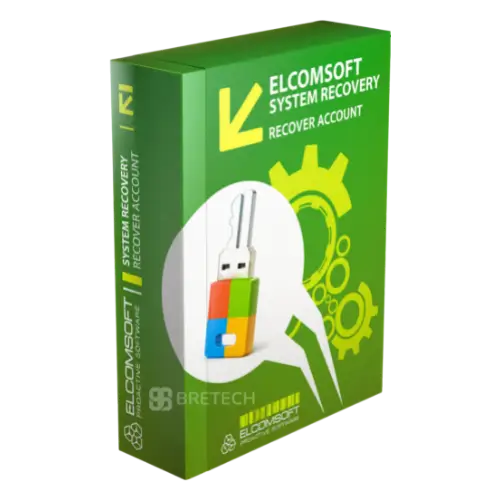
Elcomsoft System Recovery
Rs 170,300
Buy Elcomsoft System Recovery in Pakistan for authorised system recovery, encrypted volume analysis, and forensic access work.
- Genuine Elcomsoft licence
- For authorised system recovery tasks
- Helps review supported systems and encrypted evidence
- PKR pricing and local payments
- Digital delivery, activation help, and invoice support
Elcomsoft System Recovery in Pakistan
Locked out of a Windows computer you own or are authorized to examine? Elcomsoft System Recovery helps IT teams, forensic labs, and system administrators regain access to supported Windows systems, collect evidence, create forensic disk images, and work with account password data in a controlled workflow.
BreTech is an official Elcomsoft reseller in Pakistan, helping customers buy a genuine Elcomsoft System Recovery license with PKR pricing, local payment options, digital delivery, activation guidance, and invoice support. If you are not sure whether this tool fits your Windows recovery or forensic workflow, our team can help you check before purchase.
You can also compare related tools in our Forensics & Imaging category or view more products on the Elcomsoft brand page.
What Elcomsoft System Recovery Is Used For
Elcomsoft System Recovery is used for authorized Windows account recovery, system access restoration, password hash extraction, forensic disk imaging, and in-field computer analysis.
It is useful for IT administrators, DFIR teams, forensic labs, law enforcement, auditors, and support teams that need lawful access to Windows computers after password loss, staff handover, disabled accounts, or system access problems.
Common use cases include resetting local Windows passwords, unlocking disabled accounts, assigning administrator rights, exporting password hashes for offline recovery, collecting evidence, and creating forensic disk images for later analysis.
Key Features
- Bootable Windows PE environment: Create a bootable USB or DVD for supported Windows systems.
- Windows password reset: Reset supported local Windows account passwords when access is lost.
- Account recovery support: Work with local accounts, Microsoft Accounts, Microsoft Entra ID accounts, cached domain accounts, and supported Active Directory data.
- Administrator access management: Assign administrator rights, unlock disabled accounts, and review account privileges.
- Password hash export: Export SAM, SYSTEM, and Active Directory password hashes for offline recovery.
- Forensic disk imaging: Create RAW/DD or E01 forensic disk images with hash verification.
- Write-blocking workflow: Use read-only access by default to help protect evidence during collection.
- Encrypted disk metadata extraction: Extract metadata from supported BitLocker, FileVault, VeraCrypt, TrueCrypt, PGP Disk, LUKS, and LUKS2 volumes for further recovery workflows.
- Windows event log viewing: Review supported Windows event logs for quick investigation and timeline work.
- Wi-Fi and system credential recovery: Recover supported stored Wi-Fi passwords and selected system account passwords where available.
Important Legal Use Note
Elcomsoft System Recovery should be used only on computers, accounts, disks, and evidence you own or are authorized to access.
This is not a tool for unauthorized access. For forensic work, follow your organization’s legal approval, evidence handling, chain-of-custody, and documentation process.
Before buying, confirm your Windows version, boot mode, disk encryption status, account type, and recovery goal with BreTech.
Supported Windows Systems
Elcomsoft System Recovery supports many Windows desktop and server systems.
Common supported platforms include:
- Windows 11
- Windows 10
- Windows 8.1 and 8
- Windows 7
- Older Windows versions where applicable
- Windows Server versions up to Windows Server 2025
- 32-bit and 64-bit systems
- UEFI and legacy BIOS boot modes
- Local Windows accounts
- Microsoft Accounts
- Microsoft Entra ID accounts
- Cached domain accounts
- Active Directory data
Support can vary by hardware, boot mode, encryption status, and product version, so confirm your exact environment before purchase.
How It Helps in IT and Forensic Workflows
Elcomsoft System Recovery can help in several common Windows recovery and forensic scenarios.
Restore Access to Locked Windows Systems
If a user, administrator, or support team loses access to a Windows computer, the tool can reset supported local account passwords, unlock disabled accounts, and assign administrator privileges where allowed.
This is useful for IT support, staff handover, business recovery, and authorized system administration.
Collect Evidence Safely
For forensic work, Elcomsoft System Recovery can start in a read-only workflow and help create verifiable forensic disk images.
It can create RAW/DD or E01 images and calculate hash values to support later evidence verification.
Export Password Hashes for Offline Recovery
If the original password is needed instead of a reset, the tool can export supported password hashes from local or domain account databases.
Those hashes can then be used with Elcomsoft Distributed Password Recovery for offline password recovery.
Work With Encrypted Disk Cases
Elcomsoft System Recovery can detect encrypted disks and extract metadata from supported encrypted volumes.
For deeper disk decryption or mounting, compare it with Elcomsoft Forensic Disk Decryptor.
Who Should Buy This Tool?
Elcomsoft System Recovery is best for teams that handle Windows account recovery, forensic imaging, and locked system access as part of lawful technical work.
Best for:
- IT administrators
- DFIR teams
- Digital forensic labs
- Law enforcement units
- Data recovery services
- Corporate investigation teams
- Audit and compliance teams
- Managed IT service providers
Related Elcomsoft Tools
If your main goal is full encrypted disk mounting, decryption, or key extraction, compare this product with Elcomsoft Forensic Disk Decryptor.
For GPU-assisted offline password recovery from exported hashes or encrypted volume metadata, Elcomsoft Distributed Password Recovery may be needed.
If you need a wider package with multiple forensic and password recovery tools, compare with Elcomsoft Desktop Forensic Bundle.
Why Buy from BreTech
- Genuine Elcomsoft license: Buy original software with proper license delivery and support.
- PKR pricing: Pay in Pakistani Rupees without international payment issues.
- Local payment options: Bank transfer and other supported local payment methods are available.
- Digital delivery: License details are shared after payment confirmation and order processing.
- Workflow guidance: We can help you check whether ESR fits your Windows recovery or forensic case.
- Invoice support: Useful for IT teams, labs, businesses, universities, and organizations that need purchase documentation.
License Delivery and Activation
After payment confirmation, BreTech shares the official license and activation guidance. Delivery details can vary depending on product availability, vendor processing, license type, order timing, and any manual verification required by the vendor.
For urgent IT, forensic, DFIR, audit, or business recovery needs, please confirm current pricing, license availability, compatibility, delivery process, and renewal terms with our team before placing the order.
FAQs
Q: Is Elcomsoft System Recovery available in Pakistan?
A: Yes. BreTech helps customers in Pakistan buy a genuine Elcomsoft System Recovery license with PKR pricing, local payment options, digital delivery, activation guidance, and invoice support.
Q: What is Elcomsoft System Recovery used for?
A: It is used for authorized Windows account recovery, password reset, password hash export, forensic disk imaging, and in-field Windows system analysis.
Q: Does it support Windows 11?
A: Yes. Official Elcomsoft information lists support for Windows 11, Windows 10, Windows 8.1, Windows 8, Windows 7, and Windows Server versions up to Windows Server 2025.
Q: Can it recover the original Windows password?
A: In some cases, it can recover or help recover original passwords by extracting supported password hashes for offline recovery. In other cases, it can reset the account password instead of recovering the original one.
Q: Is it safe for forensic use?
A: It can support forensic workflows with read-only access, write-blocking behavior, disk imaging, and hash verification. Use it only on systems you own or are authorized to examine.
Learn Before You Buy
- Best Digital Forensics Software in Pakistan
- Best Data Extraction Software Pakistan
- Best Password Recovery Software in Pakistan
- Cybersecurity Checklist for Pakistan
Buy Elcomsoft System Recovery in Pakistan
For IT support, forensic imaging, Windows account recovery, DFIR, audit, or business recovery work, contact BreTech with your Windows version, boot mode, account type, disk encryption status, number of computers, and invoice needs.
Our team can confirm the current PKR price, license availability, delivery process, and whether Elcomsoft System Recovery, Elcomsoft Forensic Disk Decryptor, or Elcomsoft Distributed Password Recovery is the better fit for your workflow.
Important Note
Elcomsoft System Recovery should be used only on computers, disks, accounts, or forensic images you own or are authorized to examine. Product features, supported Windows versions, boot media options, forensic imaging methods, encrypted disk workflows, and license delivery details can change because of vendor updates.
Please confirm the latest details with BreTech or official Elcomsoft documentation before buying.



There are no reviews yet.