Abdul Basit
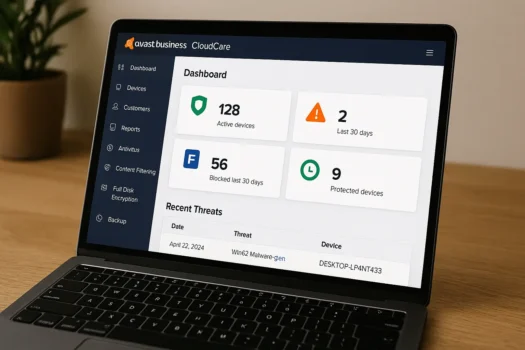
Avast Business CloudCare in Pakistan helps MSPs manage security for many client PCs from one cloud console. The real risk is not only new threats. It’s the daily chaos of scattered tools, missed updates, and no clear visibility on what is protected.
A common mistake is running modern IT support with “whatever is installed on each PC,” then reacting after incidents. That approach creates more tickets, slower fixes, and weak reporting for clients.
CloudCare solves this by giving MSPs and IT service providers a cloud-managed platform for endpoint protection, patch management, remote support workflows, and clearer reporting, all from one place.
Avast Business CloudCare is built for MSP use. It gives you multi-client visibility, faster onboarding, and practical controls that reduce repeat infections and patch-related issues. If you support SMEs in Pakistan, it’s a clean way to standardise security across different client sites.
Get Avast Business CloudCare from BreTech
If you want genuine Avast business licensing in Pakistan with PKR pricing and email delivery on most orders, start here:
- Shop Avast business solutions on BreTech
- Browse antivirus and malware protection tools for endpoints
- Explore full security suites for business protection
Understanding Avast Business CloudCare in Pakistan
CloudCare is designed for managed service providers who need one dashboard for many customers. Instead of logging into separate PCs and hoping policies match, you run one consistent setup across clients.
For Pakistan-based MSPs, this matters because client environments often include mixed Windows PCs, laptops used outside the office, and small branch setups where updates get delayed.
If you are planning your service stack, this guide is a helpful baseline: business security software for SMEs in Pakistan.
What cloud-managed security means for MSPs
A cloud console lets you handle repeat tasks from one place:
- Add new client devices quickly
- Apply the same security policy across endpoints
- Track alerts, device health, and patch status
- Produce simple reports for owners and audits
That is how you reduce tickets and protect SLAs without hiring more staff.
Key features MSPs care about in CloudCare
CloudCare is mainly about control, visibility, and repeatable rollout. These are the features most MSPs rely on day to day.
Multi-client dashboard and device grouping
When you manage many SMEs, grouping matters. CloudCare helps you organise endpoints by client, branch, or department so you can see problems fast and apply the right policy without confusion.
Endpoint protection with ransomware protection
Endpoint protection is still the foundation. You need real-time scanning, web protection, and behaviour monitoring that can stop suspicious actions before they spread across shared folders.
If your clients do accounting, POS, or shared file work, ransomware protection should be treated as a core requirement, not an optional add-on.
Patch management for Windows and common apps
A big percentage of “security incidents” are really patch gaps. CloudCare’s patch management helps you keep PCs updated across client sites, even when devices are not sitting inside the same office network.
This is especially useful when client laptops move between home and office.
Remote support readiness
CloudCare fits MSP workflows, so it suits teams that do remote troubleshooting daily. In practice, MSPs want fewer site visits and quicker fixes, without relying on random remote tools.
For remote staff security planning, this post pairs well: remote work cybersecurity in Pakistan.
Content filtering and backup services
Many MSPs also want basic browsing control and recovery options for common client needs. Content filtering reduces risk from unsafe sites, and backup helps recover important files after accidents.
If you offer a “security + recovery” package, these services can strengthen your client promise.
Benefits for MSPs and IT service providers in Pakistan
CloudCare is not only a security product. It also helps MSP operations. MSPs usually adopt it for these practical outcomes:
- Faster onboarding for new clients
- More consistent policies across endpoints
- Fewer repeat infections caused by unmanaged devices
- Clearer reporting for clients and audits
- Better visibility across branches and remote users
“Most MSP pain is not lack of tools. It’s lack of visibility. One dashboard that shows what’s patched and what’s at risk changes everything.” BreTech support note
Common use cases in Pakistan
These examples show where CloudCare fits best.
Schools and educational labs
Shared PCs and frequent USB usage create repeat infections. Cloud-managed policies help keep lab machines consistent, and reporting helps schools show they are actively managing risk.
Clinics and healthcare providers
Clinics need stable systems and better protection for patient-related workflows. Endpoint security, patching discipline, and clear reporting reduce the risk of downtime.
Small offices and retail branches
Many small businesses have one main PC, a few laptops, and a basic shared setup. CloudCare helps MSPs keep updates and protection consistent across branch devices.
CloudCare vs a basic business antivirus plan
CloudCare is usually the right fit when you support multiple clients and need a true multi-client view.
| Scenario | What usually works better |
|---|---|
| One small office, owner manages security | A simpler business antivirus plan |
| MSP managing many SMEs | CloudCare style multi-client dashboard |
| Remote users across different locations | Cloud-managed policies and patch management |
| Client needs reporting and audit proof | Cloud console with scheduled reports |
If you are comparing Avast and AVG business protection for one team, this related guide may help your client decide: Avast vs AVG business security in Pakistan.
What to avoid when selling CloudCare to clients
These are the mistakes that create support load and weak results:
- Deploying endpoints but not enforcing policies in the console
- Leaving patch management “for later” and then fighting repeat incidents
- Mixing cracked tools or shared keys into a client environment
- Overpromising results without a rollout and reporting routine
If you want clients to trust your licensing, these two posts support your sales conversations:
- How to verify a software license is genuine in Pakistan
- How to avoid counterfeit software licenses when buying in Pakistan
A simple rollout plan for MSPs
This rollout keeps things clean and avoids “installed but unmanaged” endpoints.
- Start with one pilot client (5 to 10 devices)
- Apply one base policy (web protection, ransomware protection, updates)
- Enable patch management schedule and confirm it works
- Set reporting for the client owner or manager
- Roll out to other clients using the same templates
- Review alerts weekly and report monthly
Conclusion
Avast Business CloudCare in Pakistan is a strong fit for MSPs who want one cloud console to protect and manage many client PCs, with patch management and clearer reporting built into the workflow.
Choose genuine licensing and avoid cracked builds or shared keys, because they create update failures and support problems. For the latest features, editions, and system requirements, also check the official vendor website before finalising a client rollout.
If you want to package CloudCare with broader SME guidance, share our guide on best cybersecurity tools in Pakistan and this checklist on buying genuine software in Pakistan.
Further Reading
Want to learn more about MSP security and cloud-managed protection in Pakistan? Check out these helpful posts:
- Business security software for SMEs in Pakistan
- Best Antivirus Software for Businesses in Pakistan
- Best cybersecurity tools in Pakistan
- Best Avast Business Antivirus On-Premise Solution in Pakistan
- Remote work cybersecurity in Pakistan
- Avast Ultimate Price in Pakistan – Where to Buy
For more guides, explore our Security blog section.
FAQs
Q: What is Avast Business CloudCare?
A: Avast Business CloudCare is a cloud-managed platform that helps MSPs and IT service providers manage endpoint security for multiple clients from one dashboard.
Q: How does CloudCare help MSPs in Pakistan?
A: It improves visibility across clients, speeds up onboarding, and helps enforce consistent policies and patch routines, which reduces repeat incidents and support tickets.
Q: Does CloudCare include patch management?
A: Yes, CloudCare is commonly used for patch management so MSPs can keep Windows devices and common apps updated across client sites and remote users.
Q: Can CloudCare work for schools, clinics, and retail branches?
A: Yes. It is often used where many devices need consistent protection and reporting, especially when the client does not have a dedicated IT team.
Q: Why should I buy a genuine CloudCare license?
A: Genuine licensing helps ensure stable updates, working dashboards, and reliable support. Shared keys and cracked builds often cause update failures and security gaps.