Abdul Basit
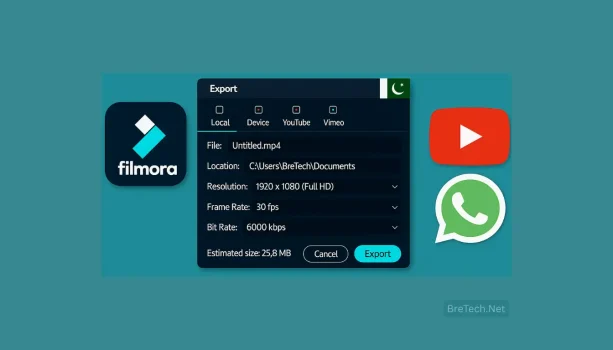
Filmora export settings matter when your video looks sharp on your PC but turns blurry after YouTube or WhatsApp compression, especially with slower uploads and budget laptops common in Pakistan.
Many creators export at random bitrates or upscale a 720p timeline to 1080p, which forces heavier compression and makes text and logos look soft.
The fix is simple: match your timeline and export, use H.264 MP4, and apply the right bitrate range for each platform so you get clean quality without huge file sizes.
Filmora is available from BreTech in Pakistan with PKR pricing, local payment options, fast digital email delivery on most orders (typically within 1–72 hours), and Urdu/English support.
What Are the Best Filmora Export Settings for YouTube?
Use these reliable presets:
- Resolution & FPS: 1920×1080 at 30 fps (or 60 fps if your footage is 60)
- Codec & Container: H.264 MP4
- Bitrate (CBR/VBR): 8–12 Mbps for 1080p; 35–45 Mbps for 4K
- Keyframe interval: 2 seconds
- Audio: AAC, 48 kHz, 192 kbps
- Hardware encoding: On (NVENC/Intel/AMD) for faster exports
Tip: Keep your timeline 1080p if your clips are 1080p. Avoid upscaling, YouTube will compress needlessly.
New to Filmora? Read Wondershare Filmora in Pakistan, then get your license from Wondershare Filmora.
Browse Wondershare tools at BreTech: Wondershare brand.
How to Export Small-Size, Clear Videos for WhatsApp
WhatsApp compresses heavily, so start with a clean file:
- Portrait Reels: 1080×1920, 30 fps, 6–10 Mbps, AAC 128–160 kbps
- Landscape lessons: 1280×720 or 1920×1080, 4–8 Mbps
- Caption clarity: Use high-contrast fonts (white with outline), avoid scaling text layers
- Don’t upscale: Keep 720p projects at 720p, scaling up makes text soft
If the file is still big, reduce bitrate slightly (8 → 6 Mbps) or re-export 720p for faster sharing. For business broadcasts, 720p often keeps captions cleaner than a highly compressed 1080p upload.
See more creator workflows in Best Video Editing Software in Pakistan.
For Action Cam Footage Only? Try the Budget Pro-Fix
If you only edit shaky action footage, fix fisheye/lens distortion, and want a simpler one-time purchase alternative, this tool is a good fit.
Check Ashampoo ActionCam (One-Time Payment) at BreTech.
Why Do Uploads Look Blurry After YouTube or Instagram Compression?
- Mismatched settings: Timeline 720p, export 1080p can look soft, match both
- Low bitrates: Too small for detail (motion, tiny text, heavy texture)
- Export-time filters: Apply LUTs/effects in the timeline, not only at export
- Thin fonts: Use thicker fonts and outlines for mobile screens
Quick fix: Export a higher-bitrate master, then let platforms compress from a strong source.
Need AI voice or intro help? Try AI Video Creation Tools With Urdu Voiceover in Pakistan.
Presets for Pakistan Laptops (Core i3 / 4–8GB RAM)
- Preview: 720p
- Proxy media: On for big clips
- Timeline: 1080p, 30 fps (avoid mixed frame rates)
- Export: H.264 MP4 with hardware encoding
- Housekeeping: Close extra tracks and clear cache weekly
Local example: A Karachi shop posts daily price-drop reels at 6–8 Mbps (1080×1920) with bold Urdu captions, sharp on Instagram and small enough for WhatsApp forwards.
Why Buy from BreTech?
BreTech is a trusted reseller in Pakistan for genuine software licenses. You get genuine licensing, local payments, quick delivery, and Urdu/English guidance for budget and mid-range PCs.
Get Started:
- Wondershare Filmora: Start editing today
- Filmora AI Credits: Unlock AI effects and tools
- Wondershare Filmstock: Effects, music, and stock media
Compare more editors: Video Editing
Read Further
- Vidnoz AI Avatars in Pakistan: Make Intros, Finish in Filmora
- Filmora Reels in Pakistan: 9:16 Videos with Urdu Captions
- Filmora Lifetime vs Annual in Pakistan: Which Option Is Better?
- Filmora vs Movavi in Pakistan: Best Choice for 2025
- Wondershare Virbo in Pakistan: AI Spokesperson Videos in Urdu
- Best Video Format for WhatsApp and YouTube
Explore more licensed tools in our Video Editing Software in Pakistan category and compare verified options for budget and professional PCs.