Abdul Basit
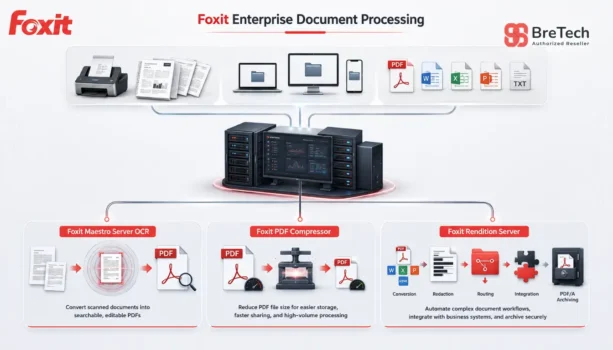
Foxit Rendition Server vs Maestro Server OCR vs PDF Compressor is an important comparison for organizations in Pakistan that process large document volumes. Although all three products support automated document processing, each solves a different main problem.
A common mistake is choosing a product only from its feature list. OCR, document conversion, file compression, PDF/A archiving, and complete workflow automation are different requirements.
Maestro Server OCR is mainly designed for high-volume text recognition. PDF Compressor combines OCR, conversion, compression, and archiving. Rendition Server supports more complex workflows involving routing, integrations, redaction, and custom processing rules.
This guide will help your organization select the correct Foxit server product and prepare the technical details needed for a vendor quotation.
BreTech is an authorized software reseller in Pakistan, providing genuine Foxit licensing, PKR pricing, local PKR payments, invoice support, and digital email delivery after vendor approval.
Which Foxit Server Product Fits Each Need?
Maestro Server OCR is the best fit when high-volume OCR is the main requirement. PDF Compressor is suitable when you need OCR, conversion, compression, and PDF/A in one solution.
Rendition Server is designed for complex document automation involving routing, integration, redaction, tracking, and custom workflow control.
Foxit Server Products Compared at a Glance
All three products support server-based document processing. Their main difference is the amount and type of work each solution manages.
| Product | Main Role | Best Fit |
|---|---|---|
| Foxit Maestro Server OCR | High-volume OCR | Organizations turning scanned records into searchable PDF or PDF/A files |
| Foxit PDF Compressor | OCR, conversion, compression, and archiving | Standardized environments that need several common processing tasks in one product |
| Foxit Rendition Server | Complete and customizable document automation | Complex enterprise processes with routing, integration, redaction, and custom rules |
Maestro is the most focused option. PDF Compressor provides a broader set of ready-to-use processing functions. Rendition Server covers a wider document pipeline and provides the greatest level of control.
What Is Foxit Rendition Server?
Foxit Rendition Server automates document conversion, OCR, compression, redaction, routing, and PDF/A output for large organizations.
Main Uses of Foxit Rendition Server
The platform can receive content from scans, uploads, capture systems, and other supported sources. It then applies selected processing actions and sends the finished output to another system.
Its main uses include:
- Converting Office files, images, email files, and other formats
- Producing PDF, PDF/A, image, text, or OCR output
- Running OCR, compression, redaction, tagging, and enhancement
- Splitting, merging, watermarking, and routing content
- Connecting with ECM, ERP, CRM, and document management systems
- Keeping sensitive processing inside an on-premises environment
Foxit lists REST and SOAP web service interfaces for integration with business systems. Rendition Server also supports rule-based automation and process tracking. Specific audit and reporting requirements should be confirmed during deployment planning.
Who Should Consider Rendition Server?
This platform is suitable when a business needs more than one OCR or compression task. It is designed for complex processes where content must follow defined rules before reaching its final destination.
A large company may use it to receive files from several departments, convert them into a standard format, remove sensitive data, and transfer the finished records to an archive.
Government offices, legal teams, financial organizations, and other large institutions may use it when security, compliance, integration, and traceable processing are important.
Businesses with simpler requirements can first review PDF software for corporate teams before moving to a complete automation platform.
What Is Foxit Maestro Server OCR?
Foxit Maestro Server OCR is built for high-volume recognition of scanned records and the creation of searchable PDF or PDF/A output.
Main Uses of Maestro Server OCR
Maestro helps organizations process scanned pages without opening and handling every file manually. Its main task is recognizing text and making image-only content searchable.
Its main uses include:
- Turning scanned pages into searchable PDF files
- Handling large OCR workloads
- Creating PDF/A output for record retention
- Preparing recognized content for search and indexing
- Reducing repeated manual OCR work
- Supporting automated recognition through a server setup
Foxit positions Maestro as an OCR-focused product. It supports integrated OCR and PDF/A archiving, while compression and advanced custom workflow development are not its primary roles.
Who Should Consider Maestro Server OCR?
Maestro is suitable when text recognition is the main requirement. It can support organizations that hold large collections of scans, image-only PDFs, or older paper records.
For example, a government department may need to digitize public records and make them searchable. A hospital may need easier access to scanned patient records. A legal office may need to search large case archives.
Organizations digitizing official records can also review PDF software for government organizations.
Maestro may be more than an organization needs when staff process only a small number of scanned documents. In that case, a desktop PDF tool with OCR may be sufficient.
What Is Foxit PDF Compressor?
Foxit PDF Compressor combines OCR, document conversion, compression, and PDF/A processing in one server solution.
Main Uses of Foxit PDF Compressor
The software is designed for organizations that need several common document-processing tasks without building a fully customized pipeline.
Its main uses include:
- Converting scans and born-digital files into PDF or PDF/A
- Applying OCR to image-based content
- Reducing the size of large PDF files
- Preparing searchable output for storage and retrieval
- Processing large batches without opening each file
- Supporting standard archive and document management processes
Foxit positions PDF Compressor as a multi-function product for conversion, OCR, compression, and archiving. It provides a configurable processing setup but does not offer the same level of extensible workflow control as Rendition Server.
Who Should Consider PDF Compressor?
This product is suitable when storage, transfer, and archive size are important concerns, but the organization also needs OCR and document conversion.
A bank may use it to optimize scanned applications, statements, or account records before moving them into long-term storage. A scanning service may use it to produce smaller, searchable output for clients.
Organizations in the finance sector can also review PDF software for banks and financial institutions.
PDF Compressor may not be the right option when OCR alone is the main task or when the process needs complex routing, plugins, and custom business rules.
Key Differences Between the Three Foxit Products
The products overlap in OCR and PDF/A support, but their main strengths and configuration levels are different.
| Requirement | Rendition Server | Maestro Server OCR | PDF Compressor |
|---|---|---|---|
| Main strength | Complete document automation | OCR accuracy and throughput | Conversion and compression |
| OCR | Included in wider workflows | Primary function | Included |
| Compression | Included in wider workflows | Not its primary purpose | Primary capability |
| PDF/A archiving | Included | Included | Included |
| Workflow control | Advanced custom workflows | OCR-focused configuration | Configurable standard workflows |
| Audit and tracking | Advanced tracking capabilities | Confirm for selected package | Confirm for selected package |
| Typical setup | Customized enterprise deployment | Focused OCR deployment | Configurable multi-function setup |
| Best scale | Mission-critical enterprise processes | High-volume recognition | Standard to large processing environments |
These differences are based on the main purpose of each Foxit enterprise product. Exact capabilities, modules, licensing, and deployment terms should still be confirmed in the final vendor quotation.
Rendition Server offers the widest scope. It can manage intake, conversion, recognition, compression, redaction, routing, and output inside one controlled platform.
Maestro handles a narrower but important task. It is a better fit when OCR quality and throughput matter more than compression, routing, or custom process development.
PDF Compressor sits between them. It provides several common functions in one solution and fits more standardized document-processing environments.
All three products support OCR and PDF/A output, but a shared feature does not make the products equal. The main role, processing control, deployment type, and integration requirements are more important than the number of matching features.
Which Foxit Product Should Your Organization Choose?
Start with the main business problem, then check the processing volume, source formats, output requirements, security needs, and system integrations.
Select Rendition Server for Complex Automation
Rendition Server is the strongest option when content must pass through several controlled processing stages.
It is a better fit when your workflow includes custom rules, several input sources, redaction, system integration, routing, tracking, or different output requirements.
The platform may require more technical planning and setup, but it also provides the highest level of workflow control.
Select Maestro Server OCR for High-Volume Recognition
Maestro is the clearer choice when most source material is scanned and the main goal is searchable output.
It fits digitization projects, record conversion, and regular batch OCR. It avoids the extra functions of a complete workflow platform when those functions are not required.
Do not select it only because OCR appears in the other products. Select it when text recognition itself is the central requirement.
Select PDF Compressor for Conversion and Optimization
PDF Compressor is suitable when an organization needs a practical mix of OCR, document conversion, compression, and PDF/A archiving.
It fits standardized environments where large or scanned files must become smaller, searchable, and ready for storage.
It may be easier to plan than Rendition Server because it does not require the same level of advanced workflow customization.
Some enterprises may operate separate systems or departments with different requirements. However, this does not mean every organization needs more than one product. BreTech and Foxit should first review whether one solution can cover the complete required process.
Example Workflows for Different Organizations
These examples show how the products may fit common business requirements. The final deployment should follow the organization’s actual input files, processing rules, and required output.
Government Records Digitization
A public office may have years of scanned records that cannot be searched. Maestro Server OCR can recognize the text and create searchable PDF or PDF/A output.
When storage size is also a major concern, PDF Compressor may be considered for optimization. Rendition Server becomes relevant when redaction, routing, integration, or several controlled stages are also required.
Example flow: Scanned records → OCR → searchable PDF/A → digital archive
Bank Records Processing
A bank may receive scanned forms, statements, identification records, and born-digital Office files. It may need searchable output with smaller file sizes for long-term storage.
PDF Compressor may fit this standardized process. Rendition Server may be more suitable when content must follow different rules, connect with other systems, or pass through redaction and tracking stages.
Example flow: Input files → conversion and OCR → optimized PDF/A → records system
Corporate Document Automation
A large company may receive Office files, emails, images, and PDFs from several departments. Each format may need to become a standard file before entering a document management system.
Rendition Server can control conversion, enhancement, redaction, routing, and delivery through one on-premises service.
Example flow: Business content → automated processing → approved output → document management system
These workflows are examples only. They should not be treated as fixed product or licensing requirements.
Desktop PDF Software vs Foxit Server Products
Desktop applications are suitable when employees open and work on individual documents. Common tasks include editing text, adding comments, filling forms, signing, and converting a small number of files.
Server solutions run in the background and handle repeated or high-volume work. They are more suitable when processing must be centralized, automated, consistent, and connected with another system.
A desktop application may be enough for a small office or one department. Buyers with these needs can compare BreTech’s PDF editor software in Pakistan.
An enterprise server product becomes more useful when manual processing causes delays, different departments produce inconsistent output, or large batches must be handled regularly.
What BreTech Checks Before Requesting a Foxit Quote
Organizations sometimes request an “OCR server” without explaining their complete workflow. This makes it difficult to identify the correct product and obtain accurate pricing.
Before sending a request to Foxit, BreTech checks the source file formats, OCR languages, estimated processing volume, required output, server environment, security needs, and system integrations.
Providing these details early can reduce unnecessary quotation revisions and help the vendor recommend the correct product configuration.
Before Requesting a Foxit Server Quote
A clear requirement list helps BreTech and Foxit identify the correct product. Collect these details before contacting sales:
- Main requirement: OCR, conversion, compression, PDF/A, redaction, or complete automation
- Source formats: Scans, images, Office files, emails, PDFs, or other formats
- Processing volume: Estimated pages or files per day or month
- Required output: Searchable PDF, PDF/A, compressed PDF, images, or text
- OCR needs: Required languages and the quality of the scanned documents
- Business rules: Actions that must happen before and after processing
- System connections: ECM, ERP, CRM, DMS, archive, or another platform
- Security needs: On-premises processing, redaction, tracking, or audit requirements
- Current environment: Servers, operating systems, and available IT support
- Sample material: Representative files for testing when requested
A simple written workflow can also help. Show where the files come from, what must happen to them, and where the final output must go.
Foxit Enterprise Server Pricing in Pakistan
Rendition Server, Maestro Server OCR, and PDF Compressor are enterprise products that require a sales discussion rather than a standard retail checkout.
BreTech can prepare the request and obtain vendor-confirmed pricing based on the selected solution, processing volume, deployment environment, integrations, and licensing requirements.
Buyers should not expect one fixed price to cover every organization because the final cost depends on the required configuration.
BreTech provides PKR pricing, local PKR payment options, invoice support, and help with the Foxit quotation process. Delivery and activation time are confirmed after Foxit approves and processes the final order.
Organizations can also review other Foxit software available through BreTech before deciding whether they need a desktop, team, cloud, or server product.
Product capabilities reviewed against current Foxit enterprise product information in July 2026. Final features, licensing, pricing, and deployment terms should be confirmed in the vendor quotation.
Further Reading
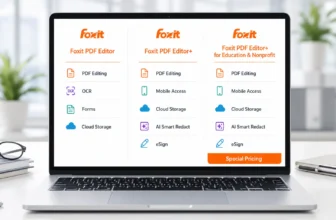
- Foxit PDF Editor editions comparison for desktop and team licensing
- Best PDF redaction software in Pakistan for removing sensitive information
- Best PDF editor software in Pakistan for individual and small-office use
Frequently Asked Questions
Q: How Do Organizations Use These Foxit Server Products?
A: Organizations use them for OCR, document conversion, compression, PDF/A creation, and automated file routing. The right product depends on the main task, processing volume, and required workflow control.
Q: Which Product Is Best for Turning Scanned Files into Searchable PDFs?
A: Foxit Maestro Server OCR is the most focused option for turning scanned documents into searchable PDFs. It is designed for regular, high-volume OCR processing.
Q: Is Foxit PDF Compressor Only a File Compression Tool?
A: No. It can also support OCR, document conversion, and PDF/A output. Compression is a main strength, but it is not the product’s only function.
Q: When Is Rendition Server Better Than an OCR Server?
A: Rendition Server is better when the workflow requires several automated stages, such as conversion, OCR, redaction, routing, integration, and delivery. An OCR server is more suitable when text recognition is the main task.
Q: Can These Products Process a Single File?
A: Yes, but they are mainly designed for repeated or high-volume document processing. A desktop PDF tool may be more practical for occasional single-file tasks.
Q: Can Foxit Server Tools Support Regulatory Requirements?
A: They can support PDF/A output, redaction, controlled processing, tracking, and on-premises deployment. Each organization must still confirm that the final setup meets its legal and regulatory requirements.
Q: What Information Does BreTech Need for a Foxit Server Quote?
A: BreTech normally needs the main task, source formats, estimated processing volume, OCR languages, required output, server environment, integrations, and security requirements.
Request a Foxit Enterprise Quote
Choose Maestro Server OCR for focused high-volume recognition, PDF Compressor for OCR and file optimization, or Rendition Server for advanced document workflow automation.
Before requesting pricing, prepare your source formats, estimated volume, required output, OCR languages, integrations, security needs, and server environment.
Explore Foxit software available in Pakistan or contact BreTech for a Foxit enterprise quotation.