Abdul Basit
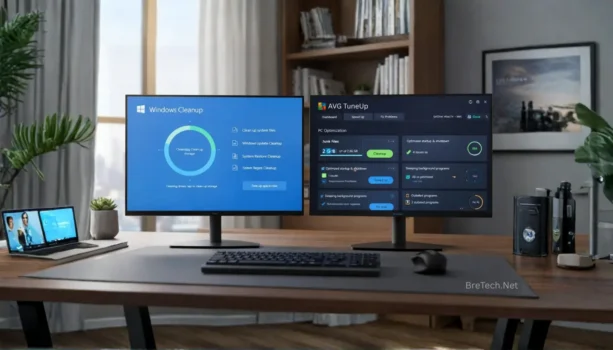
Windows Cleanup vs PC optimizers in Pakistan (2026) matters most when your PC feels slow, storage is full, or apps start lagging in the middle of work. Speed issues often come from junk files, startup load, and background apps.
Many people install random “one-click” tools or run risky cleaners without understanding what Windows already provides. That can cause stability problems, broken apps, or wasted money on the wrong tool.
This guide explains what Windows cleanup tools can safely do, when a trusted PC optimizer is worth it, and which BreTech options fit Pakistan buyers who want genuine licenses and predictable results.
These built-in tools are free and safe for routine cleanup. A PC optimizer can add convenience and deeper maintenance, but only if you choose a trusted tool and avoid aggressive “tweaks.”
Key Takeaways
- Windows Cleanup offers basic, no-cost system optimization tools.
- PC optimizers can range from free to premium, promising enhanced performance.
- Evaluating safety and reliability is essential when choosing an optimizer.
- Cost-effectiveness plays a significant role in decision-making for consumers.
- Both options can help optimize computer speed, but understanding features is key.
Windows Built-In Cleanup Tools (What They Actually Do)

Windows built-in cleanup tools help you free storage and remove safe-to-delete clutter without installing anything. They are the safest first step when a PC feels slow or your drive is almost full.
What Are Windows Built-In Cleanup Tools?
Windows includes a few separate tools that work together: Storage cleanup (temporary files), Storage Sense (auto cleanup), and Optimize Drives (drive maintenance). They do not “boost FPS,” but they can reduce slowdowns caused by low disk space.
Key Features of Windows Built-In Cleanup
- Temporary files cleanup (Settings → System → Storage): Removes safe junk like temp files, caches, and old update leftovers to free space.
- Storage Sense (automatic cleanup rules): Automatically clears temporary files and Recycle Bin items on a schedule you choose.
- Optimize Drives (HDD defrag, SSD trim handled by Windows): Defrags HDDs when needed. SSDs use trim, so you should avoid manual “defrag” tools on SSDs.
Advantages and Disadvantages of Windows Cleanup
Windows cleanup has its good points and not-so-good points:
| Advantages | Disadvantages |
|---|---|
| It’s a free disk cleanup option that’s easy to find on Windows systems. | It might not fix all performance problems, so you might need more tools. |
| It makes your computer faster by removing files you don’t need. | It can delete important files if you’re not careful, which can mess up your system. |
| It has a simple interface that’s easy to use. | It doesn’t have as many features as some specialized computer performance tools. |
Windows Cleanup vs PC Optimizers

PC optimizers are powerful tools that boost your computer’s speed. They find and remove unnecessary files and adjust settings for better performance. Knowing the many options helps you pick the right pc cleaner for your needs.
What are PC Optimizers?
PC optimizers are software that makes your computer run better. They clean up files, fix registry settings, and manage resources. Choosing the right one can make your computer faster and easier to use.
Comparison of Popular PC Optimizers
| Optimizer | Best For | Safe Strength |
|---|---|---|
| Ashampoo WinOptimizer | All-in-one maintenance | Startup control + cleanup |
| CCleaner Professional | Lightweight cleanup | Health Check + privacy cleanup |
| Glary Utilities Pro | Simple toolbox | One-click maintenance |
| IObit Advanced SystemCare Pro | Boost modes + cleanup | Turbo Boost + cleanup |
| AVG TuneUp | App sleeping | Background app control |
Safety Considerations for Using PC Optimizers
PC optimizers can greatly improve your computer’s speed, but be careful. Choose trusted software to avoid risks. Always check user reviews and the company’s reputation before installing.
Make sure to back up important files before starting the optimization. This way, you’re protected against any problems that might come up. The right pc cleaner will not only speed up your computer but also keep it safe.
Conclusion
The world of PC maintenance tools is getting more complex but still very important. Knowing the difference between windows cleanup and PC optimizers helps people in Pakistan make better choices for their computers. Windows Cleanup tools are good for basic needs and don’t cost anything. But, third-party PC optimizers offer more features that can really boost your computer’s performance.
When looking at system optimization tools, what you need and how much you can spend matters a lot. The best pc cleaner for you might depend on whether you want something simple or more advanced. This helps users pick the right software to improve their computer use.
In the end, using what we’ve learned helps make better choices for a better computer experience. By finding a balance between what works well and what’s affordable, users can keep their computers running smoothly. This leads to long-term happiness with their chosen tools.
For reliable cleanup and performance tools that are easier to manage than manual tweaks, explore our System Optimization software.
FAQs
Q: What are Windows Cleanup tools?
A: Windows Cleanup tools are built-in features in Microsoft Windows. They help keep your system running smoothly by deleting temporary files and emptying the recycle bin. These tools also manage errors and offer basic functions for free.
Q: Are PC optimizers worth the investment?
A: PC optimizers can be a good investment. They provide extra features to improve your computer’s performance. These tools find and remove unnecessary files, adjust settings, and make your system faster.
Q: What should I consider when choosing a PC optimizer?
A: When picking a PC optimizer, think about cost, reliability, and features. Check if the software has advanced cleaning options and real-time monitoring. Also, look for free trials or guarantees to see if it works before buying.
Q: Can Windows Cleanup tools and PC optimizers be used together?
A: Yes, you can use Windows Cleanup tools and PC optimizers together. This combination ensures basic maintenance and tackles deeper performance issues. It’s a way to get the most out of your system.
Q: Do I need to pay for the best PC cleaner?
A: There are great free disk cleanup options out there. But, premium PC optimizers offer more features and support. Decide if paying for a better optimizer is worth it for your system’s performance.
Q: How can I ensure the safety of PC optimizers?
A: To keep PC optimizers safe, download from trusted sources and read user reviews. Look for certifications and security features. Always research software to avoid malware or harmful programs.
Further Reading
- Best PC Optimization Software in Pakistan
- WinOptimizer vs. CCleaner Pakistan
- Ultimate Guide to CCleaner in Pakistan
- PC Optimizer Made My PC Slow?
- How To Remove Windows 11 Bloatware Safely
- Common Mistakes When Using PC Optimizers
For more insights, explore our Utilities & Optimization blog category.