Abdul Basit
Adobe Acrobat is a popular choice for creating, editing, and managing PDF files. However, it may not suit every office because of its subscription model, interface, or team requirements.
Businesses looking for an Adobe Acrobat alternative can choose from several capable PDF editors in 2026. Options include Foxit PDF Editor, PDF-XChange, Wondershare PDFelement, EaseUS PDF Editor, Ashampoo PDF Pro, SwifDoo PDF, and PDFChef.
The best Adobe Acrobat alternative depends on how your team works. Some businesses need advanced PDF editing, OCR, forms, redaction, and security. Others only need a simple tool for editing, conversion, signatures, and page management.
This guide compares practical PDF software options in Pakistan for offices, professionals, and business teams. It will help you compare features, supported operating systems, license terms, desktop or cloud access, and local purchase support.
Key Takeaways
- Foxit PDF Editor is a strong option for businesses that need editing, OCR, forms, redaction, signatures, and collaboration tools.
- PDF-XChange Editor Plus and PRO may suit Windows teams that want detailed desktop tools or batch document processing.
- Wondershare PDFelement supports PDF work across Windows, Mac, mobile devices, and the web.
- EaseUS PDF Editor may suit Windows-based offices with regular editing, OCR, conversion, and form needs.
- Ashampoo PDF Pro is a Windows desktop option, while SwifDoo PDF and PDFChef provide options across more than one platform or device type.
- A free PDF editor may handle basic tasks, but businesses should check feature limits, watermarks, and commercial-use terms.
- Before buying, compare the user count, device limits, operating system, license model, and required PDF features.
What Makes the Best Adobe Acrobat Alternative for Business?
The best PDF editor is not always the one with the longest feature list. A business should choose software that matches its daily work, team size, security needs, and license terms.
Some offices need advanced editing, OCR, forms, and redaction. Others mainly need to convert files, add comments, merge documents, or protect sensitive information.
PDF Editing, OCR, and File Conversion
A useful Adobe Acrobat alternative should make common PDF work easier. Your team may need to:
- Edit text and images inside a PDF
- Convert PDFs to Microsoft Word, Excel, or image formats
- Turn scanned pages into searchable text with OCR
- Merge, split, and organize PDF documents
- Create, complete, or update forms
OCR is especially important for offices that work with scanned invoices, contracts, records, or printed forms. Without reliable OCR, employees may need to type the information again.
Security, Redaction, and Signatures
Business PDF files may contain customer details, financial records, contracts, or other sensitive data. Depending on your work, you may need password protection, file permissions, redaction, digital signatures, or secure sharing.
Redaction is different from placing a black shape over text. Proper redaction should remove the hidden information from the document. Businesses handling confidential files can also review this guide to PDF redaction software in Pakistan.
Collaboration, Cloud Access, and Desktop Use
A desktop PDF editor may suit teams that store files locally or work without a reliable internet connection. Browser and cloud tools may help remote teams review, edit, and share documents from different locations.
Before choosing, check whether your team needs Windows or Mac support, browser access, mobile apps, cloud storage, shared reviews, or centralized license management.
Pricing, License Terms, and Local Support
Do not compare PDF editors by price alone. A low-cost plan may not include the features, user rights, devices, or support your business needs.
Before buying, confirm:
- Subscription or perpetual license
- Number of users and permitted devices
- Individual or business-use rights
- Renewal and upgrade terms
- Included support and cloud services
- Invoice requirements
- Delivery and activation process
The best Adobe Acrobat alternative is the one that fits your team’s real workflow, not simply the cheapest PDF editor.
Adobe Acrobat Pro as the Comparison Baseline
Adobe Acrobat Pro is the main comparison point in this guide. It provides professional PDF editing, OCR, file conversion, forms, document comparison, redaction, protection, and electronic signature tools.
Acrobat is available across desktop, web, and mobile platforms. Adobe also provides business plans for organizations that need several licenses and central user management.
A suitable alternative does not need to copy every Acrobat Pro feature. It only needs to perform the tasks your office uses regularly under suitable license terms.
Businesses that prefer Adobe’s PDF workflow can review Adobe Acrobat Pro. Other buyers can use it as a baseline when comparing the alternatives below.
Best Adobe Acrobat Alternatives in Pakistan: Quick Comparison
Each PDF editor has a different balance of features, platform support, and license options.
| PDF editor | May suit | Main strengths to compare | Important point to check |
|---|---|---|---|
| Foxit PDF Editor | Offices, professionals, and business teams | Editing, OCR, forms, redaction, signatures, and collaboration | Choose the correct plan for your required features |
| PDF-XChange Editor Plus | Windows users who want detailed desktop tools | Enhanced OCR, forms, document comparison, stamps, and editing | Check current Windows system requirements |
| PDF-XChange PRO | Teams with wider PDF creation and processing needs | Editing, batch tools, PDF printing, conversion, and forms | Confirm that your team needs all included products |
| Wondershare PDFelement | Small and medium businesses | Editing, OCR, conversion, signatures, batch tools, and cross-platform use | Compare individual and team license options |
| EaseUS PDF Editor | Small Windows-based offices | Editing, OCR, conversion, forms, signing, and page management | Check whether it covers your advanced security needs |
| Ashampoo PDF Pro | Windows users and smaller offices | Editing, OCR, conversion, merging, protection, and digital signatures | Confirm system and business-license requirements |
| SwifDoo PDF | Individuals and smaller offices needing flexible device access | Editing, conversion, annotation, signing, compression, and OCR on supported platforms | Confirm the selected platform, features, and device limits |
| PDFChef by Movavi | Users with simple or occasional PDF tasks | Text editing, conversion, page organization, merging, and signatures | Confirm whether it covers OCR, redaction, forms, or batch needs |
Foxit PDF Editor and PDF-XChange are useful starting points for businesses with advanced document needs. PDFelement and EaseUS PDF Editor may suit teams looking for practical everyday PDF workflows.
Ashampoo PDF Pro, SwifDoo PDF, and PDFChef can also be useful. However, buyers should confirm that each product covers their editing, security, OCR, and business-license needs.
You can browse more PDF editing tools before comparing individual products.
Foxit PDF Editor Family as an Adobe Acrobat Alternative
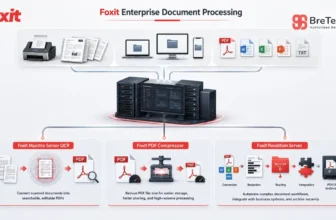
The Foxit PDF software range may suit businesses moving away from Adobe Acrobat Pro. Foxit provides desktop, browser, and mobile PDF tools for different users and work settings.
Foxit also provides volume licensing for organizations that need to purchase, deploy, and manage several licenses. Businesses should confirm the required products, number of users, deployment needs, and license type before ordering.
Foxit PDF Editor for Daily Business Work
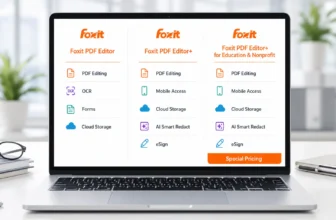
Foxit PDF Editor covers common office tasks such as editing text and images, organizing pages, merging files, converting documents, using OCR, working with forms, protecting files, and adding comments or signatures.
It may suit professionals and offices that regularly handle contracts, invoices, reports, scanned records, and business forms. Buyers should check the selected plan, supported devices, and license terms before ordering.
Best for: Businesses that need a broad PDF editor for regular document work.
Foxit PDF Editor Plus for Broader Team Needs
Foxit PDF Editor Plus includes the main PDF editing tools and adds wider services for mobile work, electronic signatures, redaction, and cloud-based workflows.
This plan may suit teams that work across different devices, send documents for signatures, or handle sensitive information. Businesses should check whether they will use the added services before selecting the larger plan.
Best for: Teams that need PDF editing with wider signing, redaction, mobile, or cloud features.
For a closer plan comparison, read the Foxit PDF Editor editions guide.
Foxit PDF Editor Cloud for Browser-Based Work
Foxit PDF Editor Cloud is designed for browser-based PDF editing and collaboration. It allows users to work with PDF documents without depending only on an installed desktop application.
Cloud access may help remote staff or teams using managed computers where software installation is limited. Businesses should still check their internet access, storage policy, security rules, and offline requirements.
Best for: Remote teams that prefer browser-based PDF editing and collaboration.
PDF-XChange for Windows Business Teams
PDF-XChange may suit businesses that want detailed desktop PDF tools for Windows. Its products focus on editing, OCR, forms, document creation, printing, and batch file processing.
PDF-XChange also provides multi-user and volume licensing options. Businesses needing several licenses should confirm the required products, number of users, maintenance period, and deployment terms through the PDF-XChange volume licensing page.
PDF-XChange Editor Plus for Advanced PDF Editing
PDF-XChange Editor Plus includes the main PDF-XChange Editor tools along with enhanced OCR, fillable form creation, document comparison, and dynamic stamp features.
It may suit offices working with scanned contracts, invoices, forms, reports, and reviewed documents. Its interface includes many tools and settings, which may help experienced users but can take time for new staff to learn.
Best for: Windows users who need detailed editing, enhanced OCR, forms, and document comparison.
PDF-XChange PRO for Larger PDF Workflows
PDF-XChange PRO combines three PDF-XChange products under one license:
- PDF-XChange Editor Plus
- PDF-Tools
- PDF-XChange Printer Standard
The bundle can help teams edit documents, process several files in batches, create PDFs from Windows applications, use OCR and forms, and complete wider document-processing tasks.
Choose PDF-XChange Editor Plus when advanced PDF editing is the main need. Consider PDF-XChange PRO when your team will also use PDF-Tools and PDF-XChange Printer Standard.
Best for: Windows teams that need editing, batch processing, PDF creation, and wider desktop workflows.
Wondershare PDFelement for Business Teams
Wondershare PDFelement may suit small and medium businesses that need an all-round PDF editor. It supports editing, conversion, OCR, compression, forms, signatures, page organization, document protection, and batch tools.
PDFelement is available across desktop, mobile, and web platforms. This may help organizations whose staff work on different devices or need access from more than one location.
PDFelement also provides Team & Business options for organizations that need licenses for several users. Team plans can help administrators assign, track, and manage licenses across groups.
Businesses should confirm the correct plan, user count, supported devices, included cloud services, and deployment requirements before ordering.
Best for: Small and medium businesses that need cross-platform PDF editing and license management for several users.
Education licensing does not need a full paragraph in this business-focused article. Keep detailed student, teacher, school, and university information on the PDFelement product page or the dedicated PDF software for schools and universities page.
EaseUS PDF Editor for Small Offices
EaseUS PDF Editor is a Windows PDF editor for creating, editing, managing, and converting documents.
Its tools include text and image editing, OCR, conversion, compression, document protection, annotations, signatures, forms, and page management. Users can also merge, split, insert, extract, rearrange, or delete pages.
EaseUS PDF Editor may suit an office that wants a focused Windows application without a larger document-management platform. Businesses should test its OCR, conversion, forms, and file compatibility with their own documents.
Before ordering, confirm the commercial-use rights, permitted devices, renewal terms, and any available multi-user licensing options. Do not assume that an individual plan automatically covers a team or shared business use.
Best for: Small Windows-based offices that need practical editing, OCR, conversion, forms, and page management.
Ashampoo PDF Pro for Business Desktop Use
Ashampoo PDF Pro is a Windows desktop tool for creating, editing, converting, merging, and protecting PDF documents.
It supports OCR for turning scanned pages into editable and searchable documents. Users can also compare documents, create PDFs through a virtual printer, and add digital signatures.
Ashampoo provides volume licensing options for organizations that need several licenses. Businesses should confirm the number of users, permitted devices, license term, supported Windows version, and included product version before ordering.
Best for: Windows offices that need desktop PDF editing, OCR, conversion, protection, and multiple licenses.
SwifDoo PDF and PDFChef for Focused PDF Tasks
Some users do not need a large document platform. SwifDoo PDF and PDFChef may suit individuals or smaller offices with more focused PDF requirements.
SwifDoo PDF for Team and Business Use
SwifDoo PDF provides tools for editing, OCR, conversion, annotations, signatures, compression, form filling, document protection, and page organization. Features can differ between its Windows, Mac, mobile, and web options.
For organizations, SwifDoo provides separate Team & Business options for desktop users:
- SwifDoo PDF for Windows Team Plan
- SwifDoo PDF for Mac Team Plan
These plans may suit offices that need PDF licenses for several Windows or Mac users. Businesses should choose the plan that matches the operating systems used by their staff.
Before ordering, confirm the number of users, permitted devices, license term, included features, and differences between the Windows and Mac editions. Larger organizations may need a custom business quotation.
Best for: Windows or Mac teams that need multiple PDF editor licenses for regular document work.
PDFChef by Movavi for Simple PDF Management
PDFChef by Movavi provides desktop apps for Windows and Mac, browser-based PDF tools, cloud access, and a mobile document scanner.
Its desktop software supports reading, text editing, file conversion, page organization, merging, and signatures. This simpler toolset may suit users who mainly need to correct documents, rearrange pages, combine files, or complete occasional conversions.
Some PDFChef licenses are intended for personal use and may not permit commercial use. Business buyers should confirm the correct license type, commercial-use rights, number of users, and permitted devices before ordering.
Best for: Individuals and small offices that need simple editing, conversion, signatures, and page management.
These licensing references were checked against the official Adobe business plans, Foxit volume licensing, PDF-XChange licensing, PDFelement Team plans, Ashampoo volume licenses, SwifDoo Team & Business information, and PDFChef’s license terms.
Are Free Adobe Acrobat Alternatives Good Enough for Business?
A free PDF editor can be useful for basic tasks, but it may not meet every business need. Free versions often limit advanced editing, OCR, redaction, conversion, cloud services, or document volume.
Some free versions also add watermarks or restrict features that require a paid license. Always check whether the free license allows business or commercial use.
When a Free PDF Editor May Be Enough
A free option may work when you only need to:
- Read and print PDF files
- Add basic comments or annotations
- Complete simple forms
- Merge or split a few documents
- Make occasional file conversions
- Sign a small number of files
These tasks may be enough for users who handle PDFs only from time to time.
When a Paid PDF Editor Is the Better Choice
A paid PDF editor is usually more suitable when your business needs:
- Full text and image editing
- OCR for scanned documents
- Secure redaction
- Reliable Word or Excel conversion
- Batch processing
- Advanced forms
- Electronic signature workflows
- Regular updates and technical support
- Clear commercial-use licensing
Free does not always mean suitable for business. A limited tool may save money at first, but it can slow down work or leave out important security and document features.
Before deciding, check feature limits, watermarks, file-size limits, commercial-use rights, operating-system support, and upgrade requirements.
How to Choose the Best Adobe Acrobat Alternative
The best choice depends on your daily PDF work, team size, operating system, and security needs. Do not select software only because it has a lower price or a long feature list.
Match the PDF Editor to Your Main Work
Start by listing the tasks your team completes most often:
- Editing contracts and reports
- Converting PDFs to Microsoft Word or Excel
- Using OCR on scanned invoices
- Creating or completing forms
- Redacting sensitive information
- Adding comments and signatures
- Merging or compressing documents
- Processing many files at once
Choose a tool that performs your regular tasks well. You may not need an advanced plan when your team only handles basic editing and conversion.
Compare the License Type and User Count
Check whether the product uses a subscription, a perpetual license, or another payment model.
Before buying, confirm:
- Number of permitted users
- Number of supported devices
- Individual or business-use rights
- Subscription or perpetual terms
- Renewal and upgrade conditions
- Included cloud services
- Available technical support
An individual license may not be suitable for a team, company, shared computer, or centralized deployment.
Choose Desktop, Cloud, or Mixed Use
A desktop editor may suit staff who work offline or store documents locally. A cloud tool may help remote teams that need browser access, sharing, and collaboration.
Some businesses may need desktop software for daily work and cloud or mobile access for remote reviews and approvals.
Check your company’s security and storage policies before uploading confidential documents to a cloud service.
Check Compatibility and Ease of Use
Confirm that the software supports every operating system used by your team.
PDF-XChange and EaseUS PDF Editor are Windows-focused. Foxit, PDFelement, SwifDoo PDF, and PDFChef provide options across more than one platform or device type.
The interface should also be suitable for your staff. A clear and familiar layout can reduce training time and make routine work easier.
How to Test an Adobe Acrobat Alternative Before Buying
A product page can list features, but it cannot show how well the software will handle your real business files. Use a free trial or test version when available.
- Choose several real PDF files. Include a contract, scanned invoice, form, report, and image-based document.
- Test text and image editing. Check whether you can make changes without damaging fonts, spacing, or page layout.
- Check OCR accuracy. Confirm that text from scanned files becomes searchable and editable.
- Test file conversion. Convert PDFs to Microsoft Word or Excel and check the tables, images, and formatting.
- Review forms, signatures, and redaction. Make sure the required tools work correctly for your documents.
- Check large files and batch tasks. Test merging, compression, conversion, and other high-volume work.
- Confirm the license terms. Check users, devices, business-use rights, renewal terms, and included support.
Do not test only a simple one-page PDF. A tool may perform differently with scanned files, complex tables, forms, large reports, or unusual fonts.
Buying Genuine Business PDF Software in Pakistan
Business buyers should confirm the product name, edition, license term, user count, and device limits before placing an order.
Successful activation alone does not prove that a license is suitable for business use. The license must also match the correct edition, permitted user type, device count, and intended use.
For offices and larger teams, BreTech can help compare suitable PDF software for corporate teams with PKR pricing, local payment options, digital delivery, activation guidance, and invoice support.
Information to Include in a Quotation Request
To receive a more useful recommendation, provide:
- The products you are considering
- Number of users and devices
- Windows, Mac, browser, or mobile requirements
- Required OCR, redaction, form, or signature tools
- Desktop, cloud, or mixed deployment
- Expected document volume
- Renewal, deployment, and invoice requirements
Need help choosing a PDF editor for your office or team? Contact BreTech for licensing guidance and a business quotation. Include your user count, preferred setup, required features, and invoice needs.
Conclusion: Which Adobe Acrobat Alternative Should You Choose?
The best Adobe Acrobat alternative depends on your business needs, team size, operating systems, and preferred way of working.
Foxit PDF Editor is a strong choice for businesses that need editing, OCR, forms, security, signatures, and collaboration. PDF-XChange Editor Plus may suit Windows users who need detailed editing, enhanced OCR, and form tools. PDF-XChange PRO is more suitable when the business also needs batch processing and PDF creation tools.
Wondershare PDFelement may suit teams that need cross-platform access. EaseUS PDF Editor may fit smaller Windows offices. Ashampoo PDF Pro is another Windows desktop option.
SwifDoo PDF may suit buyers who need single-platform or cross-platform access, while PDFChef may suit simpler PDF tasks on Windows, Mac, or through a browser.
Before buying, compare the license type, user count, supported devices, operating system, security tools, and required features. The lowest-priced option is not always the most suitable choice for regular business use.
For a broader comparison that is not limited to Acrobat replacements, read our guide to the best PDF editor software in Pakistan.
FAQs
Q: What Is the Best Adobe Acrobat Alternative for Businesses in Pakistan?
A: Foxit PDF Editor is a strong choice for many businesses. PDF-XChange may suit Windows teams, while PDFelement may suit users who need wider device support.
Q: Is Foxit PDF Editor a Good Alternative to Adobe Acrobat Pro?
A: Yes. Foxit supports editing, OCR, conversion, forms, redaction, protection, comments, and signatures. Choose the plan that matches your team’s needs.
Q: Which Adobe Acrobat Alternative Is Best for Windows Users?
A: PDF-XChange Editor Plus suits advanced Windows PDF work. PDF-XChange PRO may be better when your team also needs batch processing and PDF creation tools.
Q: Are Free Adobe Acrobat Alternatives Suitable for Business Use?
A: A free PDF editor may suit basic tasks. Check business-use rights, watermarks, feature limits, security tools, and support before using it for regular work.
Q: Which Adobe Acrobat Alternative Supports Cloud PDF Work?
A: Foxit PDF Editor Cloud, PDFelement, and selected SwifDoo plans support browser or cloud PDF work. Check the exact plan before buying.
Q: Can I Use an Individual PDF License for My Business?
A: It depends on the publisher’s terms. Check the number of users, device limits, shared-computer rules, and business-use rights before ordering.
Q: Can BreTech Provide PDF Software for Multiple Business Users?
A: Yes, for selected products. BreTech can help confirm the edition, user count, license term, PKR pricing, local payments, delivery, activation, and invoices.