Abdul Basit

Best mobile data recovery software can help you recover deleted photos, videos, WhatsApp data, contacts, messages, and files from Android phones and iPhones. It may help after accidental deletion, phone reset, update failure, or storage problems.
The most important step is to stop using the phone quickly. New photos, apps, downloads, or messages can overwrite deleted data and reduce the chance of recovery.
This guide compares mobile data recovery tools for Android, iPhone, and PC-based recovery. It will help you choose the right option based on your device, data type, recovery needs, and licence cost in Pakistan.
Quick Overview: Best Mobile Restore Software in Pakistan
Here’s a quick look at the top mobile restore software available in Pakistan. These tools are ideal for recovering lost data from your Android or iOS devices:
| Tool | Works With | Best For |
|---|---|---|
| EaseUS MobiSaver | iPhone (iOS) | Recover from device + iTunes/iCloud backups |
| EaseUS MobiXpert | Android / iPhone mobile recovery cases | Broader EaseUS mobile recovery option for phone data, device issues, and recovery support |
| Stellar Data Recovery for Android | Android | Deep scan for photos, videos, and documents |
| Stellar Data Recovery for iPhone | iPhone (iOS) | Restore from device, iTunes, iCloud (incl. encrypted backups) |
| Dr.Fone Android Data Recovery | Android | Preview-based recovery for common phone data |
| Dr.Fone iOS Data Recovery | iPhone (iOS) | Selective restore with preview from iOS sources |
| Elcomsoft Phone Breaker | iCloud / Apple backups | Advanced access to cloud/backups (pro use) |
Results depend on device condition, OS version, encryption, and whether new data has overwritten the deleted blocks.
If you are comparing EaseUS mobile recovery tools, also check EaseUS MobiXpert before choosing. It is useful for buyers who want a broader EaseUS mobile recovery option instead of only one iPhone-focused recovery tool.
Need more options? Browse the full Mobile Phone Data Recovery category to compare genuine tools for Android and iPhone.
Which Mobile Data Recovery Software Should You Choose?
Choosing the right tool depends on your device and the type of data you want to recover.
- For Android photos, videos, and files: Stellar Data Recovery for Android is a strong choice for deep scanning and media recovery.
- For WhatsApp chats and messages: Dr.Fone Android Data Recovery is better for chat-focused recovery.
- For iPhone and iPad backups: EaseUS MobiSaver and Stellar Data Recovery for iPhone work best with iTunes and iCloud backups.
- For advanced or cloud-based recovery: Elcomsoft Phone Breaker is suitable for professional and advanced use cases.
If you are unsure, first identify your device and whether the lost data is on the phone, SD card, or backup. For missing WhatsApp chats or media, use our free WhatsApp Recovery Checker Pakistan before choosing software.
If you are unsure, start by identifying your device (Android or iPhone) and whether your data exists on the device, SD card, or backup.
Considering Stellar for Android or iPhone? Compare Stellar Data Recovery editions in Pakistan to see how the mobile editions differ from Standard, Professional, Premium, Technician, and Toolkit.
Understanding Data Loss: Common Scenarios and Solutions
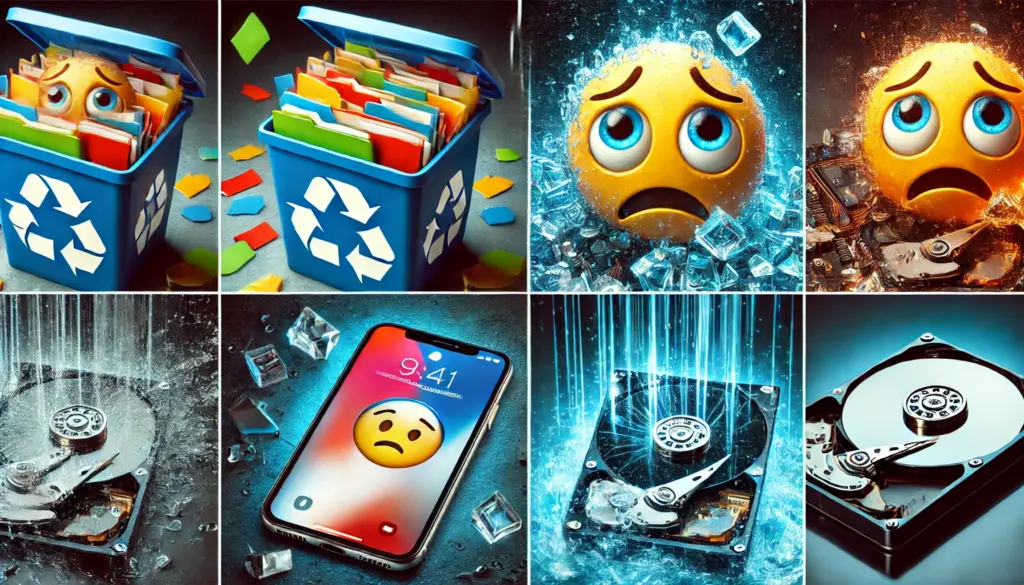
Data loss happens in many ways. Here are the most common cases and the right response.
Accidental Deletion
Very common for photos and chats. Stop using the phone to avoid overwriting, then run a recovery scan.
System Crashes
Caused by buggy apps, storage errors, or updates. Try device scans or—on iOS—restore from iTunes/iCloud backups.
Virus/Malware
May corrupt or hide files. Clean the device first with security software, then attempt recovery or backup restore.
Formatted Storage (SD cards)
Avoid writing anything new to the card. Use tools with deep scan for better results.
Why Mobile Data Recovery Software is Essential
Protecting Valuable Data
Most users don’t keep regular backups. Recovery tools help you preview and restore what’s still present on the device or in iTunes/iCloud.
Cost-Effectiveness
Professional lab recovery can be expensive. Licensed software is often cheaper and faster for typical deletes and backup-based restores.
Important Note on Unlocking
Screen-unlock tools are separate from recovery and may erase data (especially on iOS). Try recovery/backup paths first.
If your need is not only data recovery, you can also explore Mobile Utilities for phone unlock, transfer, repair, and other useful mobile tools.
Features to Look for in Mobile Data Recovery Tool
When choosing a mobile data recovery tool, focus on how you’ll recover (device scan vs backup/cloud), not just brand names. These points will help you pick faster and avoid data loss.
Match your device and data location
Pick the correct build for your phone (Android or iOS). Decide whether you’ll scan the device directly or restore from iTunes/iCloud (iOS). Advanced cases may require cloud backup acquisition (for example, iCloud with proper credentials).
Recovery depth and paths
Use quick scan for recent deletions; switch to deep scan for older or formatted media. On iOS, iTunes/iCloud routes are often faster and safer than device-only attempts.
Non-destructive workflow
Install the software on a PC, not on the affected phone. Export recovered files to a different drive or folder—never back to the source storage or SD card.
Preview, filters, and selective export
Tools that let you preview files and filter by type/date help you recover only what matters, reduce noise, and speed up decisions.
Updates and clarity
Prefer tools with an easy interface and frequent engine updates so they keep working after major Android/iOS releases.
Compliance and permissions (advanced)
If you plan to access cloud backups, make sure you have lawful credentials and authorization. These methods are for legitimate recovery only.
Quick checklist
- Right OS build (Android vs iOS)
- Correct path (device vs iTunes/iCloud vs cloud)
- Run from a PC, save to a different drive
- Use preview and filters before exporting
- Keep software up to date
Top Mobile Data Recovery Software in Pakistan
1. EaseUS MobiSaver for iPhone
EaseUS MobiSaver is a simple iPhone recovery tool for users who want to restore deleted data from the device or from Apple backups.
- Recovers photos, videos, contacts, messages, and notes
- Supports iTunes and iCloud backup recovery
- Lets you preview files before recovery
- Good for everyday iPhone and iPad data loss
2. EaseUS MobiXpert
EaseUS MobiXpert is a broader EaseUS mobile recovery option for users who want help with phone data, device issues, and recovery support beyond one iPhone-focused tool.
- Useful for mobile recovery cases where buyers want an EaseUS option
- Helps users compare broader phone recovery needs before choosing
- Good fit for buyers already considering EaseUS mobile tools
- Suitable when the recovery case is not only simple iPhone backup restore
3. Stellar Data Recovery for Android
Stellar Data Recovery for Android is a good option for Android users who want to recover deleted media and document files from phone storage or SD cards.
- Recovers photos, videos, audio, and documents
- Scans Android storage and memory cards
- Useful after deletion, formatting, or storage issues
- Better suited for media-heavy Android use
4. Stellar Data Recovery for iPhone
Stellar Data Recovery for iPhone is a flexible tool for users who want to recover data from the phone itself or from backup sources.
- Recovers photos, contacts, messages, and attachments
- Supports device, iTunes, and iCloud recovery
- Works with many common iPhone data types
- Helpful when one recovery path is not enough
5. Dr.Fone Android Data Recovery
Dr.Fone Android Data Recovery is a practical choice for Android users who mainly want to recover chats, contacts, and daily phone data.
- Recovers photos, videos, contacts, and call logs
- Supports message and WhatsApp-related recovery
- Offers preview and selective restore
- Easy for beginners to use
6. Dr.Fone iOS Data Recovery
Dr.Fone iOS Data Recovery is designed for iPhone users who want a guided recovery process with simple steps.
- Recovers photos, chats, contacts, and call logs
- Supports iPhone, iTunes, and iCloud recovery
- Includes file preview before recovery
- Good for users who want a beginner-friendly tool
7. Elcomsoft Phone Breaker
Elcomsoft Phone Breaker is an advanced option for backup and cloud-based recovery work where proper access and credentials are available.
For labs, DFIR teams, or authorized investigators who need a wider mobile forensic workflow, Elcomsoft Mobile Forensic Bundle is more suitable than a single cloud or backup recovery tool.
- Accesses cloud backups and synced data
- Supports advanced backup and account-based recovery
- Useful for encrypted and cloud-focused cases
- Better for IT users and advanced recovery work
8. Wondershare Dr.Fone Data Recovery
Wondershare Dr.Fone Data Recovery comes in separate Android and iPhone editions, plus a full toolkit for broader recovery and device tools. It helps recover deleted photos, videos, contacts, messages, call logs, and WhatsApp data with preview and selective recovery.
Choose the edition that matches your device and recovery needs:
- Dr.Fone Android Data Recovery for Android phones and tablets
- Dr.Fone iOS Data Recovery for iPhone and iPad recovery
- Dr.Fone Toolkit for users who want the broader all-in-one suite
Recovery and screen unlock are not the same. If the goal is to get deleted data back, it is safer to try recovery or backup-based options first, because some unlock actions may erase data.
Important: Screen Unlock is separate from recovery and can erase data (especially on iOS). Attempt recovery/backup paths first.
Step-by-Step Guide to Using Data Recovery Software
Installation and Setup
Install the software on your PC, not on the affected phone. Avoid writing anything to the source device or SD card.
Connecting Your Device
Use a reliable USB cable. For Android, enable USB debugging when prompted. For iOS, sign in to iTunes/iCloud when using backup-based recovery.
Scanning and Recovery
Run a quick scan first; if needed, use deep scan. Preview items, then export recovered files to a different drive/folder—never back to the source storage.
Expert Tips for Better Results
- Stop using the phone immediately to reduce overwriting.
- Scan from a PC and save elsewhere.
- Try iTunes/iCloud first on iOS—often faster and safer.
- Use filters and preview to target only what matters.
- Keep tools updated for new Android/iOS releases.
- Advanced: With lawful credentials, use Elcomsoft for iCloud/Microsoft cloud acquisition when device access is limited.
Free vs Paid Mobile Data Recovery Software in Pakistan
Many users first try free data recovery tools, but most free versions only allow scanning or preview.
- Free tools: Useful for checking if your data can be recovered, but often limited in actual recovery.
- Paid tools: Required to fully restore files, especially for WhatsApp, photos, and important documents.
- Cracked software: Risky and can damage data further or expose your device to malware.
For better results and safety, it is recommended to use genuine licensed software with proper support.
Mobile Data Recovery in Pakistan: Online or Shop Near You?
Looking for a “mobile data recovery shop near me”? You can often do it yourself at home. BreTech provides official licenses with quick email delivery and guidance for Pakistan. Some keys are sent instantly; others arrive within a few hours.
Avoid handing phones to unvetted shops. Restore safely on your own PC with trusted tools.
Explore top picks from EaseUS, Stellar, Wondershare (Dr.Fone), and Elcomsoft—all supported locally.
Conclusion: The Best Phone Data Recovery Tools in Pakistan (2026)
Pick the tool that matches your device and where the data exists (phone storage, iTunes/iCloud backup, or cloud). For Android photos, files, and common chat data, start with Dr.Fone Android Data Recovery or Stellar Data Recovery for Android.
For iPhone and iPad, EaseUS MobiSaver and Stellar Data Recovery for iPhone are safer starting points, especially when recovery from backups is possible. If you’re dealing with encrypted backups or cloud access needs, Elcomsoft Phone Breaker is an advanced option for professional use cases.
For better results, avoid random “free recovery” apps and use genuine, supported software from BreTech so you can get help if anything goes wrong.
Recover your data safely by choosing the right tool for your device. Browse mobile data recovery software in Pakistan and select a genuine solution based on your recovery needs.
Frequently Asked Questions
Q: What’s the best mobile data recovery software in Pakistan?
A: For Android, start with Dr.Fone Android Data Recovery or Stellar Data Recovery for Android. For iPhone/iPad, try EaseUS MobiSaver or Stellar Data Recovery for iPhone. Pick based on your device and whether you have iTunes/iCloud backups.
Q: Can I recover deleted photos from my Android?
A: Yes. Connect the phone to a PC and run Stellar for Android or Dr.Fone Android. Preview items, then restore to a different drive (not the phone).
Q: Is it possible to recover data from broken phones?
A: If the device is still detectable by the PC, a scan may work. Otherwise, use iTunes/iCloud backups on iOS or consider cloud acquisition (advanced) with Elcomsoft when you have lawful credentials.
Q: How does Android recovery software work?
A: It scans internal storage or an SD card for recoverable records. You select files from the preview and save them safely to your PC.
Q: Can I recover files for free?
A: Most tools offer a free scan or preview. Full recovery typically requires a licensed version for export.
Q: What should I do right after I delete important files?
A: Stop using the phone immediately to avoid overwriting. Run the scan from a PC and save recovered files to a separate drive or folder.
Q: How can I recover WhatsApp messages?
A: On Android, use Dr.Fone Android Data Recovery. On iOS, restore via iTunes/iCloud with EaseUS or Stellar, or use Dr.Fone iOS for selective recovery. Results depend on backups and OS version.
Q: Will unlocking affect my data?
A: Often yes, especially on iOS. Screen unlock is separate from recovery and can erase data. Try recovery or backup paths first before attempting an unlock.
Additional Resources
- Best Android Screen Unlock Software in Pakistan
- How to Recover Deleted Photos from SD Cards
- Best WhatsApp Data Recovery Software in Pakistan
- Best Phone Unlock Software in Pakistan
- How to Recover WhatsApp Backup From Google Drive
For more expert tips, recovery guides, and practical solutions, explore our Mobile Data Recovery guides.