Abdul Basit
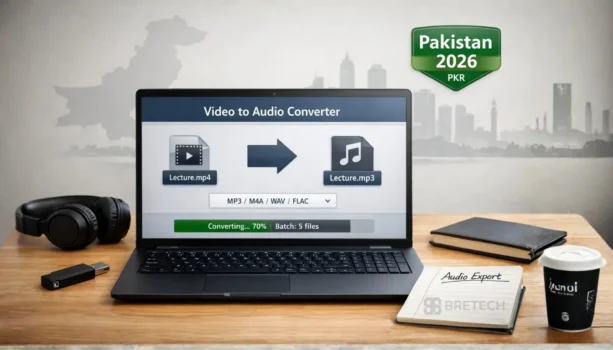
Best video to audio converter in Pakistan (2026) matters when you need to extract sound from a video file for a podcast, lecture, YouTube content, or voiceover. If the converter is weak, the audio quality drops, the output format is wrong, or the conversion process fails on big files.
In Pakistan, people often try a free online converter or random tools and then face problems like smaller files with poor audio, broken sync, or failed batch conversions. Some tools also do not work well on older PC systems.
The safer choice is a paid video-to-audio converter tool for Windows PC that lets you convert videos with proper audio format control, stable speed, and helpful support. BreTech offers genuine licenses in PKR, local payment options, and 1–72 business hours email delivery.
If you want high-quality audio fast, use the quick table first, then follow the guide to pick the best tool for your use case.
Quick Overview: Paid Video-to-Audio Converter for PC (2026)
| Tool | Best For | Key Features | Works On | Approx Price (PKR) |
|---|---|---|---|---|
| EaseUS Video Converter | Creator work and YouTube audio extraction | Uses GPU acceleration, batch conversions, trimming, many formats like MP4 | Windows PC | Mid-range |
| HD Video Converter Factory Pro | Faster video conversion on low-spec PC | Efficient conversion process, smaller files options, basic editing features | Windows PC | Mid–High |
| Ashampoo Video Converter | Simple video and audio conversion | Drag-and-drop interface, easily convert to common audio files | Windows PC | Budget |
| WonderFox DVD Video Converter | DVD, VOB, and large media libraries | Video converter + extraction, formats like AVI, MKV, WMV, FLV, plus DVD support | Windows PC | Higher |
Looking for more formats, DVD support, or faster batch conversion options? Browse all BreTech video conversion tools in one place. Discover more video conversion tools here!
“Most customers message us after an online converter fails on a large file or the audio comes out low quality.” — BreTech Support (Pakistan)
How We Picked
We picked top tools that work well on Windows PC, handle video and audio formats, keep audio quality stable, and offer reliable output for real files. We also kept the list limited to tools you can buy from BreTech, so the guide stays practical.
Quick Guide: How to Convert Videos to Audio Files on Windows PC
Most video converter tools follow the same steps. The main goal is to extract high-quality audio and choose the right audio format for your use case.
First, open the converter tool and add your video file. Many tools support drag-and-drop, which helps you click once and include multiple files for batch conversions.
Next, choose the audio format. For podcasts and voice recordings, M4A or AAC can give smaller files with good audio quality. For editing software workflows, WAV is often used for clean output. If you want lossless audio, FLAC is a common choice.
Finally, start video conversion and check the output. If the sound is low, look for basic trimming or settings for audio format quality. For big files, uses GPU acceleration can improve speed and make the process faster.
Best Paid Video-to-Audio Converter Tool for PC
1. EaseUS Video Converter
EaseUS Video Converter is a good all-in-one pick if you often convert videos for content work and want stable results. It supports many video and audio formats, and it is built to handle batch conversions without turning the PC slow.
It is useful when you need extracting audio from video quickly, then saving it in M4A, AAC, WAV, WMA, or other audio files. It also includes trimming so you can cut the needed part before export, which helps for podcasts, lectures, and short clips.
Key features:
- GPU acceleration for faster conversion
- Batch conversions for multiple files
- Trim and basic editing before export
- Many supported formats for video and audio
Ideal for: YouTubers, students, freelancers, and office users who need reliable conversions.
2. WonderFox HD Video Converter Factory Pro
WonderFox HD Video Converter Factory Pro is a strong choice when you want speed on a weaker PC and you mostly work with common video formats. It is built to convert quickly and can be helpful for routine conversions when you want the output to stay stable.
This tool can be a practical option if you frequently convert video to MP3 or M4A and you want a simple workflow that does not feel heavy. It also includes basic editing options, which can help when you only need small changes before export.
Key features:
- Efficient conversion workflow for everyday use
- Useful on low-spec PCs for faster results
- Supports common formats for video and audio
- Basic editing options before export
Ideal for: Users with older PCs who still want quick conversions.
3. Ashampoo Video Converter
Ashampoo Video Converter is a good pick if you want a simple interface and you mainly convert standard video files into common audio formats. It is easy to use and feels suitable for people who do not want advanced controls.
If your main goal is to extract audio from videos for listening, learning, or sharing, this tool keeps the workflow straightforward. It is also a decent choice when you want something budget-friendly that still works reliably.
Key features:
- Simple drag-and-drop workflow
- Converts to common audio formats easily
- Lightweight feel for daily conversion tasks
- Beginner-friendly interface
Ideal for: Beginners and home users who want simple conversion without extra complexity.
4. WonderFox DVD Video Converter
WonderFox DVD Video Converter is a better fit when your files come from DVDs, VOB folders, or older media collections. Many standard converters struggle with DVD sources, so this tool can save time if your content is disc-based.
It is helpful for people who want to extract audio from old DVDs, lectures on discs, or archived content. If your library is large, choose a tool that handles DVD formats properly and does not fail mid-conversion.
Key features:
- DVD and VOB support for disc-based sources
- Converts and extracts audio from large media libraries
- Handles many output formats for audio and video
- Practical for older collections and archives
Ideal for: Users converting DVDs, VOB files, or older media libraries into audio.
Video Editing Software vs Video-to-Audio Converter Editor
A video-to-audio converter is best when your goal is extraction and clean output. It lets you convert video files to audio files with fewer steps and less load on the PC.
Video editing software is better when you need editing features like adding effects, mixing tracks, or polishing a podcast before publishing. In that case, use the converter tool first to extract high-quality audio, then finish the work in an editor.
For most users, the best workflow is simple: convert first, edit second, and export final audio.
Video-to-Audio Converter for YouTube Creator Content
If you are a YouTube creator, you may need to extract sound from tutorials, interviews, or voiceovers, then reuse it as audio files. The goal is to keep audio quality stable and avoid noise from bad conversion.
Batch conversions help when you are working with many clips. Trimming helps when you only want a small section for podcasts or short content.
If you need faster results, choose a tool that uses GPU acceleration, because big MP4 or MOV files can take time on a normal Windows PC.
AI Support in a Video-to-Audio Converter Tool
Some converter tools market “smart” presets or automatic settings to make conversion easier. Do not buy only because labels like “AI” or “smart” are written on the page.
The real test is simple: does it extract high-quality audio, does it keep audio quality stable, and does the output match your audio format needs like AAC, M4A, WAV, FLAC, or OGG.
Common File Problems When You Convert Video Files on Windows PC
If conversion fails, the file format is often the reason. MKV, WMV, and older AVI files can behave differently across tools. If one tool fails, another converter tool may work better.
If audio sounds weak, check the audio format. AAC and M4A are good for smaller files, while WAV is better for editing software work. Lossless formats like FLAC can keep quality but create bigger files.
If the process is slow, use batch conversions carefully and prefer a tool that uses GPU acceleration. Also close heavy apps during video conversion so the converter can work faster.
Compare the Best Video, Audio, and Converter Tool Options
If you want one best tool for most users, pick the converter that gives stable output, good speed, and supports the formats you use daily. If you work with DVDs, choose the option that supports VOB and disc libraries.
If you are focused on podcasts and clean audio files, pick a tool that exports WAV, AAC, and M4A well, and supports trimming.
If you want a simple experience, choose a converter with a drag-and-drop interface that helps you easily convert without complex settings.
Final Guide: Choose the Best Video-to-Audio Converter for Your PC
The best video-to-audio converter depends on your file type, your output needs, and how often you convert videos. For everyday YouTube and creator content, a fast tool with batch conversions and GPU acceleration is usually the safest pick.
For simple audio extraction, choose a tool with basic controls, stable speed, and easy output. For DVD and VOB libraries, pick a converter tool built for that use case.
To buy genuine software with PKR pricing, local payments, and fast email delivery, explore the BreTech products in this guide.
Ready to convert videos to clean MP3, M4A, WAV, or FLAC without failed exports or risky downloads? Buy a genuine license with PKR pricing and local support from BreTech. Discover more video conversion tools here!
FAQs
Q: What Is The Best Video To Audio Converter For PC In Pakistan In 2026?
A: The best option is a Windows converter that exports clean MP3/M4A/WAV, supports batch conversion, and stays stable on long files. Match the tool to your file type and output format needs.
Q: Which Audio Format Is Best For WhatsApp Sharing In Pakistan?
A: MP3 is the most compatible for phones and WhatsApp sharing. M4A/AAC can give better quality at smaller size, so it’s a good choice when storage and internet speed are limited.
Q: How Can I Extract Audio From YouTube Videos Without Losing Quality?
A: Use a converter that keeps audio quality stable and lets you choose the output format and quality settings. Export once in the right format, and avoid converting the same file again and again.
Q: Why Do Online Video To Audio Converters Fail On Large Files?
A: Many online tools have size limits, slow uploads, timeouts, or unstable processing. A PC converter is usually more reliable for long lectures, big MP4 files, and batch work.
Q: What Should I Use If My Video Is MKV, WMV, Or An Old AVI File?
A: Try a converter that supports many formats and handles older files well. If one tool fails on a specific format, another converter may work better with the same file.
Q: How Do I Fix Slow Conversion Speed On A Windows PC?
A: Close heavy apps, convert in batches, and use a tool that supports GPU acceleration if your PC has a compatible GPU. Also keep enough free disk space for temporary conversion files.
Q: Do I Need A Video Editor Or Only A Video To Audio Converter?
A: Use a converter when you only need clean audio extraction and simple trimming. Use a video editor when you need effects, mixing, noise cleanup, or full podcast-style editing after extraction.
Further Reading
- Best Video Converter Software in Pakistan
- Best Audio Editing Software for Beginners in Pakistan
- Best YouTube Video Downloader Pakistan
- Best Video Editing Software for Vlogging in Pakistan
- Best Video Format for WhatsApp and YouTube
- Best Ringtone Maker Software
Looking for more multimedia tips? Explore our full Video Editing Guides for expert tutorials and software reviews.