Abdul Basit
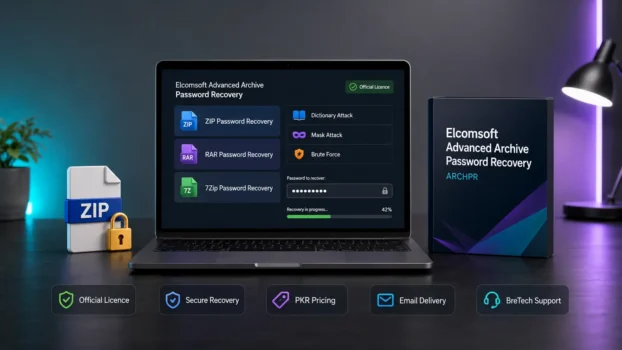
Many people search for Elcomsoft ZIP Password Recovery when they cannot open a password-protected ZIP file. The official product name is Elcomsoft Advanced Archive Password Recovery, also known as ARCHPR.
Some users then try unsafe crack tools or start brute-force recovery with no clear limits. This can waste time, expose the PC to malware, and still fail if the password is long or complex.
The safer option is to use the official ARCHPR licence and start with smart recovery methods. If you are buying in Pakistan, BreTech is an official Elcomsoft reseller.
BreTech provides official Elcomsoft software through its Elcomsoft software in Pakistan page, with PKR pricing, local payment options, digital delivery, and activation help.
What Is Elcomsoft ZIP Password Recovery?
Elcomsoft ZIP Password Recovery is not the exact official product name. It is the search term many users type when they need to recover a locked ZIP file.
The official tool is Elcomsoft Advanced Archive Password Recovery (ARCHPR). It is designed for password-protected archive files such as ZIP, 7Zip, RAR, ARJ, ACE 1.x, WinZip archives, and self-extracting archives.
ARCHPR works by testing possible passwords using selected recovery methods. It does not repair damaged archive files, and it does not guarantee success in every case.
Is ARCHPR the Right Elcomsoft Tool?
Use ARCHPR when your problem is an encrypted archive file.
| File or Problem Type | Correct Elcomsoft Tool | Notes |
|---|---|---|
| ZIP password recovery | Advanced Archive Password Recovery | Correct tool for ZIP archives |
| RAR or WinRAR password recovery | Advanced Archive Password Recovery | Correct tool for supported RAR archives |
| 7Zip password recovery | Advanced Archive Password Recovery | Correct tool for supported 7Zip archives |
| Locked PDF restrictions or PDF password | Advanced PDF Password Recovery | Different tool, not the same as ARCHPR |
| Large forensic password recovery jobs | Elcomsoft Distributed Password Recovery | Advanced lab/business tool, not usually needed for normal ZIP users |
If your file is a PDF, read the Advanced PDF Password Recovery guide instead. PDF recovery and ZIP recovery are different use cases.
How Elcomsoft ARCHPR Recovers ZIP Passwords
ARCHPR gives you different recovery methods. The best method depends on what you remember about the password.
| Step | What To Do | Why It Matters |
|---|---|---|
| 1. Load the archive | Add your locked ZIP, RAR, or 7Zip file | Confirms the archive can be opened by the tool |
| 2. Choose an attack type | Start with Dictionary or Mask | Faster than blind guessing |
| 3. Add password hints | Set length, characters, and known parts | Reduces the number of passwords to test |
| 4. Run recovery | Start the job and monitor progress | Helps you see whether the settings are realistic |
For a deeper setup guide, read our Advanced Archive Password Recovery guide.
Attack Types Explained
Dictionary Attack
Dictionary Attack checks words, names, phrases, and common password patterns. It is a good first option when the password may be based on a name, word, date, business term, or simple variation.
This is usually better than starting with full brute-force recovery.
Mask Attack
Mask Attack is useful when you remember part of the password. For example, you may remember that it started with a name and ended with a year.
Even one small clue can reduce recovery time a lot.
Brute-Force Attack
Brute-force tries many possible combinations. It can work for short or simple passwords, but it can take a very long time for long and complex passwords.
Use brute-force only with strict limits. Do not run it with every possible character and unlimited length.
Known-Plaintext Attack
ARCHPR also supports known-plaintext attacks in certain cases. This may help when you have at least one unencrypted file that is also inside the encrypted archive.
This method has limits and does not apply to every archive type.
The Most Important Recovery Tip
The biggest mistake is giving the software too wide a search range.
Always define:
- password length range
- letters, numbers, and symbols used
- known words or names
- likely years or dates
- first or last character if remembered
- whether the password used upper-case or lower-case letters
Better hints can make recovery more realistic. Without hints, strong passwords may take too long to recover.
Standard vs Professional Edition
Choosing the right edition depends on the archive type and the recovery methods you need.
| Edition | Best For | Key Difference |
|---|---|---|
| Standard | Normal ZIP, RAR, 7Zip, ARJ, and ACE archive recovery | Supports common archive recovery, dictionary attack, brute-force attack, and known-plaintext attack |
| Professional | Stronger WinZip and advanced archive cases | Adds support for WinZip AES archives, guaranteed WinZip recovery where applicable, and password-from-keys attack |
Choose Standard if you need normal archive password recovery and already have useful password hints.
Choose Professional if you work with WinZip AES archives, business archive cases, or advanced recovery situations.
What ARCHPR Can and Cannot Do
| Can Do | Cannot Do |
|---|---|
| Recover passwords for supported archive formats | Guarantee every password recovery |
| Work with ZIP, RAR, 7Zip, ARJ, ACE 1.x, and self-extracting archives | Repair corrupted ZIP files |
| Use Dictionary and Brute-force attacks | Make a strong unknown password easy |
| Use known hints to reduce recovery time | Recover files without legal permission |
| Help with some special archive recovery cases | Replace backup or data recovery software |
If your archive is damaged or files are deleted, this is a different problem. ARCHPR is mainly for password recovery, not deleted file recovery.
Beginner Setup Guide
1. Install ARCHPR
Install the official Elcomsoft Advanced Archive Password Recovery tool on a Windows PC.
Use a genuine installer and avoid modified downloads from unknown websites.
2. Add the Locked Archive
Open ARCHPR and load your ZIP, RAR, or 7Zip file.
Check that the file is not corrupted before spending time on password recovery.
3. Start With Dictionary Or Mask
Try Dictionary Attack first if the password may be based on words, names, or simple phrases.
Use Mask Attack if you remember the structure, such as letters followed by numbers.
4. Set Realistic Limits
Do not select every character type unless you really used them.
Set the likely length range and remove impossible characters from the search.
5. Run And Review
Start recovery and watch the progress.
If the estimated time is too high, stop and improve the password hints before trying again.
Common Beginner Mistakes
| Mistake | Why It Is A Problem |
|---|---|
| Starting with full brute-force | It can take too long and may never finish |
| Using crack tools | They may contain malware or unsafe changes |
| Giving no password hints | Recovery becomes much harder |
| Expecting guaranteed success | Success depends on password strength and clues |
| Using archive recovery for PDF files | PDFs need a different tool |
| Trying to repair damaged archives | ARCHPR is not a ZIP repair tool |
Why You Should Avoid ARCHPR Crack Tools
Some users search for ARCHPR crack, ZIP password recovery crack, or free unlock tools when they are in a hurry. This is risky.
Unofficial tools may contain malware, steal files, damage Windows, or waste your time with fake results. They may also create legal and licensing problems for home users, offices, and businesses.
For safer buying guidance, read Legal Risks of Unlicensed Software in Pakistan.
Is It Suitable For Pakistan Users?
Yes, ARCHPR can be suitable for Pakistan users who need legitimate recovery for their own ZIP, RAR, or 7Zip files.
It is especially useful for:
- old business backup archives
- password-protected ZIP files
- locked WinRAR archives
- saved project files
- forgotten archive passwords
- office or technician use with permission
BreTech helps Pakistan buyers with official licence guidance, local payment options, PKR pricing, digital delivery, and basic activation support.
When To Choose Another Tool
ARCHPR is not always the right tool. Choose another option if your problem is not an archive password.
| Your Problem | Better Direction |
|---|---|
| Locked PDF file | Use a PDF password recovery tool |
| Deleted files from hard drive | Use data recovery software |
| Damaged ZIP file | Use archive repair or file repair tools |
| Need to compare password tools | Read a password recovery comparison |
| Need to manage ZIP/RAR files | Use file compression software |
For comparison before buying, read Best Password Recovery Software in Pakistan.
If you mainly want to create, open, or manage archives, our Ashampoo ZIP Pro vs WinRAR comparison may be more useful.
Legal And Ethical Use Notice
Use Elcomsoft Advanced Archive Password Recovery only for files you own or files you have clear permission to recover.
Do not use password recovery software to access someone else’s private files, business archives, or personal data without permission. Misuse may violate privacy rules, workplace policy, or local law.
Final Verdict
Elcomsoft ZIP Password Recovery is best understood as a search phrase for Elcomsoft Advanced Archive Password Recovery (ARCHPR). It is the correct Elcomsoft tool for supported ZIP, RAR, 7Zip, ARJ, ACE, WinZip, and self-extracting archive password recovery.
Start with Dictionary Attack or Mask Attack before trying brute-force. Choose Standard for normal archive recovery, and choose Professional when WinZip AES or advanced recovery methods are needed.
For Pakistan buyers, BreTech can help with official Elcomsoft licence guidance, PKR pricing, local payment options, digital delivery, and activation support.
FAQs
Q: Is Elcomsoft ZIP Password Recovery the official name?
A: The official product name is Elcomsoft Advanced Archive Password Recovery, also known as ARCHPR. “Elcomsoft ZIP Password Recovery” is a common search phrase used by people who need to recover ZIP archive passwords.
Q: Can ARCHPR recover every ZIP password?
A: No. No password recovery tool can guarantee every result. Success depends on password strength, archive type, recovery method, and how much you remember about the password.
Q: Which attack should I try first?
A: Start with Dictionary Attack if the password may use words, names, or phrases. Use Mask Attack if you remember any part of the pattern. Use brute-force only as a last option with strict limits.
Q: Does ARCHPR work for RAR and 7Zip files?
A: Yes, ARCHPR supports ZIP, RAR, 7Zip, ARJ, ACE 1.x, AES encryption, and self-extracting archives, depending on the archive type and edition.
Q: Is ARCHPR for PDF password recovery?
A: No. ARCHPR is for archive files such as ZIP, RAR, and 7Zip. For locked PDFs, use Elcomsoft Advanced PDF Password Recovery instead.
Q: Which edition should I buy?
A: Choose Standard for normal archive password recovery. Choose Professional if you need WinZip AES support or advanced recovery methods such as guaranteed WinZip recovery where applicable.
Q: Does it work on Mac?
A: ARCHPR is mainly a Windows tool. If you use Mac, check your workflow first and confirm the correct licence before buying.
Q: Is it safe to use ARCHPR crack?
A: No. Crack tools are risky and may contain malware. Use a genuine licence for safer installation, cleaner activation, and legal use.
Further Reading
- Advanced Archive Password Recovery Guide
- Best Password Recovery Software in Pakistan
- Advanced PDF Password Recovery Guide
- Legal Risks of Unlicensed Software in Pakistan
- Ashampoo ZIP Pro vs WinRAR in Pakistan
Need more help with locked files, archive recovery, or forgotten passwords? Browse our Password Recovery guides before choosing a licence.