Abdul Basit
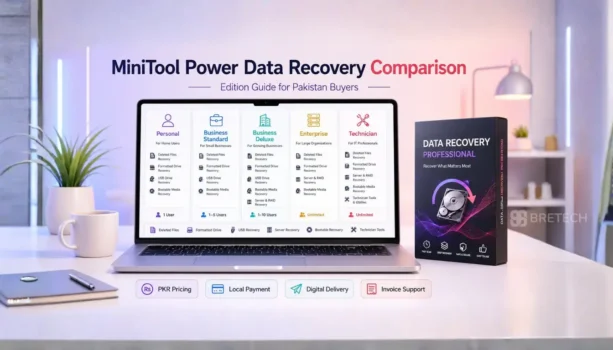
Choosing the right MiniTool Power Data Recovery edition in Pakistan depends on your recovery case, device type, and licence use.
A home user recovering deleted files from one laptop does not need the same licence as an office, company, IT department, or repair technician working on many systems.
This guide compares MiniTool Power Data Recovery Personal, Business Standard, Business Deluxe, Business Enterprise, and Business Technician, so you can choose the right genuine licence before buying.
Key Takeaways
- Personal is the best choice for home users, students, and personal PC recovery.
- Business Standard is suitable for one office PC or one server.
- Business Deluxe is better when Windows may not start and bootable recovery is needed.
- Business Enterprise is made for companies with many internal PCs or servers.
- Business Technician is for IT technicians, repair shops, and service providers.
- Stop scanning the drive if it clicks, disconnects, or has physical damage.
At a Glance
| Buyer Type | Best MiniTool Edition | Why It Fits |
|---|---|---|
| Home user | MiniTool Power Data Recovery Personal | Best for recovering your own files from a personal Windows PC, laptop, USB drive, memory card, or external drive. |
| Small office | MiniTool Power Data Recovery Business Standard | Suitable for one office PC or one server where commercial licence use is needed. |
| Office with boot issue | MiniTool Power Data Recovery Business Deluxe | Better when Windows may not start and bootable recovery media is needed. |
| Company or IT department | MiniTool Power Data Recovery Business Enterprise | Made for internal company use across many PCs or servers. |
| Repair shop or technician | MiniTool Power Data Recovery Business Technician | Best for recovering data from customer devices as a paid service. |
“For most buyers, the right MiniTool edition depends on licence use first, then recovery features.”
MiniTool Power Data Recovery Software Comparison
MiniTool Power Data Recovery is data recovery software with different editions for home users, businesses, companies, and service providers.
The right option depends on whether you need to recover data from your own device, one office PC, a server, many company systems, or customer devices.
| Edition | Best For | Licence Use | Device Coverage | Main Buyer |
|---|---|---|---|---|
| MiniTool Power Data Recovery Personal | Personal files and home PCs | Private use | Depends on selected Personal plan | Home users, students, freelancers |
| MiniTool Power Data Recovery Business Standard | One office PC or server | Commercial use | 1 PC/Server | Small offices and business users |
| MiniTool Power Data Recovery Business Deluxe | One system with bootable recovery needs | Commercial use | 1 PC/Server | Offices with crash recovery needs |
| MiniTool Power Data Recovery Business Enterprise | Many company PCs or servers | Business use | Up to 99 PCs/Servers | SMEs, companies, IT departments |
| MiniTool Power Data Recovery Business Technician | Many client systems | Technician use | Up to 299 PCs/Servers | Repair shops and service providers |
Recovery Tool Feature Comparison
All MiniTool Power Data Recovery editions are made to recover files from common data loss situations, but the licence type, device coverage, and advanced features are different.
The main choice is not only about recovery power. You should first check whether you need personal use, business use, bootable recovery, multi-PC use, or technician use.
| Feature | Personal | Business Standard | Business Deluxe | Business Enterprise | Business Technician |
|---|---|---|---|---|---|
| Best use | Home recovery | One business system | Bootable business recovery | Many company systems | Client recovery work |
| Commercial use | No | Yes | Yes | Yes | Yes |
| Bootable recovery | Depends on selected Personal plan | No | Yes | Yes | Yes |
| Server recovery | No | Yes | Yes | Yes | Yes |
| Device coverage | Depends on selected Personal plan | 1 PC/Server | 1 PC/Server | Up to 99 PCs/Servers | Up to 299 PCs/Servers |
| Main value | Simple personal recovery | Commercial licence for one system | Bootable recovery for one system | Company-wide internal coverage | Service provider use |
For a wider market comparison, read Best Data Recovery Software in Pakistan.
Which MiniTool Power Data Recovery Option Should You Choose?
- Choose Personal if you are a home user, student, freelancer, or personal laptop user recovering your own files.
- Choose Business Standard if you need a genuine commercial licence for one office PC or one server.
- Choose Business Deluxe if the affected system may not boot and you need recovery through bootable media.
- Choose Business Enterprise if your company has many internal PCs or servers and needs wider recovery coverage.
- Choose Business Technician if you run a repair shop, IT support business, or data recovery service for customers.
MiniTool’s Personal options may include monthly, yearly, or ultimate licence choices depending on the plan available at purchase time. Check the product details before buying if device count, upgrade period, or bootable recovery is important for your case.
MiniTool Power Data Recovery Editions Explained
MiniTool Power Data Recovery Personal
MiniTool Power Data Recovery Personal is suitable for home users who need to recover their own files from a personal Windows PC, laptop, USB drive, memory card, or external hard drive.
It can help with deleted files, lost files, formatted drives, missing folders, photos, videos, and documents. MiniTool may offer different Personal plans, so check the selected plan carefully for device count, upgrade period, and bootable recovery support.
This edition is not the right choice for office, server, repair shop, or client recovery work. Business buyers should choose a commercial edition instead.
MiniTool Power Data Recovery Business Standard
MiniTool Power Data Recovery Business Standard is suitable for one office PC or server where commercial usage rights are needed.
It fits small offices, shop owners, and business users who need a genuine recovery tool for one important system. It is better than Personal for commercial use, but not ideal for many company PCs.
Choose this edition when the system is still working normally and you do not need bootable recovery media.
MiniTool Power Data Recovery Business Deluxe
MiniTool Power Data Recovery Business Deluxe is better when bootable recovery is important for a business PC or server.
This edition is useful when Windows cannot start normally and you need to recover files through bootable recovery media. For many offices, Deluxe is safer than Standard when downtime can affect daily work.
Choose Deluxe if the affected PC or server is important for orders, accounts, client files, office records, or other business data.
MiniTool Power Data Recovery Business Enterprise
MiniTool Power Data Recovery Business Enterprise is made for companies that need recovery support across many internal PCs or servers.
It is suitable for SMEs, offices, IT departments, and organisations managing several business systems. Choose Enterprise when the recovery need is inside one company, not for outside customer jobs.
This edition is stronger than Standard or Deluxe when your organisation needs wider internal device coverage instead of a licence for only one PC or server.
MiniTool Power Data Recovery Business Technician
MiniTool Power Data Recovery Business Technician is made for IT technicians, repair shops, and service providers.
Choose this edition if data recovery is part of your paid service and you recover files from customer PCs, laptops, or business systems.
It is usually not needed for home users or single-office buyers. For service work, Technician is the safer match because it is designed for wider client recovery use.
If you are comparing MiniTool with EaseUS before choosing, compare the EaseUS Data Recovery Wizard editions in Pakistan to see which personal, technician, Mac, or bootable option fits your recovery needs.
Personal vs Business Data Recovery Software
Personal is for private, non-commercial use. It is suitable for users recovering their own files from their own laptop, desktop, USB drive, memory card, or external drive.
Business editions are better for offices, shops, companies, schools, NGOs, IT departments, and server recovery.
Pakistan buyers should avoid using a personal licence for business recovery work because it may create licence compliance and activation problems.
Standard vs Deluxe Recovery Tool Feature Comparison
Business Standard covers commercial recovery for one PC or server. It is enough when the system is working and the recovery case is simple.
Business Deluxe is better when the computer may not boot. The bootable recovery option can be important when Windows crashes and files must be recovered before repair or reinstallation.
Choose Deluxe if the machine is important for office work and downtime can affect orders, accounts, customer records, or daily operations.
Enterprise vs Technician for Advanced Recovery Needs
Business Enterprise is better for one company that wants data recovery support across its own internal PCs and servers. It fits SMEs, offices, and IT departments that manage several systems under the same organisation.
Business Technician is different because it is made for service providers. It is the better option for repair shops, IT technicians, and support businesses that recover data from customer devices.
Choose Enterprise if the recovery work is for your own company systems. Choose Technician if you recover data for clients as part of a paid service.
For wider company-level recovery planning, read Best Enterprise Data Recovery Software in Pakistan.
Data Loss Situations Where MiniTool Can Recover Files
MiniTool Power Data Recovery can help in many common data loss situations where the drive is still readable and the problem is logical, not physical.
It can recover files that were accidentally deleted, lost after formatting, removed from the Recycle Bin, or missing from a damaged partition.
The software may also help with lost data from a hard drive, SSD, USB flash drive, SD cards, memory card, or external storage device.
For photos, videos, documents, and other file types, the previewing files feature can help users check recoverable data before saving it.
This recovery tool is useful for many beginner users, but complex cases need care. If the drive is physically damaged, making noise, or not detected, stop scanning and get expert assistance.
File System, File Types and Storage Device Support
MiniTool Power Data Recovery is commonly used for Windows file recovery from drives, partitions, and external storage devices.
Many Pakistan users need recovery from NTFS, FAT32, and exFAT storage, especially on Windows 11 PCs, office laptops, USB flash drives, and memory cards.
Some users also compare file system needs such as HFS when working with mixed storage environments. Check the product page carefully before buying if your recovery case involves a non-Windows file system.
The software can help with various file formats, including documents, photos, videos, and other important file types.
The final result depends on the drive condition, overwrite level, scan result, and recovery accuracy.
When MiniTool Power Data Recovery May Not Be Enough
Recovery software is useful for many logical data loss cases. These include deleted files, formatted drives, missing folders, inaccessible partitions, and accidental file loss.
It is not the right first step if the drive is clicking, physically damaged, not detected properly, or disconnecting again and again.
In these cases, continued scanning can make recovery harder. A professional data recovery lab may be safer for valuable business or personal data.
Before trying software on a weak drive, check Disk Health Checker Tools in Pakistan. If bad sectors are involved, also read Best Bad Sector Repair Software in Pakistan.
Safe Recovery Process Before You Scan a Drive
Before you scan any drive with recovery software, take a few safe steps first. Many recovery cases fail because users keep using the same drive, install new software on it, or save recovered files in the wrong place.
This process is especially important for deleted files, formatted drives, missing folders, lost partitions, and office data recovery cases in Pakistan.
Stop Using the Affected Device
Stop using the affected drive immediately after data loss. New downloads, Windows updates, browser cache, software installs, or saved documents can overwrite the lost files.
This matters most when the data was recently deleted, lost after formatting, removed from the Recycle Bin, or disappeared from a partition. The less you use the drive, the better your chance of recovery.
Check the Drive Condition First
Before scanning, check whether the drive is still detected properly by Windows. If the drive opens normally but files are missing, recovery software may help.
If the drive is clicking, disconnecting again and again, showing wrong capacity, or not detected at all, do not keep scanning it. That may point to physical damage, and a professional recovery lab may be safer.
Install the Recovery Tool Safely
Do not install the recovery tool on the same drive where data was lost. Use another PC, another partition, or another storage drive when possible.
This helps protect the source drive and reduces the risk of overwriting recoverable files during the recovery process. For business data, this step is very important.
Start the Scan Carefully
Start with a scan, preview recoverable files, then select only the files you actually need. Do not rush the process or stop the scan too early if the drive is stable.
Previewing files can help you check whether the scan result is useful before saving recovered data. It also helps avoid wasting time on broken, duplicate, or unnecessary files.
Save Recovered Files to Another Drive
Always save recovered files to a different drive. Do not save them back to the same drive or partition you are scanning.
Saving recovered files to the same drive can overwrite other lost data and reduce the chance of further recovery. Use an external drive, another internal drive, or a safe backup location.
Avoid Repair Before Recovery
Do not format, repair, initialise, or reinstall Windows before recovery. These actions can change the file system and reduce the chance to recover data safely.
If your issue is partition-related and the data is not already lost, you may need partition management instead. Read MiniTool Partition Wizard Editions before buying the wrong tool.
Recovery Process Mistakes to Avoid
Small mistakes during data recovery can reduce the chance of getting files back. This is why you should treat the affected drive carefully before scanning, repairing, or reinstalling anything.
For Pakistan users, this is especially important when the lost data includes business records, client files, accounts, student work, family photos, or shop data.
Saving Recovered Files to the Same Drive
Do not recover files back to the same drive you are scanning. This can overwrite other lost data and reduce the chance of further recovery.
Always save recovered files to another drive, external storage device, or safe backup location. This simple step can protect the remaining recoverable data.
Using the PC After Data Loss
Do not keep using the affected PC for browsing, downloading, editing documents, or installing software after data loss.
Even normal Windows activity can write new data to the drive. If the lost files are important, stop using the system and scan it from another safe setup where possible.
Trying Repair Before Recovery
Do not format, initialise, repair, or reinstall Windows before recovering important files. These actions can change the file system and make recovery more difficult.
If the drive has physical damage, clicking sounds, repeated disconnection, or detection problems, stop using software and contact a professional recovery service.
Choosing an Edition Only by Price
Do not choose a MiniTool edition only because it is cheaper. Match the licence type, device coverage, bootable recovery need, and business use first.
For example, a home user may not need a business edition, but a repair shop should not use a personal licence for client recovery work.
Genuine Licence Key, Download and Support in Pakistan
Buy a genuine MiniTool Power Data Recovery licence only. Cracked or unauthorised software can fail during recovery, expose private data, cause activation issues, and create legal risk.
This matters more in data recovery because the software may scan sensitive files, customer records, business documents, photos, invoices, and private folders.
A genuine licence key gives safer activation, correct usage rights, update access, and invoice support where available. It also helps avoid fake installers, broken activators, and risky modified software.
For offices, companies, schools, NGOs, IT departments, repair shops, and service providers, the correct licence is also part of proper software compliance.
BreTech helps Pakistan buyers choose the right edition with PKR pricing guidance, local payment support, digital delivery, download guidance, activation help, and invoice support where available.
For general buying safety, read Buy Genuine Software in Pakistan and Verify a Software Licence Is Genuine in Pakistan.
Buy MiniTool Power Data Recovery in Pakistan
BreTech helps Pakistan buyers choose the right MiniTool software licence based on personal use, office use, server recovery, company size, and technician work.
You can also visit the Data Recovery software category to compare more recovery tools for deleted files, formatted drives, business recovery, and storage problems.
Use the Quick Answer table above to open the correct MiniTool Power Data Recovery edition page. This keeps the buying path simple and avoids repeating the same product links again.
BreTech provides PKR pricing guidance, local payment support, digital delivery, download guidance, activation help, and invoice support where available.
How BreTech Helps
BreTech can help you choose the correct edition before buying, especially if you are not sure whether you need Personal, Business, Enterprise, or Technician use.
For business and technician buyers, ask for guidance before ordering so the licence matches your recovery situation, number of systems, and usage rights.
If you are not sure which option fits your case, contact BreTech with your device type, data loss situation, number of PCs, and whether the recovery is personal, business, or client work.
Further Reading
- Affordable Data Recovery Software in Pakistan
- Best Photo Recovery Software in Pakistan
- Best Database Recovery Software in Pakistan
- Best Backup Software in Pakistan
Explore our Data Recovery learning centre for MiniTool guides, recovery comparisons, buying advice, and practical data loss help.