Abdul Basit
File backup vs system image backup for small offices in Pakistan is an important decision when a Windows crash, ransomware attack, or accidental file deletion can stop daily work in minutes. Client records, invoices, accounts data, and project folders can disappear fast, and many small businesses are not ready when it happens.
A common mistake is relying on manual copying, random USB backups, or delaying a proper backup solution until something goes wrong. That weak backup approach can lead to downtime, lost work, and extra recovery costs that small businesses cannot afford.
The real issue is not just taking backups, but choosing the right data protection strategy for your office PCs with reliable data protection software in Pakistan. This guide helps you understand the difference between file backup and system image backup so you can choose the best backup solution for daily work, disaster recovery, and business continuity.
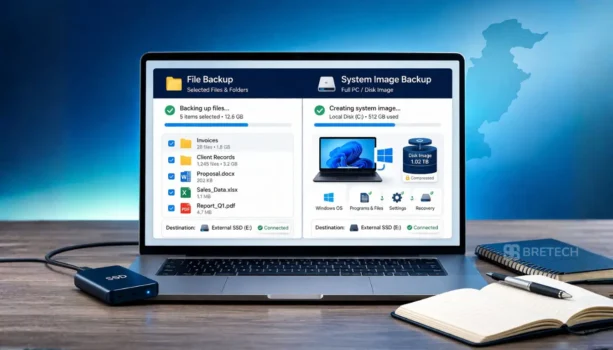
File backup saves selected files and folders, while system image backup creates a full copy of your PC, including Windows, installed software, system settings, and data. For most small offices in Pakistan, file backup is useful for daily work files, while system image backup is better for full system recovery after a serious failure. If you want a broader overview of tools available locally, see our guide to best backup software in Pakistan.
What Is File Backup?
File backup, also called file-based backup or file-level backup, copies selected files and folders instead of the whole system. This includes business documents, Excel sheets, PDFs, customer records, photos, and other files or folders you choose to protect.
For small businesses in Pakistan, file backup is often the easier starting point because backups are smaller, use less storage space, and make it easier to restore individual files. If a staff member deletes a folder, overwrites a document, or loses a single file, file backup gives a more granular way to recover it quickly with dedicated file and folder backup software.
What Is System Image Backup?
System image backup, also called image backup or image-based backup, creates a full backup of your PC or laptop. It includes the operating system, installed software, system settings, user accounts, and files on the selected drive.
This type of backup is designed to recover the entire system after a major problem. If your office PC stops booting, gets infected, or suffers a serious disk failure, a system image can restore the machine to its exact state much faster than reinstalling Windows, applications, and office tools one by one. Dedicated disk and system imaging software makes this process easier. For readers comparing recovery-focused options, our guide to AOMEI OneKey Recovery price in Pakistan may also help.
File Backup vs System Image Backup: Key Differences and Backup Approach
| Feature | File Backup | System Image Backup |
|---|---|---|
| What it saves | Selected files and folders | Entire system |
| Speed | Faster | Slower |
| Storage usage | Lower | Higher |
| Best for | Daily office work | Full system recovery |
| Recovery type | Restore individual files | Restore an entire PC |
The main difference is simple: file backup protects work files, while system image backup protects the full system. File backup is ideal when you need to restore individual files, while image backup is better for full restore and disaster recovery.
Which Backup Type Is Better for Small Offices in Pakistan?
For many small offices in Pakistan, file backup is enough for everyday protection if the main concern is documents, spreadsheets, invoices, and client records. It works well for accountants, shop owners, freelancers, and office staff who need a practical way to recover a file without using too much backup storage.
System image backup is the better choice when the office depends heavily on one or more important PCs. If reinstalling Windows, settings, applications, and office tools would waste too much time, image-based backup becomes much more valuable.
In most cases, the best solution is not choosing one only. A smarter backup strategy is to use file backup for new and changed files every day, and system backups for full recovery when a PC fails. It is also wise to think about offsite protection, which is why some businesses also look at cloud backup services in Pakistan as part of a safer setup.
Best Backup Software Options for Small Offices
EaseUS Todo Backup is a strong backup software option for offices that want file backup and system image backup in one tool. It suits businesses that need to back up files regularly while also keeping a full restore option ready. You can read more in our guide on EaseUS Todo Backup price in Pakistan or explore more EaseUS backup tools.
AOMEI Backupper is another reliable choice for small offices that want image backup, file restore, and better storage efficiency through features like incremental backup. It is useful for businesses that want dependable protection without a difficult setup. You can also browse related AOMEI backup tools.
BreTech offers genuine backup software in Pakistan with PKR pricing, local payment options, and 1–72 hour digital email delivery on most orders. As an authorized reseller, BreTech helps businesses buy the right paid backup software license with local support.
How to Choose the Right Backup Tool
Choose file backup if your priority is protecting daily work files and folders. Choose system image backup if your priority is restoring the whole office PC after a crash. Choose both if your office cannot afford long downtime or major data loss.
Your data protection strategy should balance storage usage, recovery time, ease of use, and price in Pakistan. Before you buy, think about how many PCs you need to protect, how often you need to recover data, and whether a single file restore or full system recovery matters more to your business. If you are still comparing brands and features, this backup software comparison in Pakistan can make the choice easier.
Conclusion
Choosing between file backup and system image backup depends on how your office works and how quickly you need to recover after a problem. File backup is better for everyday files, while system image backup is better for full system recovery.
For most small offices in Pakistan, using both together is the best backup approach. It protects important files, supports business continuity, and gives you a safer way to recover from serious system problems. BreTech can help you choose genuine backup software with local support, practical licensing options, and PKR pricing for your office needs.
FAQs
Q: Is image-based backup better than file-based backup for small offices?
A: Not always. File-based backup is better for daily documents and quick file restore. Image-based backup is better when you need to recover the full system after a crash or major failure.
Q: Can I restore individual files from a system image backup?
A: Sometimes yes, but file-level backup usually makes it faster to restore files. A system image is mainly for recovering the entire PC, not just a single file or small set of files.
Q: Do small offices in Pakistan need both backup types?
A: In many cases, yes. File backup protects daily work, while image backup protects the whole PC. Using both helps improve business continuity and reduce downtime.
Q: Is cloud storage enough, or do I still need backup software?
A: Cloud storage helps keep files saved online, but it is not a complete backup solution for businesses on its own. Backup software adds better file restore, recovery control, and safer protection.
Q: Does image-based backup use more storage than file-based backup?
A: Yes. Image-based backup usually uses more space because it saves more data, including the system, apps, and settings. File-based backup is smaller in size and better for storage efficiency.
Q: How often should a small office configure its backups?
A: It depends on how often files change. Many offices configure backups daily for file-level backup and weekly or monthly for image backup, depending on recovery needs and time to configure.
Q: When should I use image-based backup instead of file backup?
A: Use image-based backup when you need full system recovery after a crash, boot issue, or disk problem. It is the better choice when reinstalling Windows and software would take too long.
Q: Does system image backup save software and settings too?
A: Yes. A system image normally saves Windows, installed software, user data, and configuration settings. That makes it useful when you want to recover the PC in one step.
Q: Which backup type is the simpler choice for small offices?
A: File backup is usually simpler for daily work because it focuses on selected files and folders. Image backup takes more space, but it gives stronger recovery when the whole PC fails.