Abdul Basit
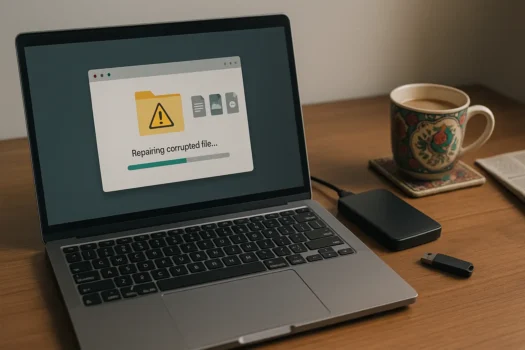
How to fix corrupted files is a common PC problem in Pakistan. When a Word document won’t open, a video stops midway, or a drive turns unreadable, corruption can disrupt studies and work—and waste precious time.
At BreTech, you can repair and recover files using genuine licenses with PKR pricing, digital email delivery, and local support from an authorized reseller—so you get safe activation and timely help.
Trusted tools from EaseUS, Stellar, MiniTool, and Wondershare help repair documents, photos, and videos safely. For picks and step-by-step fixes, explore our Best File Repair Tools for Windows in Pakistan guide.
At-a-Glance: Best Tools to Fix Corrupted Files
| Tool | Key Features | Ideal For |
|---|---|---|
| EaseUS Data Recovery Wizard | Deep scan, preview, limited file repair | Home & office users |
| Stellar File Repair Toolkit | Repairs Word, Excel, PowerPoint, PDF | Students & SMEs |
| MiniTool Power Data Recovery | RAW/partition loss, crashed OS scan | IT teams |
| Wondershare Repairit | Photo & video repair (DSLR/mobile/CCTV) | Creators & studios |
What Causes File Corruption?
- Power cuts/voltage spikes during save/transfer
- Unstable or low-quality USB/media
- System crashes or forced shutdowns
- Malware altering file structure
Backups and genuine tools reduce repeat incidents.
How to Fix Corrupted Files in Windows (Step-by-Step)
- Stop using the affected drive to avoid overwriting recoverable data.
- Run CHKDSK (disk errors & bad sectors):
chkdsk C: /f /r - Run SFC (system file integrity):
sfc /scannow - Use a professional repair tool (e.g., EaseUS, Stellar) for the target file type.
- Restore from a backup if damage is severe.
- Preview first, then save repaired copies to a different drive.
What Beginners Often Get Wrong (and How to Do It Right)
| Mistake | Correct Approach |
|---|---|
| Keep using the same drive after errors | Stop all writes immediately. New saves can overwrite damaged sectors, killing recovery chances. |
| Installing recovery software on the broken disk | Install tools on another disk/USB and scan the problem drive as a secondary device. |
| Running many tools repeatedly | Run one diagnostic (CHKDSK) first, then one trusted recovery tool to avoid extra writes. |
Interrupting long chkdsk /r scans | Let it finish. /r maps bad sectors and salvages readable data; interrupting risks further issues. |
| Downloading “system files” from random sites | Use sfc /scannow or official updates only. Third-party DLLs can add malware or wrong versions. |
Best Tools to Repair Corrupted Files
1. EaseUS Data Recovery Wizard
Quick/deep scans, preview before restore; handy for accidentally deleted or lightly corrupted documents and photos.
Ideal For: Students, home users, freelancers.
Compare EaseUS Data Recovery Wizard editions in Pakistan
2. Stellar File Repair Toolkit
Dedicated repair for DOCX/XLSX/PPTX/PDF; batch jobs for many files in one go
Ideal For: Offices and SMEs with invoices/reports.
3. MiniTool Power Data Recovery
Good on RAW partitions, formatted drives, and post-crash scenarios; recovers first, then you validate file integrity.
Ideal For: Technicians/IT teams.
4. Wondershare Repairit
Specialized photo/video repair (DSLR, mobile, CCTV).
Ideal For: YouTubers, wedding studios, media teams.
Local User Quote
“A voltage surge corrupted my project files. I bought the Stellar Toolkit from BreTech and fixed everything the same day.” — Ali Khan, Accountant (Faisalabad)
Evidence (Fact-Checked)
- Human factor is prevalent: The “human element” was a component in 68% of breaches in the 2024 Verizon DBIR dataset, underscoring misdelivery, misconfigurations, and similar errors as common failure points.
- Hardware + human error dominate data loss: A 2025 study notes hardware failure (40–44%) as the leading technical cause, with human error (29–32%) next.
- Many organizations report data loss: Proofpoint’s 2024 Data Loss Landscape found 85% of organizations experienced data loss in the prior year.
These sources support the guidance to stop writes, run built-ins (CHKDSK/SFC), and then use reputable tools—before considering re-imaging or professional services.
How to Choose the Right Repair Tool
| Criteria | What to Check |
|---|---|
| File Types | DOCX, XLSX, PPTX, PDF, JPEG/PNG, MP4/MOV support |
| Scan Modes | Quick + Deep, RAW/partition support |
| Preview | Confirm repair before saving |
| License | Genuine activation, updates, refund policy |
| Local Support | Email assistance from BreTech after purchase |
Explore More Categories
- Data Recovery Software Price in Pakistan
- File & Folder Backup Tools in Pakistan
- File Repair & Recovery Software Price in Pakistan
Further Reading
Want to learn more about fixing or recovering files? Check out these helpful posts:
- Best File Repair & Recovery Tools for Windows in Pakistan
- Best Data Recovery Software in Pakistan
- How to Recover Deleted Files from Hard Drive in Pakistan
- Best Backup Software in Pakistan
- How to Fix Corrupted Files in Windows
- How to Avoid Data Loss in Pakistan (Simple Backup Routine)
Ready to repair your files?
Explore more in the File Repair & Recovery Software Price in Pakistan category. Browse trusted licenses on the Stellar brand page.