Abdul Basit
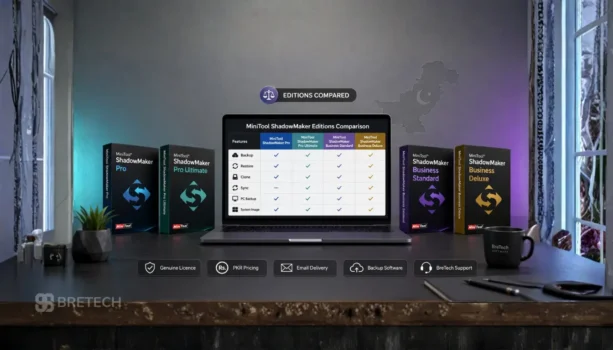
MiniTool ShadowMaker editions compared side by side can make the buying decision much easier, especially if you are choosing between Pro, Pro Ultimate, Business Standard, and Business Deluxe in Pakistan.
Many buyers only look at the lowest price, then later realise the licence may not fit their device count, business use, or server backup needs. Backup software should be chosen carefully because it protects your files, Windows system, and important work data.
This guide explains each MiniTool ShadowMaker edition in simple words. It also helps you understand the MiniTool ShadowMaker price in Pakistan, licence use, and which edition is best for home, office, and business backup needs.
Quick Comparison
| Your Need | Best Edition | Why It Fits |
|---|---|---|
| One personal Windows PC | MiniTool ShadowMaker Pro | Good for home users who need paid backup and recovery |
| Multiple personal PCs | MiniTool ShadowMaker Pro Ultimate | Better for users with more than one personal computer |
| One office PC or server | MiniTool ShadowMaker Business Standard | Suitable for business use on one system |
| Multiple office PCs or servers | MiniTool ShadowMaker Business Deluxe | Better for businesses, technicians, and multi-system use |
For related backup, cloning, imaging, and recovery tools, you can also explore BreTech’s disk and system imaging software and data protection software categories.
What Is MiniTool ShadowMaker?
MiniTool ShadowMaker is Windows backup software used for file backup, system image backup, disk backup, partition backup, and recovery planning.
It can help protect your data before Windows failure, drive problems, accidental deletion, ransomware damage, or system upgrade issues. Instead of only copying files manually, it allows you to create a more organised backup plan.
For a wider view of backup tools, you can also read BreTech’s guide on best backup software in Pakistan.
MiniTool ShadowMaker Price in Pakistan
MiniTool ShadowMaker price in Pakistan depends on the edition, licence type, number of supported devices, and whether the licence is for personal or business use.
BreTech lists MiniTool ShadowMaker products with PKR pricing, local payment options, digital delivery, and activation help. Prices can change due to vendor updates, exchange rates, licence availability, or promotional offers, so it is better to check the live product page before ordering.
| Edition | Buyer Type | Price Level |
|---|---|---|
| MiniTool ShadowMaker Pro | Personal user | Entry paid edition |
| MiniTool ShadowMaker Pro Ultimate | Personal multi-PC user | Higher than Pro |
| MiniTool ShadowMaker Business Standard | Small office or single business system | Business-level price |
| MiniTool ShadowMaker Business Deluxe | Multi-PC business use | Highest of these four editions |
You can also browse all available MiniTool products.
Compare Main Features of MiniTool ShadowMaker Editions
| Edition | Best For | Main Use Case | Avoid If |
|---|---|---|---|
| Pro | One personal PC | Home backup, system image, file backup | You need business or server use |
| Pro Ultimate | Multiple personal PCs | Better value for several personal systems | You need office or commercial licensing |
| Business Standard | One office PC or server | Small business backup | You need to cover many systems |
| Business Deluxe | Multiple business PCs or servers | Office, technician, and business backup work | You only need one home PC |
The main difference is not only features. You should also check licence rights, number of computers, and whether the system is for personal or business use.
MiniTool ShadowMaker Pro
MiniTool ShadowMaker Pro is suitable for personal users who need backup protection for one or limited personal Windows PCs, depending on the licence option available. It is a practical choice for home users, freelancers, students, or anyone who wants a paid backup tool for daily PC protection.
It can be used for common backup jobs such as file backup, system backup, disk backup, and recovery planning. It is also useful before major Windows updates, SSD upgrades, or risky software changes.
Choose Pro If
- You need backup for personal use
- You want a paid backup tool
- You do not need business use
- You want system image and file backup support
- You need a simple backup solution for home or personal PC protection
MiniTool ShadowMaker Pro is the best starting point when your need is simple and personal.
MiniTool ShadowMaker Pro Ultimate
MiniTool ShadowMaker Pro Ultimate is better for users who need backup protection for more than one personal computer.
It can suit families, power users, or people who use a desktop and laptop together. If you own multiple personal Windows PCs, Pro Ultimate can be more practical than buying a lower edition separately for each system.
Choose Pro Ultimate If
- You have more than one personal PC
- You want better long-term personal value
- You need backup for both laptop and desktop
- You do not need business or server licensing
- You want a stronger personal edition than Pro
For personal users with multiple systems, Pro Ultimate is usually the better choice.
MiniTool ShadowMaker Business Standard
MiniTool ShadowMaker Business Standard is made for business use where one PC or server needs backup protection.
This edition is suitable for small offices, shop PCs, accounts systems, office laptops, or a single Windows Server setup. It is also a safer choice when the software will be used in a commercial environment.
Choose Business Standard If
- You need backup for one office PC
- You need backup for one server
- You want a licence for business use
- You need invoice support for company records
- You do not need to cover many systems
Business Standard is usually the right choice for a small business that needs backup protection for one important system.
MiniTool ShadowMaker Business Deluxe
MiniTool ShadowMaker Business Deluxe is the stronger business option for users who need backup support for multiple business PCs or servers, depending on the licence option available.
It suits offices, IT technicians, service providers, and businesses that manage more than one important machine. If your work depends on several systems, buying the correct business edition is safer than trying to use a personal licence.
Choose Business Deluxe If
- You need backup for multiple office PCs
- You manage several business systems
- You need server backup support for more than one system
- You provide IT support or maintenance
- You want a more complete business licence
Business Deluxe is the best fit when your backup need is bigger than one PC or one server.
MiniTool ShadowMaker Edition Comparison by User Type
| Situation | Recommended Edition |
|---|---|
| I have one home laptop | MiniTool ShadowMaker Pro |
| I have one home desktop | MiniTool ShadowMaker Pro |
| I have two or more personal PCs | MiniTool ShadowMaker Pro Ultimate |
| I have one office PC | MiniTool ShadowMaker Business Standard |
| I have one Windows server | MiniTool ShadowMaker Business Standard |
| I have several office PCs | MiniTool ShadowMaker Business Deluxe |
| I manage business systems for clients | MiniTool ShadowMaker Business Deluxe |
The safest rule is simple: use personal editions for personal systems and business editions for commercial systems.
Free vs Paid MiniTool ShadowMaker
Many users search for MiniTool ShadowMaker free before buying. The free version may be useful for testing the software, but it may not be enough for serious backup planning.
Paid editions are better when you need proper long-term use, business licensing, support for important systems, or a more complete backup workflow.
Avoid cracked versions, serial keys, and unofficial installers. Backup software needs access to your files and system, so unsafe copies can put your data at risk.
MiniTool ShadowMaker for System Image Backup
System image backup is useful when you want to protect the full Windows setup, not only documents and photos.
If Windows becomes corrupt, the drive fails, or an update causes boot problems, a system image can help reduce downtime. This is why MiniTool ShadowMaker can be useful before major upgrades, Windows reinstall work, or SSD replacement.
To understand the difference clearly, read BreTech’s guide on file backup vs system image backup in Pakistan.
MiniTool ShadowMaker for Disk and Data Protection
MiniTool ShadowMaker can help with backup planning for files, folders, disks, partitions, and system protection.
For home users, this helps protect photos, documents, work files, and Windows settings. For office users, it can help protect accounts data, client files, business documents, and important work PCs.
MiniTool ShadowMaker Alternatives at BreTech
MiniTool ShadowMaker is one option in the backup software market. Some Pakistan buyers also compare it with EaseUS Todo Backup and AOMEI Backupper before choosing.
For a direct business-focused comparison, read AOMEI Backupper vs EaseUS Todo Backup for Businesses in Pakistan before choosing between MiniTool, AOMEI, and EaseUS backup tools.
If you are still comparing brands, read this detailed guide: EaseUS vs AOMEI vs MiniTool backup and partition comparison in Pakistan.
You may also find these related guides useful:
- EaseUS Todo Backup price in Pakistan
- AOMEI Backupper editions in Pakistan
- MiniTool Partition Wizard Editions Compared
Why Buy MiniTool ShadowMaker from BreTech?
BreTech helps Pakistan buyers choose the correct MiniTool ShadowMaker edition before purchase. This matters because backup software should match your device count, usage type, and recovery needs.
When you buy from BreTech, you get genuine software licence support, PKR pricing, local payment options, digital delivery, activation guidance, and official invoice support where required.
For safer buying guidance, you can also read buy genuine software in Pakistan and legal risks of unlicensed software in Pakistan.
FAQs
Q: What is MiniTool ShadowMaker used for?
A: MiniTool ShadowMaker is used for Windows PC backup, file backup, system image backup, disk backup, restore planning, disk cloning, and file sync. It helps protect important data before drive failure, Windows issues, accidental deletion, or hardware changes.
Q: Which MiniTool ShadowMaker edition is best for home users?
A: MiniTool ShadowMaker Pro is best for one personal PC. If you need backup for multiple personal computers, MiniTool ShadowMaker Pro Ultimate is usually the better choice.
Q: Which MiniTool ShadowMaker edition is best for business users?
A: MiniTool ShadowMaker Business Standard is suitable for one office PC or server. MiniTool ShadowMaker Business Deluxe is better for multiple business PCs or servers.
Q: Is ShadowMaker Free enough for PC backup?
A: ShadowMaker Free may be useful for testing the interface and basic backup function. For long-term use, scheduled backup tasks, recovery media, business use, and better data protection, a paid edition is usually safer.
Q: Can MiniTool ShadowMaker restore files and Windows systems?
A: Yes, MiniTool ShadowMaker can restore backed-up files, folders, disks, partitions, or system images, depending on the backup you created. This is useful when files are lost, Windows fails, or a drive needs recovery.
Q: Does MiniTool ShadowMaker support clone and sync?
A: MiniTool ShadowMaker includes clone and sync options in supported editions. Disk cloning can help when moving from an old drive to a new SSD, while sync can keep selected files stored in another backup destination.
Q: Where can I buy MiniTool ShadowMaker in Pakistan?
A: You can buy MiniTool ShadowMaker in Pakistan from BreTech with PKR pricing, local payment options, digital delivery, activation help, and invoice support where required.
Final Verdict
MiniTool ShadowMaker Pro is best for one personal PC. Pro Ultimate is better for multiple personal PCs. Business Standard is the right choice for one business PC or server, while Business Deluxe is better for multiple business PCs or servers.