Abdul Basit
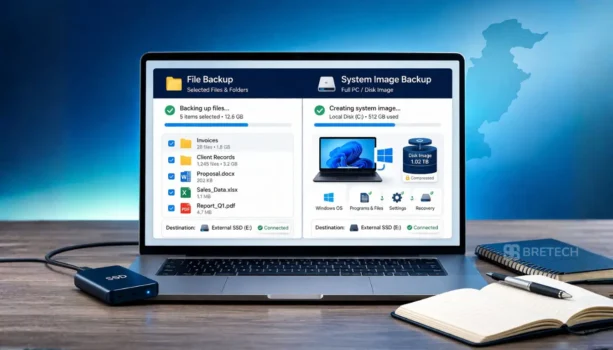
File backup and system image backup protect your computer in different ways. File backup saves selected files and folders, while a system image backup protects the complete Windows system, including installed software, settings, and data on the selected drive.
For a small office, file backup is useful for quickly restoring documents, invoices, spreadsheets, customer records, and project folders. System image backup becomes important when a PC suffers a disk failure, Windows problem, or another serious issue that requires full system recovery.
For most small offices, the practical approach is to use file backup for frequently changing business files and system image backup for full PC recovery. Pakistani businesses can then choose suitable backup software based on the number of computers, recovery needs, and required license type.
Key Takeaways
- File backup protects selected files and folders and makes individual file recovery easier.
- System image backup protects the full Windows environment, including applications, settings, and data on the selected drive.
- File backup is useful for documents and frequently changing office data.
- System image backup is useful when a complete PC needs to be restored after a serious failure.
- Small offices may benefit from using both instead of relying on only one backup method.
File Backup vs System Image Backup at a Glance
| Feature | File Backup | System Image Backup |
|---|---|---|
| What it saves | Selected files and folders | Windows, applications, settings, and data on selected drives |
| Best for | Daily business files | Full PC recovery |
| Individual file recovery | Simple and convenient | Depends on the backup software |
| Storage requirements | Usually lower | Usually higher |
| Setup | Generally simpler | May require more planning |
| Typical office use | Documents, invoices, accounts, client files | Disk failure, boot problems, major system recovery |
| Practical strategy | Frequent backups | Periodic backups and before major system changes |
What Is File Backup?
File backup, also called file-level backup, copies selected files and folders instead of creating a copy of the complete computer.
A small office may use it to protect documents, Excel spreadsheets, PDFs, customer records, photos, project folders, and other important business files. Because only selected data is backed up, restoring an individual document or folder is usually more convenient than restoring a complete system.
Using dedicated file and folder backup software can also help businesses schedule backups instead of depending only on manual copying.
If your main requirement is synchronizing files between supported locations rather than maintaining a complete PC backup, EaseUS EverySync is designed for file synchronization between supported local, network, cloud, and FTP locations.
What Is System Image Backup?
A system image backup creates a copy of the Windows system and the selected drives included in the backup. Depending on the backup configuration, this can include Windows, installed applications, settings, user data, and other system information.
This type of backup is useful when the entire PC needs to be recovered. If Windows no longer starts, a storage drive fails, or the system becomes seriously damaged, restoring an image can reduce the work required to rebuild the computer manually.
Businesses looking for this type of protection can explore disk and system imaging software.
What Is the Main Difference Between File Backup and System Image Backup?
The main difference is what you need to recover.
File backup is designed mainly for recovering selected files and folders. System image backup is designed for recovering a complete system environment.
If an employee accidentally deletes an invoice or spreadsheet, a file backup may be all that is needed. If the complete Windows installation or storage drive fails, a system image can provide a much broader recovery option.
Which Backup Type Is Better for a Small Office?
Neither backup type is automatically better for every office. The right choice depends on what the business needs to recover.
If the priority is protecting frequently changing documents, invoices, customer records, and project folders, file backup should normally receive more frequent attention.
If an office PC contains important applications, custom settings, accounting software, or a working environment that would take significant time to reinstall, system image backup becomes more important.
For many offices, using both provides a more complete recovery strategy.
When Is File Backup Enough?
File backup may be enough when the main requirement is protecting documents, spreadsheets, images, PDFs, databases exported as files, and other business folders.
It can also be suitable when Windows and installed applications can be reinstalled without causing serious business disruption.
Choose file backup as your main method when the priority is frequent protection and quick recovery of individual files.
When Is System Image Backup Better?
System image backup is more suitable when recovering the full computer is important.
For example, an office PC may contain accounting applications, printer configurations, specialized business software, custom settings, and other components that would take considerable time to rebuild manually.
A system image can also be useful before major Windows changes, disk replacement, hardware upgrades, or other work where having a complete recovery point is valuable.
Why Small Offices May Need Both
File backup and system image backup solve different recovery problems.
File backup can protect business files that change every day, while system image backup can provide a recovery path when the whole Windows environment is affected.
A practical small-office backup plan may include:
- Frequent backup of important work folders
- Periodic system image backups of important PCs
- An additional backup before major system or hardware changes
- A separate or offsite copy of important business data where appropriate
The exact schedule should depend on how frequently your data changes and how much downtime your business can tolerate.
Backup Software Options for Small Offices
The right backup application depends on whether you need individual file protection, full system imaging, server protection, centralized management, or virtual machine backup.
EaseUS Todo Backup
EaseUS Todo Backup provides backup options that can cover files as well as system-level recovery, depending on the edition selected.
Businesses should choose the edition according to the type of computer being protected and the licensing required. See the EaseUS Todo Backup editions comparison in Pakistan before choosing between available home, workstation, server, technician, or other applicable options.
If you are also considering AOMEI, read AOMEI Backupper vs EaseUS Todo Backup to compare the two backup families for business use.
AOMEI Backupper
AOMEI Backupper provides backup, restore, and cloning capabilities across different editions.
For a small office, the correct edition depends on the operating system, number of machines, business use, and whether Windows Server or technician licensing is required.
Read the AOMEI Backupper editions guide for Pakistan or explore available products on the AOMEI brand page.
AOMEI Cyber Backup
AOMEI Cyber Backup is aimed at businesses that need centralized backup management across supported workloads.
It becomes more relevant when an organization needs to manage backups for multiple systems rather than configuring every computer individually.
A simple office with only one or two Windows PCs may not need this level of centralized management, while larger environments may benefit from it.
Paragon VM Backup
Paragon VM Backup is designed for virtual machine backup environments.
It is not necessary for most offices using only standard Windows desktops and laptops. However, an organization running important virtual machines may need a backup product specifically designed for those workloads.
How to Choose the Right Backup Tool
Start with the type of recovery you need.
Choose file backup software when the main goal is protecting individual business files and folders. Choose system imaging software when recovering the complete Windows environment is important.
If both are important, look for software and licensing that support the required combination.
When comparing backup software, consider:
- Number of PCs or servers
- File backup requirements
- Full system recovery requirements
- Backup destination
- Recovery time requirements
- Windows or Windows Server support
- Business-use licensing
- Centralized management requirements
- Cloud, local, network, or external storage needs
For a wider comparison of available products, see our guide to the best backup software in Pakistan.
Common Backup Mistakes Small Offices Make
One common mistake is treating manual file copying as a complete backup strategy. Staff may forget to copy files, miss important folders, or overwrite the previous copy.
Another problem is keeping the only backup on the same physical computer as the original data. A storage failure, theft, malware incident, or other serious problem can then affect both copies.
Cloud synchronization can also be useful, but synchronization and backup are not always the same thing. A business should understand how its chosen service handles deleted, changed, or damaged files.
A better approach is to use a defined backup schedule, keep appropriate backup copies, and periodically make sure important data can actually be restored.
Buying Checklist for Pakistani Offices
Before choosing backup software, check:
- Number of PCs you need to protect
- Whether you need file backup, system image backup, or both
- Windows or Windows Server requirements
- Business-use license rights
- Backup storage requirements
- How frequently important files change
- How quickly systems need to be recovered
- Local, network, external drive, or cloud backup requirements
- Whether centralized backup management is needed
- License delivery and activation requirements
Why Buy Genuine Backup Software from BreTech?
Backup software protects important personal and business data, so choosing the correct product and license matters.
BreTech helps Pakistani buyers compare genuine backup software based on their required devices, operating systems, business use, and recovery needs. Available purchase support can include PKR pricing, local payment options, digital license delivery, invoice support, and activation guidance where applicable.
If you are unsure whether you need file backup, system imaging, cloning, server backup, or centralized management, compare the required workload before choosing a license.
Final Thoughts
File backup and system image backup protect different parts of a computer.
Use file backup when quick recovery of individual business files is the priority. Use system image backup when recovering the complete Windows environment is important.
For many small offices, combining both methods provides a more practical recovery strategy than depending on either one alone.
To compare suitable products, explore data protection software in Pakistan and choose backup software according to your devices, recovery requirements, and license type.
Further Reading
- Best Backup Software in Pakistan
- AOMEI Backupper Editions in Pakistan
- Best Cloud Backup Services in Pakistan
- Full Guide to Clone NVMe SSD to NVMe SSD
- MiniTool ShadowMaker Editions Comparison
You can also explore more guides in the File & Folder Backup section for practical information about protecting business files and choosing suitable backup tools.